Closed (fixed)
Project:
Panels
Version:
6.x-3.3
Component:
Panel pages
Priority:
Normal
Category:
Support request
Assigned:
Unassigned
Reporter:
Created:
9 Feb 2010 at 16:11 UTC
Updated:
14 Sep 2010 at 23:00 UTC


Hello All,
I'll admit to being a complete newbie with Drupal, so I'm still learing quite a bit about all the bells and whistles that come with this CMS. I'm also aware that Panels has just upgraded and all the tutorials out there are for a prior version, so that might be confounding me a bit in setting up panels. Hope you'll be patient with me!
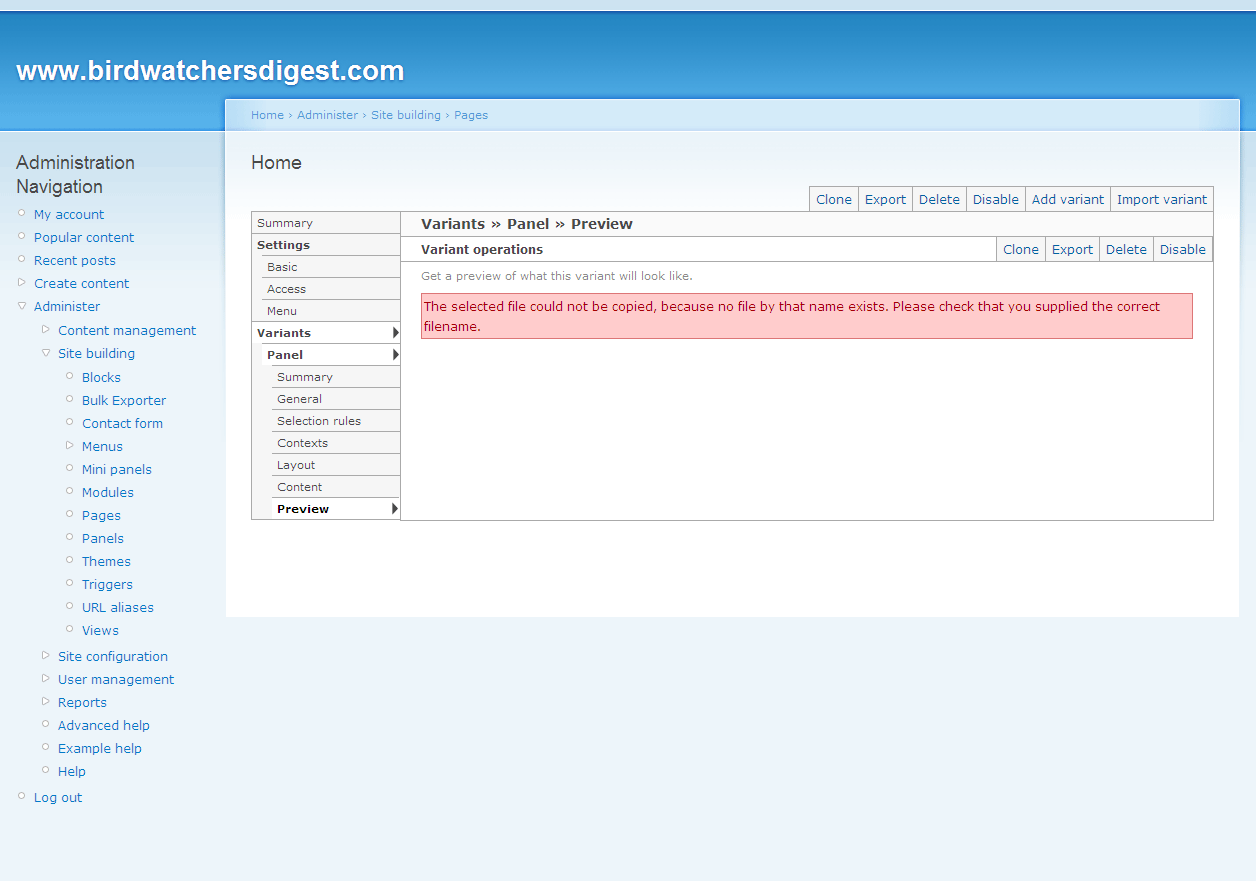
In a nutshell, I'm attempting to create a panel for my home page and seem to be getting an error when I preview the panel and try to override it on the home page: "The selected file could not be copied, because no file by that name exists. Please check that you supplied the correct filename." You can see the error in the attached screenshot.
I've installed Drupal 6 with modules Panels 6.x-3.3, Views 6.x-2.8, CCK 6.x-2.6, and the Chaos tool suite 6.x-1.3. In Views, I've enabled the frontpage view, setting the path to "front". In my panel page, I've set the path to "front", have checked "this is my home page", and given the panel page a machine name of "front_page." In Site Configuration > Site Information, I've set the default front page path to "front." For everything else, I've pretty much just gone with all the defaults. I figure I have to be missing a step somewhere, though since all the options are different in the tutorials, it's hard to know what I'm missing. Any advice on what to check is appreciated. Thanks!
| Comment | File | Size | Author |
|---|---|---|---|
| panel-preview.gif | 49.86 KB | pjcc21e |

Comments
Comment #1
merlinofchaos commentedWell. This isn't actually the problem you're having, but you should not have a view with a page display and a page manager page with the same path. The view will overwrite the page manager one and you won't see it in any case. This is an issue with the system that I have not yet figured out how to properly address.
As for the actual problem you're reporting. My *guess* is that it's having trouble creating the CSS for the flexible layout. Which I'm not sure if you're using or not, so it's a tough guess. This would indicate a file permissions issue in the 'files' directory -- visiting the 'status report' page at administration >> reports >> status report (I think) might give you more information there.
Comment #2
pjcc21e commentedHi Merlin,
I'll take any pointers and advice you can offer, related or not :) I've deleted the view with the "front" path. I didn't know that it was a case where I should have one or the other.
I've looked at the status report and it says "Writable (public download method)" for my file system, so I think the permissions are set properly, plus my web host (CrystalTech) has additional file permissions settings. I've made sure that my 'sites' folder is fully writeable for PHP (if that's where Drupal is trying to write a CSS file).
As for what CSS file I'm using, I built Drupal using the fixed layout. I don't know if that makes a difference to you?
I can report that after I deleted that view, I'm still getting the error in the preview. What other things can/should I check?
Thanks so much for your help!
Comment #3
pjcc21e commentedOkay, I figured it out! It turns out that I didn't have the page.tpl.php file in the directory where I'm creating my theme. (I copied several files over, but I *think* that was the one Drupal was looking for). It appears to be working now. Thanks!
Comment #4
merlinofchaos commentedComment #5
lunkan commentedHi there, having the exact same problem! :(
First off, my environment is Windows 7 IIS 7.5 fast_cgi MySQL, yes running on my local machine to have mobile dev environment. I've set the permissions from drupal root and down to full access for everybody just to try to eliminate authorization as an issue.
Everything works fine BUT when trying to preview a panel, i.e the step by step panel from the instructions, I recieve the exact same message as mentioned. Though the components placed in my layout are displayed they are not displayed correctly and the error message is visible at the top of the panel.
pjcc21e: The page.tpl.php file, in what directory did you have to place the page.tpl.php file?
I hope someone have a solution.
Comment #6
lunkan commentedSorry, not sure if I managed to set status to something wrong, trying with active to perhaps get some attention from anyone out there, hope so anyway.
Hi there, having the exact same problem! :(
First off, my environment is Windows 7 IIS 7.5 fast_cgi MySQL, yes running on my local machine to have mobile dev environment. I've set the permissions from drupal root and down to full access for everybody just to try to eliminate authorization as an issue.
Everything works fine BUT when trying to preview a panel, i.e the step by step panel from the instructions, I recieve the exact same message as mentioned. Though the components placed in my layout are displayed they are not displayed correctly and the error message is visible at the top of the panel.
pjcc21e: The page.tpl.php file, in what directory did you have to place the page.tpl.php file?
I hope someone have a solution.
Comment #7
merlinofchaos commentedThe only answer I have is the answer I gave in #1.
Comment #8
devansro commentedI just ran into this issue on a Windows setup myself. In my case, the Temporary Directory had been set to C:\WINDOWS\Temp (administration >> site configuration >> File system). I changed it to a writable directory (like sites/all/files/temp) and I was good to go. (merlinofchaos, thanks for the truly awesome Panels module!)
Comment #9
merlinofchaos commentedBased on #8 I can conclude that the temp directory being improperly configured is the most likely cause of this error.