Issue spotted by matteoraggi and confirmed by Militopedia
Here an extract of the description written by Militopedia:
In the configuration page of ubercart I can enter a bank transfer message (e.g. details about when and how to do the bank transfer). If I switch languages, the text is shown correctly in different languages in the configuration pages.

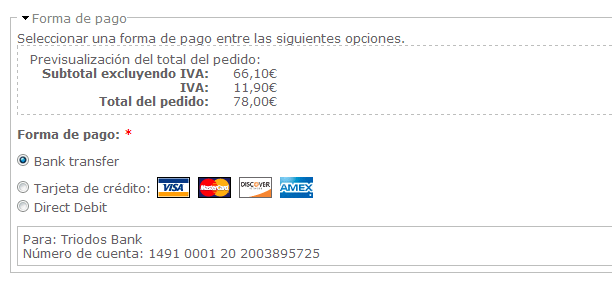
However, when I go to checkout where I can choose the payment option, only the English text appears when I chose bank transfer (which I guess is loaded using java script).

I tried to include the variable into settings.php, but no change.

Can anybody tell me how I can correct the code so that the translated instructions is shown on the checkout page?
It seems the problem is caused by either Ubercart or Drupal - but I keep the issue here until someone can locate it more precisely.


Comments
Comment #1
xibun commentedI just got a theory for this one... this might be caused by the uc_conditional_payment module.
Since that module was recently patched for i18n support it seems to be fixed: #669260: No multilingual support
@matteoraggi, @Militopedia -> now the questions is: are you also using uc_conditional_payment ? is the problem fixed once you install the latest version ?
Comment #2
marty77 commentedsubscribe
Comment #3
xibun commented@marty77: are you using the uc_conditional_payment module on your site?
Comment #4
marty77 commentedHi xibun - I'm not using uc_conditional_payment
Comment #5
xibun commented@marty77: let's see:
1) which version of Ubercart do you use? (official release or latest .dev version?)
2) do you use other modules which manipulate the checkout page?
3) I assume you know how to set i18n variables (very different from the much more common i18n constants)
Comment #6
marty77 commentedHi xibun,
1. 6.x-2.2
2. We use other payment methods as well, paypal and ideal - but that shouldn't be the problem
3. i dont know what you mean with variables and constants
Comment #7
xibun commentedabout 3)
constants: you can translate them in
-> **/admin/build/translate/search
variables: you have to translate them on the settings page for each language directly
-> en/admin/store/settings/payment/edit/methods
-> nl/admin/store/settings/payment/edit/methods
-> etc.
Comment #8
marty77 commentedYes - the variable translate did the trick!
Thanks xibun
Comment #9
xibun commentedInstead of marking it a duplicate of the uc_conditional_payment bug I mark it as "support request" for this module since you might encounter the issue when new to multilingual variables.
Comment #11
mairav commentedEven if I use the variable method of translating in /admin/store/settings/payment/edit/methods the "payment method title" and the "payment instructions", if I make my text in spanish, and go to the en//admin/store/settings/payment/edit/methods the english text where replace by the spanish text.
Besides, when I go to "Review Order" in "Paying by:" I get the original "Bank transfer" and not my new Payment method title. That happens in the email sent to the customer too.
Comment #12
xibun commented1) variable method: using uc_conditional_payment? which version? which ubercart version? which uc_bank_transfer version?
2) did you look in the code which strings are being used in those places? are you sure you have translated them?
Comment #13
mairav commentedSorry for the delay, I didn't realize you've answered.
1) I don't use uc_conditional_payment. I use Ubercart 6.x-2.4 and Bank Transfer | Ubercart Payment 6.x-1.0-beta2
2) If I'm not wrong, in the variable translation method, I can't go to the translate interface. I just go to https://askfordesign.net/admin/store/settings/payment/edit/methods in the english page and complete the "Payment method title:" and the "Payment instructions". Then I have to go to the same page in Spanish, and place my text in spanish. If I do this, when I make a change in the spanish page, it's modified in the english page. I don't understand what you mean with "did you look in the code which strings are being used in those places? ".
Comment #14
bunset commentedI dont know how traslate title phrase Bank Transfer in checkout page, where you select payment method,
I did traslate it in admin/build/translate/search but doesnt work in checkout page as you can see in attachment capture.
I have no installed i18n module and
I am with Ubercart 6.x.-2.4 and Bank Transfer 6.x-1.0
Some tip to do get this text traslated is very welcome.
Thanks.
Comment #15
xibun commented@bunset: this is NOT done in /translate/search !!!
-> read post #7 in this same thread.
Comment #17
ñull commentedWhy is this a variable at all? I think there is no use in making this string a customisable. If it were a simple t('Bank transfer') we would not have this problem.
Comment #18
xibun commented@ñull: there is no problem. everything works as it should. why do you think the issue was closed - basically since May 2010? and when you read the issue thread you would realize it never was a bug in this module in the first place. now I could explain it again, but please read the thread for what is - or better was - going on.
and about your concern: "Why is this a variable at all?" - VERY simple: many users/admins rename it to something else towards the end user. now the alternative to using a variable is a) good programming skills and modify it in the theme layer (or earlier) OR b) ignoring good practice and hacking this module. with your long experience in Drupal I assume I don't need to explain more about Drupal philosophy.