

 Come together with the global Drupal community in Rotterdam, 28 Sept – 1 Oct 2026. Sessions, contribution, connection, and Early Bird savings until 8 June.
Hi,
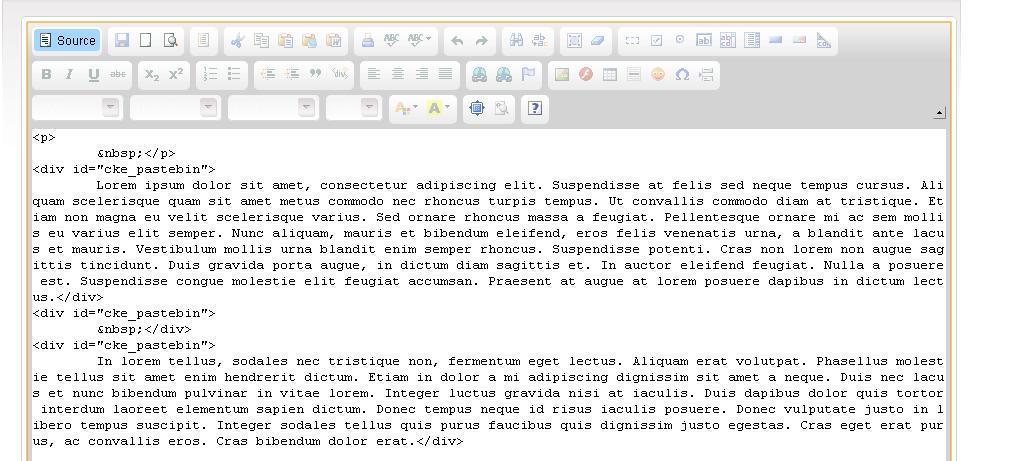
Pasting text from Windows Notepad generates the following tag on every line.
This happens both Chrome 4 and Firefox 3.6
As a result, Blog Post teasers can not be displayed.
Any help in solving this issue would be greatly appreciated.
Many thanks in advance
| Comment | File | Size | Author |
|---|---|---|---|
| #7 | ckeditor_settings.txt | 5.85 KB | sp_key |
| #5 | ckeditor.config.txt | 5.59 KB | sp_key |
| #3 | error.JPG | 110.74 KB | sp_key |

Comments
Comment #1
sp_key commentedEdit:
Tag is: div id="cke_pastebin"
Comment #2
mephir commentedMr Bot ;) Maybe some more details about ckeditor configuration, drupal configuration. I don't see any problems with pasting text.
Can you repeat this on http://ckeditor.com/demo ?
Comment #3
sp_key commentedMiddle number from 95372? Plus an unreadable verification icon to register?
I was reduced to tears after the first 10 attempts before starting spitting incomprehensible greek swear words at the computer!
Anyway, to get back to the issue :)
I can in fact replicate the error at the demo page you sent me following the below steps.
Copy lorem ipsum text from browser,
Paste lorem ipsum text into notepad
Copying and pasting text from notepad into CK
Pressing the Source button reveals the problem!
Please see attached image
Edit: Furthermore I don't know what kind of configuration info you need from me but if you let me know I 'll be happy to provide more info
Comment #4
mephir commentedMaybe you should upgrade ckeditor to the latest stable version, if this bug doesn't appear on demo page.
If the problem will be still annoying, can you found in page source ckeditor configuration and paste here. Line with it should start with
jQuery.extend(Drupal.settings, { ....in head section.Comment #5
sp_key commentedHi Mephir,
I thought the above explenation was clear.
The bug appears on demo page too.
Furthermore, I have the latest ck anyway.
The problem is annoying mainly for two reasons.
A) Invalid html
B) My blog teasers won't be displayed unless I paste the text while in source mode which means I need to manually enter tags for inserting images (which defeats the point of having a WYSIWYG editor).
CKEditor configuration attached
Hope we find a solution to this!
Thanks for your time.
Comment #6
mephir commentedI don't need config file, because i can found it in CVS. Can you attach this text which you are pasting into. Im trying paste text with p and div but everything is ok.
About ckeditor configuration, follow the steps:
1. go to node/add/page
2. on firefox press Ctrl+U
3. find the line which start with text in my comment above
4. paste it here
Or alternative version if you have access to database via phpmyadmin, pgmyadmin(i dont know which base you are using) or something else you can export ckeditor_settings table and attach file here.
Comment #7
sp_key commentedGot it!
Both ways:
Requested text:
jQuery.extend(Drupal.settings, { "basePath": "/", "admin_menu": { "toolbar": [ ], "destination": "destination=node%2Fadd%2Fpage", "hash": "d26777e0be4ae0d45597e2fd97f01a9c", "basePath": "/admin_menu", "replacements": { ".admin-menu-users a": "0 / 1" }, "margin_top": 1 }, "fivestar": { "titleUser": "Your rating: ", "titleAverage": "Average: ", "feedbackSavingVote": "Saving your vote...", "feedbackVoteSaved": "Your vote has been saved.", "feedbackDeletingVote": "Deleting your vote...", "feedbackVoteDeleted": "Your vote has been deleted." }, "ckeditor": { "teaser": "edit-body", "module_path": "/sites/all/modules/ckeditor", "theme": "acquia_marina", "settings": { "edit-body": { "customConfig": "/sites/all/modules/ckeditor/ckeditor.config.js?1263457168", "defaultLanguage": "en", "toolbar": "DrupalFull", "enterMode": 1, "shiftEnterMode": 2, "toolbarStartupExpanded": true, "width": "100%", "height": 420, "skin": "kama", "format_tags": "p;div;pre;address;h1;h2;h3;h4;h5;h6", "stylesCombo_stylesSet": "drupal:/sites/all/modules/ckeditor/ckeditor.styles.js", "contentsCss": [ "/sites/all/themes/acquia_marina/style.css", "/sites/all/themes/acquia_marina/icons.css", "/sites/all/modules/ckeditor/ckeditor.css" ] } }, "autostart": { "edit-body": true } }, "ahah": { "edit-book-bid": { "url": "/book/js/form", "event": "change", "keypress": null, "wrapper": "edit-book-plid-wrapper", "selector": "#edit-book-bid", "effect": "slide", "method": "replace", "progress": { "type": "throbber" }, "button": false }, "edit-attach": { "url": "/upload/js", "event": "mousedown", "keypress": true, "wrapper": "attach-wrapper", "selector": "#edit-attach", "effect": "none", "method": "replace", "progress": { "type": "bar", "message": "Please wait..." }, "button": { "attach": "Attach" } }, "edit-field-vid-field-vid-add-more": { "url": "/content/js_add_more/page/field_vid", "event": "mousedown", "keypress": true, "wrapper": "field-vid-items", "selector": "#edit-field-vid-field-vid-add-more", "effect": "fade", "method": "replace", "progress": { "type": "throbber" }, "button": { "field_vid_add_more": "Add another item" } } }, "tableDrag": { "field_vid_values": { "field_vid-delta-order": [ { "target": "field_vid-delta-order", "source": "field_vid-delta-order", "relationship": "sibling", "action": "order", "hidden": true, "limit": 0 } ] }, "upload-attachments": { "upload-weight": [ { "target": "upload-weight", "source": "upload-weight", "relationship": "sibling", "action": "order", "hidden": true, "limit": 0 }, { "target": "upload-weight", "source": "upload-weight", "relationship": "sibling", "action": "order", "hidden": true, "limit": 0 } ] } }, "teaserCheckbox": { "edit-teaser-js": "edit-teaser-include" }, "teaser": { "edit-teaser-js": "edit-body" }, "gmap_markermanager": [ ] });
//-->
Also see attached table
Many thanks for your support!
Sp
Comment #8
sp_key commentedUpdate: Just tried doing the same thing here: http://drupal.ckeditor.com/
Result: Using the latest Chrome browser I get a div id="cke_pastebin tag on every paragraph.
Using the latest Firefox this doesn't happen, however the result in Drupal is identical for me.
I don't see the blog teasers (only the titles of the blog posts) unless I paste the text while in Source mode
Comment #9
sp_key commentedAny updates or suggestions on this?
It's still not playing fine.
Just a reminder, blog teasers will not show due to inserted div tags.
Comment #10
mephir commentedYou are using paste button or Ctr+v, i tried with your settings without any success to reproduce this bug.
Comment #11
wwalc commented@sp_key: Please check this link: http://dev.fckeditor.net/ticket/5144
If you can confirm this bug on http://ckeditor.com/demo using FF 3.6, plesae add a comment to that ticket that you're experiencing this bug also in FF, not only in web-kit browsers (provide exact FF version + let them know what OS are you working on).
Marking as won't fix because we can't fix it in a module.
Comment #12
sp_key commented@mephir I'm using Ctrl+V.
@wwalc
Firefox is not doing this at the moment however, once you post something with firefox teasers on my blog page won't show unless I go back in a blog post, select source mode, delete the
tags and save again.
This happens to me on a regular basis posting blog posts.
If you need more info please do not hesitate to ask.
Comment #13
petarb commentedJust confirming I get the same issue. However, I'm using Safari.
Comment #14
mightyulysses commentedI found that changing the "Force pasting as plain text:" setting in Advanced Options in the CKEditor settings seems to remove random divs being added when text is being pasted in.