

 Come together with the global Drupal community in Rotterdam, 28 Sept – 1 Oct 2026. Sessions, contribution, connection, and Early Bird savings until 8 June.
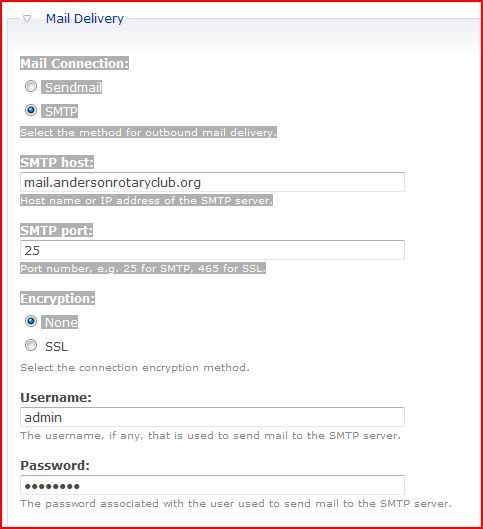
I currently have the Mail Connection setting set to port 25 for SMTP. I seem to be able to receive emails thru the system but when I send emails, I get the following error msg:
warning: fsockopen() [function.fsockopen]: unable to connect to mail.andersonrotaryclub.org:25 (Connection timed out) in /home/terr7541/public_html/modules/webmail_plus/vendor/PHPMailer/class.smtp.php on line 122.
Backtrace: fsockopen(...)[class.smtp.php:122] <=Connect(...)[class.phpmailer.php:614] <=SmtpConnect(a:0:{})[class.phpmailer.php:528] <=SmtpSend(...)[class.phpmailer.php:419] <=Send(a:0:{})[webmail_plus.compose.inc:689] <=webmail_plus_compose_form_submit(...)[form.inc:775] <=form_execute_handlers(...)[form.inc:415] <=drupal_process_form(...)[form.inc:119] <=drupal_get_form(...)[:] <=call_user_func_array(...)[menu.inc:348] <=menu_execute_active_handler(a:0:{})[index.php:18] <=index.php
Your message Re: test was not sent due to the following error: SMTP Error: Could not connect to SMTP host.
Here are the connection settings from my server provider:
Mail Server Username: (username)+andersonrotaryclub.org
Incoming Mail Server: mail.andersonrotaryclub.org
Incoming Mail Server: (SSL) hp47.hostpapa.com
Outgoing Mail Server: mail.andersonrotaryclub.org (server requires authentication) port 587
Outgoing Mail Server: (SSL) hp47.hostpapa.com (server requires authentication) port 465
Supported Incoming Mail Protocols: POP3, POP3S (SSL/TLS), IMAP, IMAPS (SSL/TLS)
Supported Outgoing Mail Protocols: SMTP, SMTPS (SSL/TLS)
I tried to set the port to 465, but I get the same error.
I have attached a screenshot of the current settings.
Any help would be GREATLY appreciated!
| Comment | File | Size | Author |
|---|---|---|---|
| #4 | Screenshot_7.png | 37.14 KB | Canine Coaches |
| Capture.JPG | 40.22 KB | jquillin |


Comments
Comment #1
jquillin commentedComment #2
Canine Coaches commentedYour answer is in your message
Outgoing Mail Server: mail.andersonrotaryclub.org (server requires authentication) port 587
You stated in your message you have it set to port 25 WHY?
Do not set issues to critical because you can't figure something out. Critical is for major bugs and mostly for security issues. That is one good way to get your post ignored. And you set it to critical the same day you posted the original (low priority) issue.
You should read this http://drupal.org/forum-posting before you post in these forums again. You can be blocked for inappropriate posting such as this.
Chris
ps. I have set this issue back down to minor where it should have been in the first place.
Comment #3
jquillin commentedSorry about my priority mis-assignment! Won't happen again I promise! It is critical to me - hence the error in judgement.
As for my problem... I originally set it to port 25 because that's what it set to do in the WebMail Plus documentation.
On your recommendation I did try to set the port to 587 and it still doesn't work... any ideas???
Here is the error I get:
* warning: fsockopen() [function.fsockopen]: unable to connect to mail.andersonrotaryclub.org:587 (Connection timed out) in /home/terr7541/public_html/modules/webmail_plus/vendor/PHPMailer/class.smtp.php on line 122.
Backtrace: fsockopen(...)[class.smtp.php:122] <=Connect(...)[class.phpmailer.php:614] <=SmtpConnect(a:0:{})[class.phpmailer.php:528] <=SmtpSend(...)[class.phpmailer.php:419] <=Send(a:0:{})[webmail_plus.compose.inc:689] <=webmail_plus_compose_form_submit(...)[form.inc:775] <=form_execute_handlers(...)[form.inc:415] <=drupal_process_form(...)[form.inc:119] <=drupal_get_form(...)[:] <=call_user_func_array(...)[menu.inc:348] <=menu_execute_active_handler(a:0:{})[index.php:18] <=index.php
* Your message Re: test was not sent due to the following error: SMTP Error: Could not connect to SMTP host.
Thanks very much,
Julie
Comment #4
Canine Coaches commentedThe docs are not that great, I am trying to get some further info from developer so can update them. Port 25 is the default port for smtp, many host now use different ports now because some spam filters auto block port 25.
If you have it set to 587 or correct port for your server you probably need to change the following:
Set encryption to none or use port 465 (Outgoing Mail Server: (SSL) hp47.hostpapa.com (server requires authentication) port 465) I don't know if encryption will work for you the way your host has the server set up. That should not be a problem though.
Set username to: "mail+example.com" (mail being your email prefix and example.com your domain) eg. mail@example.com
Set authentication to internal
Set your drupal password to match your mail password (should be done already if you are receiving email)
Go to AES settings (administer>site configuration>)
Set as per the attached screenshot. Don't woory about the key it will auto generate (check your file directory after saving) Viewing method is up to you.
That should do it. Hope this works for you. I am gong to be rebuilding my computer for the next day or 2 or 3, but I will try to post as much as possible from my laptop.
Chris
Comment #5
jquillin commentedThat did it! Thanks so very much! I do now have two more issues...
1) The delete button does not work
2) How to I get the Emails/Compose menus and folder menus shown on the screenshot in the http://drupal.org/node/369604 documentation??
Thank YOU!
Comment #6
Canine Coaches commentedI have been swamped and not really touched this site since my last post. I can't remember if I even tried the delete function, but I think I tried all basic functions. I would suggest updating, but you might want to wait as I am not sure which versions have what features/display. I am currently using 6.1.16 and one file from 6.1.14 which are so far compatible. I will work on this some today and/or tomorrow and post back. The main thing I am looking to fix now is the "display page" so it looks similar to the screenshots, but I don't know what version the screenshots are from. I don't see screenshots at the link you posted, but these are the only ones I have seen screenshots I am guessing you will have to do this through the theme and add the images for the icons (folders). It may also require creating a custom block to contain all links as the blocks available in 6.1.16 are different.
I will post back in a couple days, hopefully with some answers on theming this page and blocks.
Chris