

 The 2026 Drupal Business Survey is open. Your response will help shape the future of the Drupal business ecosystem.
Hi,
I have 2 views:
1. View list all term nodes by date.
2. View where shows top viewed nodes (2 node only).
How can I exclude nodes from view #1 which is already in the view #2?
how can I display view #2 only if pager equal first page?
Thanks
| Comment | File | Size | Author |
|---|---|---|---|
| #16 | 720422-tutorial-exclude-2.patch | 14.53 KB | esmerel |
| #15 | 720422-tutorial-exclude-1.patch | 14.51 KB | esmerel |
| #13 | 720422-tutorial-exclude.patch | 14.72 KB | esmerel |
| #9 | 720422_view_in_view.patch | 9.84 KB | iamjon |
| #7 | views_exclude_export.txt | 4.48 KB | iamjon |




Comments
Comment #1
pcdonohue commentedFor your first question "How to exclude already displayed nodes", perhaps the module Views Exclude Previous can help?
I'm looking for something similar. I have a featured node that appears via nodequeue, and then a view showing the 5 most recent postings. I want the featured node to be excluded from the list of recent postings.
Patrick
Comment #2
konrad1811 commentedThe same question...
having 2 views results - just titles of nodes that may be the same
I must exclude the second from first ones
I tried Views Exclude - but don't work from within minipanel :/
best if possible to join one view querry with another and take onliy distinguish nodes titles....
Comment #3
merlinofchaos commentedViews doesn't really support this in any way that you can automate, so no matter what you're going to have to do a little bit of coding to glue this together.
The best thing you can do, I think, is to take all the nids from the view that must be excluded, concat them all together with + signs (so you get '1+2+3+4+5+6') and pass them to the second view as an argument.
The second view would then implement the Node: Nid argument and check the box for "exclude" as well as checking the box that allows it to accept + signs.
You could also run the first view in the argument default (or validate) code of the view.
Comment #4
merlinofchaos commentedThis is probably a good candidate for a tutorial somewhere. Re-opening as a document task.
Comment #5
esmerel commentedComment #6
iamjon commentedOk, this is what I did:
In my example I had a view that pulled the titles from nodes from page, I wanted to exclude all the pages that have been marked as sticky at the top of lists.
You need to have two separate views, one that pulls that the entire data, and one that pulls the elements you want to exclude.
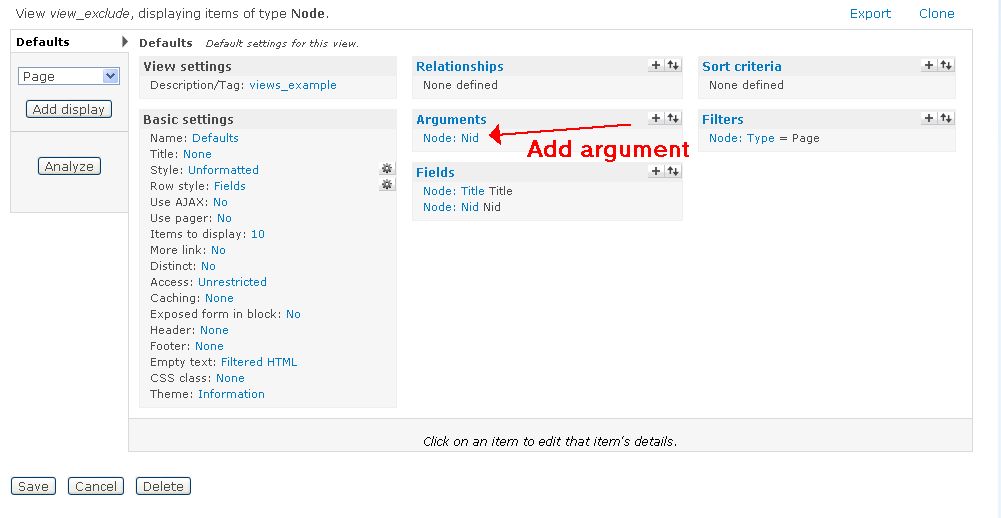
I have a view called views_exclude that pulls title and nid from page.
I have a view called views_excluder that pulls nid from page that have been filtered to bring the nodes that are sticky at the top of list.
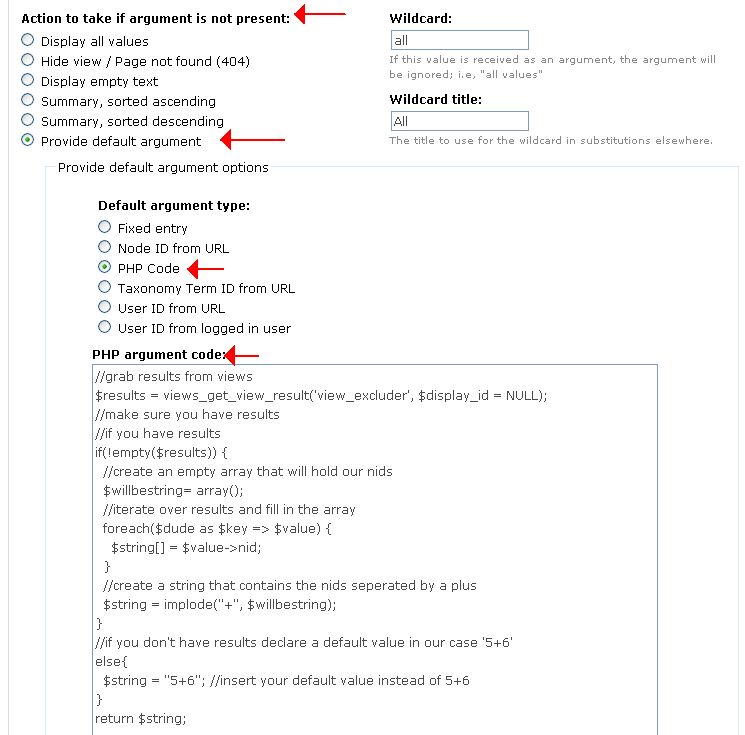
In views exclude I added an node:nid as an argument Under Action to take if argument is not present->PHP Code
Insert that code into the view and presto it works.
Comment #7
iamjon commentedUpdating the images
Assiging this to myself so I can remember to write up a patch.
Comment #8
iamjon commentedComment #9
iamjon commentedOk. Here is my patch of the first draft. I will review it again because I think it needs tlc. I started off by using the author example as a base. It goes into great detail, and walks the user step by step. I tried to imitate this (blatently copy) but half way through I realized well if someone wants to do this they probably already know what an argument is...Maybe I was just being lazy. In either case I would love
I would love some input on whether or not I should go over it and continue in the beginner language style, or maybe I should change the entire entry to be more advanced centric.
Comment #10
iamjon commentedComment #11
achtonI don't know if this is of any help at all, but for our purposes, we simply used "sticky" to discern if nodes were to be excluded or not. Editors can then choose which nodes appear in each view by setting them sticky. Works splendid in a media/newspaper environment.
Just jotting this down here, because sometimes simple solutions work too (though arguably not for everyone).
Comment #12
merlinofchaos commentedAssigning to esmerel to review this.
Comment #13
esmerel commentedStill needs a grammatical review, etc, but this patch updates the ini file so that the help doc can be reached via the adv help interface.
Comment #14
esmerel commentedChanging back to needs work because it does need a little :D
Comment #15
esmerel commentedOk, I got as far as step 7 under "Cloning the view"
Scroll down to the Defaults: Rearrange filters click the gear icon on the on the same line as Node: Sticky Yes to remove the filter
Problem here being that this filter has not yet been added. Should it be up in the first view? :)
Comment #16
esmerel commentedadded base_url to links
Comment #17
iamjon commentedThanks esmerel, I'll give it's a read over for grammar.
Comment #18
esmerel commentedComment #19
clintthayer commentedsubscribe
Comment #20
candelas commentedsubscribe :)
thanks for the module!
Comment #21
leelooch commentedThank you for this tutorial, it was a great help for me. However I had to correct two little things in the php argument code of view_exclude, witch may seem obvious but it would certainly make the life of the tutorial readers easier if we correct them : in line 9, replace $dude by $results and in the next line, $string by $willbestring so it becomes :
I can confirm that the view works well after applying these changes. Thanks again !
Comment #22
supradhan commentedWill this solution work on Drupal 7
Comment #23
chris matthews commentedThe Drupal 6 branch is no longer supported, please check with the D6LTS project if you need further support. For more information as to why this issue was closed, please see issue #3030347: Plan to clean process issue queue