When no vocabulary is selected for a given content type, after submitting, they are all selected. It has been observed on one installation detailed at the end.
I want to have content type with and without associated vocabulary. Those with associated vocabulary work fine. But, for those without association, if I unselect all boxes, after submitting it is as if they had all been selected. I used for a long time a workaround using a dummy vocabulary, but it makes other problems in the workflow a the site. I have not checked if direct selection within the db would be possible.
MySQL 5.0.51a
PHP 5.2.0-8+etch16
jQuery UI 1.6


Comments
Comment #1
anantagati commentedCan you please send screenshot of you NAT setting page?
Comment #2
nardberjean commentedSome screenshots
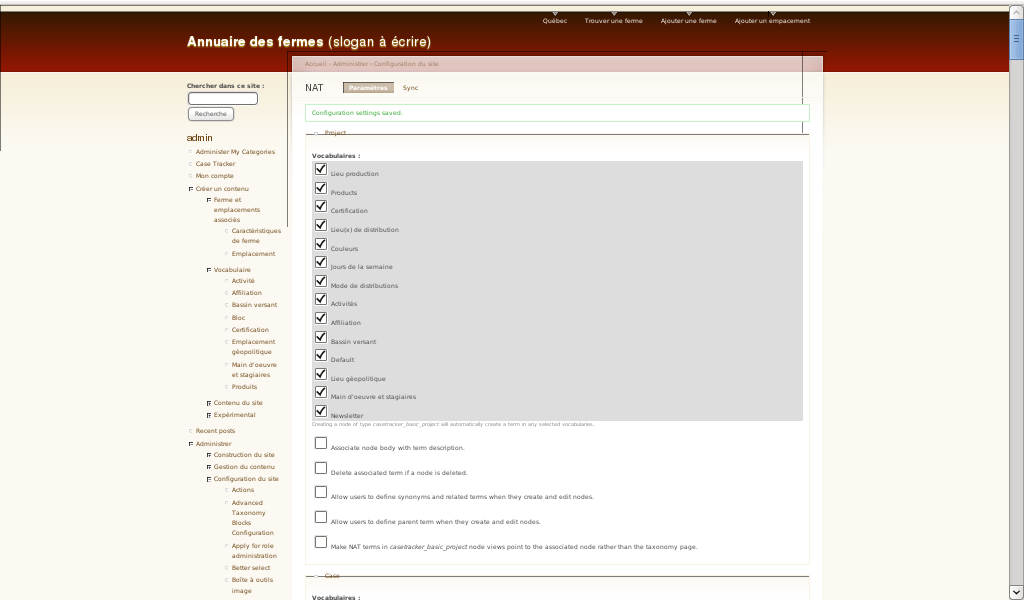
The first one is the configuration as it is working now, with the illustrated content type having a dummy vocabulary 'Default' associated with. I unchecked the 'Default' vocabulary, so that no vocabulary was associated with the document type and submitted. The resulting is the second screenshot, where all possible vocabulary are associated with the document type.
Comment #3
nardberjean commentedComment #4
anantagati commentedWhat version of NAT module are you using? Are you sure that it is latest 6.x-1.x-dev?
Comment #5
nardberjean commentedOOps, there have been a directory issue it was Node Auto Term [NAT] 6.x-1.x-dev (2009-mars-01) with a patch can be seen on #2 screenshots to allow to have parent term, which is totally needed in that website.
I replaced it by Node Auto Term [NAT] 6.x-1.x-dev (2010-févr.-18) without any patch.
Testing again.
The bug remains exactly as described previously.
Comment #6
anantagati commentedI cannot reproduce that bug. So may be a problem with your installation. Can you please test NAT on fresh Drupal install?
Comment #7
nardberjean commentedI reproduced a similar bug on a site with a fresh database, but also a lot of modules. I created one vocabulary and the nat setting page was fine. I created two other vocabulary and then I went to nat settings, all document types which had no vocabulary associated had, without manual intervention, 3 of them selected !
I join a copy of screen.
Comment #8
anantagati commentedWhen I install fresh Drupal and NAT, on setting page there are no checkboxes for vocabularies, I have there select widget.
So maybe some module interfering with settings.
Try to install NAT on fresh Drupal with just core modules and check if it works good.
Comment #9
nardberjean commentedWith a fresh database and few modules it woks perfectly, but I observ and do not understand why the selection widget for the vocabularies is selection list instead of selection boxes?
Attached is screenshot.
Comment #10
anantagati commentedThere are no check-boxes because it is made as select.
So it seems it is not a bug. Closing issue. You can enable different modules and find which module is making problems.
Comment #11
nardberjean commentedLooks like an incompatibility with the Better Select module
http://drupal.org/project/betterselect
I installed Better Select and NAT settings page get transformed, the selection lists were replaced by selection boxes, which appeared unchecked as you can see on screenshot 1.
Without checking any boxes I submitted the page and the updated version of it showed all vocabularies selected, as shown on screenshot 2.
Maybe this issue should be changed name and project, but incompatibility could be written in documentation, as long as issue is not solved, because multimodule incompatibilites are longer to find.
Comment #12
anantagati commentedComment #13
nardberjean commentedI used Better Select 6.x-1.0-beta2 no idea about dev version.
Thanks for your help anantagati.
Comment #14
nally commentedsubscribe
Comment #15
ipwa commentedI can confirm the bug in #11.
I investigated a little further on why this happens. The multi select element on NAT breaks with BetterSelect because it doesn't have a 'None' option. If the NAT module would provide a 'None' option like most other Drupal multi select elments do, this would not be an issue.
Comment #16
ipwa commentedComment #17
ipwa commentedSee: Issue #1407566: Better Select does not work on select elements without "-None-"/"-Select-" options