Hey there,
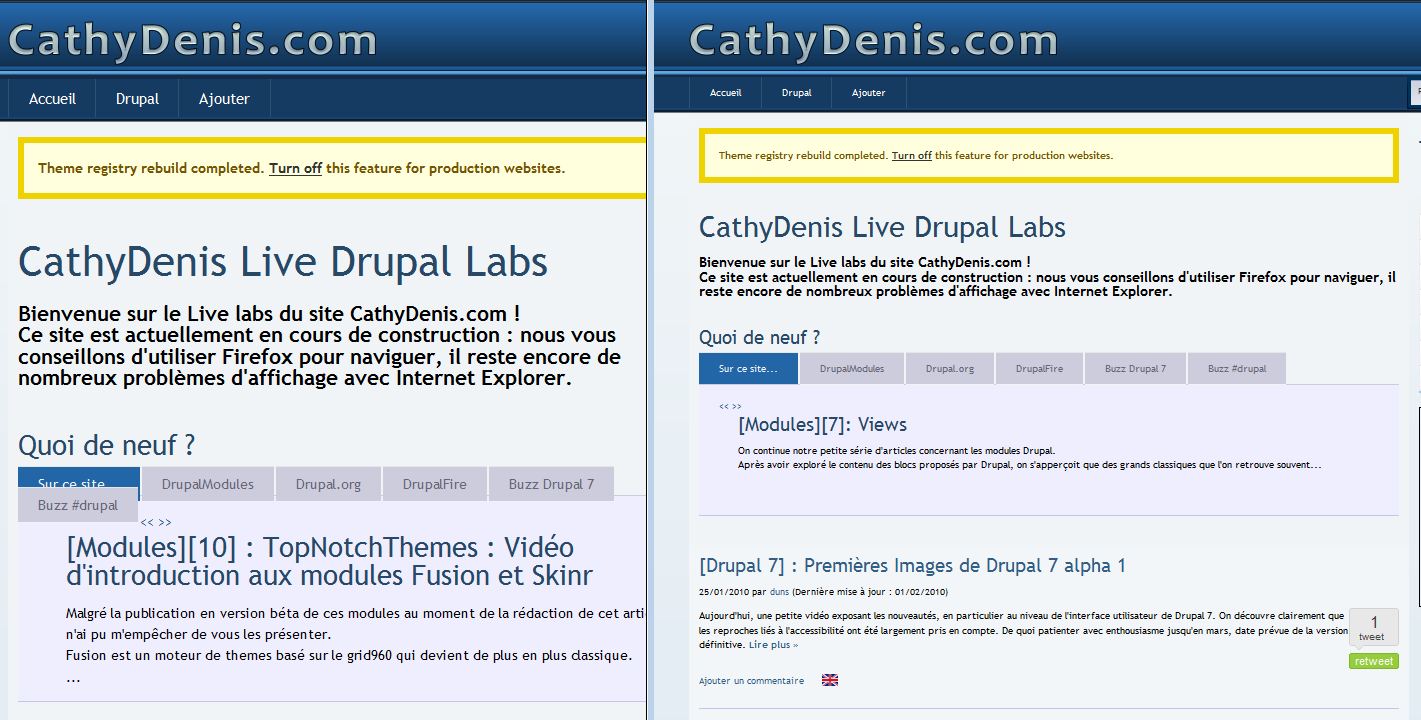
Not sure if my title describes well the problem (see attaches file for seeing my problem : left is IE8 rendering right is FF3.5 rendering of the same page on a Windows 7 system).
The problem is that by default (from typography.css) Internet Explorer is rendering font very huge and Firefox just as good.
To tweak that problem i've used ie css files included inside fusion-core/css (ie6-fixes.css, ie7-fixes.css, ie8-fixes.css) and add these lines (i've choosen a 14 pixels size by default on the theme page so...) :
/* hack for big font in ie problem */
.font-size-14 {
  font-size: 12px;
/* font-size: 87.5%; */
}
note for readers : if you've used a font-size 12 by default it would be .font-size-12 to tweak for example
I've putted 12px since it's the value that make the display approximately correct for both browsers.
My question (since this size is a parameter that could be changed inside the theme page of Drupal administration) : Is there a better way to achieve the compatibility ? Or is there a way to handle percents font inside Internet Explorer better ?
The original problem seems to be that we don't give a based pixel size for rendering so if ie have by default a 16px font-size and firefox another (say 11px) : the problem of size will be always there and the rendering will be always random.
Not sure what is the best way to handle this.
Any advice will be wellcome for handling this correctly
Regards,
Denis


Comments
Comment #1
duns commentedoups forget to give this link A List Apart: Articles: How to Size Text in CSS wich gives some ways of better handling this kind of problems between browsers.
Comment #2
jeremycaldwell commentedHi duns, can you please reattach the image again? And have you tried turning on CSS compression on your site? Sounds like IE is messing up the fonts too so that is worth a try.
Comment #3
duns commentedhere is the file (sorry i thought i've joined it in mys previous post)
Comment #4
duns commentedthe image is really there (sorry for double post). left is IE8 right is FF3.5.5
for more elements :
in theme parameters i've choosen :
Myriad (Myriad Pro, Myriad, Trebuchet MS, Arial, Helvetica, sans-serif)
14px
I haven't checked "Avoid IE stylesheet" limit checkbox (i've tested it: no change)
in performance admin page : i've no cache selected at all.
the site is live with my ie bad hacks, if you wanna see http://www.cathydenis.com
I'm thinking more and more that's not an issue simply a contraint...
thanx for your fast reply
regards,
Denis
Comment #5
stephthegeek commentedI ran a cross browser test of both Fusion Starter and Acquia Prosper, and font sizes with both the default settings and your typography settings were virtually identical.
But when I run a test of your site, actually *Firefox* does look a bit larger. What kind of typography overrides have you done? Not sure how much we can help since it's looking consistent in Acquia Prosper itself.
Comment #6
mpruitt commentedGreat article. It's the best discussion of text sizing I'm read yet. Thanks for sharing.
Comment #7
stephthegeek commented