Closed (fixed)
Project:
Provision
Component:
Code
Priority:
Normal
Category:
Bug report
Assigned:
Unassigned
Reporter:
Created:
22 Feb 2010 at 20:50 UTC
Updated:
2 Jul 2010 at 06:50 UTC
Jump to comment: Most recent file


HEAD version downloaded 2/18.
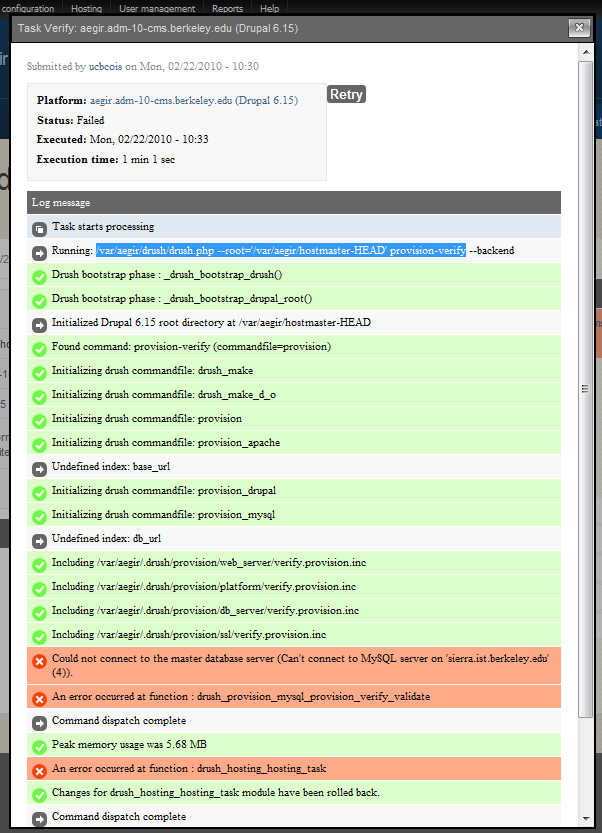
Hostmaster was successfullly installed with a remote db server. The provision verify task created on install fails as can be seen in provision-verify.png (attached).
drush sql-conf and sql-cli work:
[aegir@adm-10-cms ~]$ cd hostmaster-HEAD/
[aegir@adm-10-cms hostmaster-HEAD]$ ~/drush/drush.php sql-conf -l aegir.example.com
Array
(
    [driver] => mysql
    [username] => aegir
    [password] => secret
    [port] => 3197
    [host] => db.example.com
    [database] => aegir
)
[aegir@adm-10-cms hostmaster-HEAD]$ ~/drush/drush.php sql-cli -l aegir.example.com
Reading table information for completion of table and column names
You can turn off this feature to get a quicker startup with -A

Welcome to the MySQL monitor.  Commands end with ; or \g.
Your MySQL connection id is 23510
Server version: 5.0.67-log Build revision 6

Type 'help;' or '\h' for help. Type '\c' to clear the current input statement.

mysql> quit
Bye
Attempting to manually validate the site from the cli fails. Seems it can't parse $db_url
[aegir@adm-10-cms hostmaster-HEAD]$ /var/aegir/drush/drush.php -d --root='/var/aegir/hostmaster-HEAD' provision-verify
Drush bootstrap phase : _drush_bootstrap_drupal_root() [0.11 sec, 4.18 MB]      [bootstrap]
Initialized Drupal 6.15 root directory at /var/aegir/hostmaster-HEAD [0.12 sec,    [notice]
4.97 MB]
Found command: provision-verify (commandfile=provision) [0.13 sec, 4.96 MB]     [bootstrap]
Initializing drush commandfile: drush_make [0.13 sec, 4.97 MB]                  [bootstrap]
Initializing drush commandfile: drush_make_d_o [0.13 sec, 4.97 MB]              [bootstrap]
Initializing drush commandfile: provision [0.13 sec, 4.97 MB]                   [bootstrap]
Initializing drush commandfile: provision_apache [0.13 sec, 4.97 MB]            [bootstrap]
Undefined index:  base_url [0.14 sec, 4.98 MB]                                     [notice]
Initializing drush commandfile: provision_drupal [0.14 sec, 4.98 MB]            [bootstrap]
Initializing drush commandfile: provision_mysql [0.14 sec, 4.98 MB]             [bootstrap]
Undefined index:  db_url [0.14 sec, 4.98 MB]                                       [notice]
Undefined index:  user [0.14 sec, 4.98 MB]                                         [notice]
Undefined index:  pass [0.14 sec, 4.99 MB]                                         [notice]
Undefined index:  host [0.14 sec, 4.99 MB]                                         [notice]
Undefined index:  host [0.14 sec, 4.99 MB]                                         [notice]
Undefined index:  scheme [0.14 sec, 4.99 MB]                                       [notice]
Undefined index:  scheme [0.14 sec, 4.99 MB]                                       [notice]
Including /var/aegir/.drush/provision/web_server/verify.provision.inc [0.14 sec,[bootstrap]
4.99 MB]
Including /var/aegir/.drush/provision/platform/verify.provision.inc [0.14 sec,  [bootstrap]
5.01 MB]
Including /var/aegir/.drush/provision/db_server/verify.provision.inc [0.14 sec, [bootstrap]
5.04 MB]
Including /var/aegir/.drush/provision/ssl/verify.provision.inc [0.14 sec, 5.04  [bootstrap]
MB]
Could not connect to the master database server (Can't connect to local MySQL   [error]
server through socket '/var/lib/mysql/mysql.sock' (2)). [0.14 sec, 5.06 MB]
An error occurred at function : drush_provision_mysql_provision_verify_validate [error]
[0.14 sec, 5.06 MB]
Command dispatch complete [0.14 sec, 5.04 MB]                                      [notice]
Peak memory usage was 5.64 MB [0.14 sec, 5.04 MB]                                  [memory]
| Comment | File | Size | Author |
|---|---|---|---|
| #8 | aegir_verify_ubuntu_remote_dbserver.png | 116.61 KB | bwood |
| #6 | Screen shot 2010-02-25 at 3.32.41 PM.png | 18.32 KB | adrian |
| #2 | provision-verify.png | 69.73 KB | bwood |


Comments
Comment #1
bwood commentedInspite of the above error I went ahead and attempted to create 1) a webserver and 2) a platform on the new webserver. Creating the webserver succeeded. Creating the platform failed. I got a very similar error on verification of the new platform. Here is my attempt to verify the platform manually from the hostmaster server:
Attempting a manual provision-verify from the the webserver (not via ssh -o) fails identically.
Comment #2
bwood commentedI guess attachments get lost if you preview your post and then Save it... Here it is.
Comment #3
bwood commentedPer mig5's suggestion in irc I did the following:
1. applied these patches: http://drupal.org/node/712016#comment-2622678
2. dropped all the tables in the aegir db
3. replaced settings.php with default
4. reinstalled hostmaster
provision-verify on the hostmaster site FAILED
5. created a webserver
6. installed a platform (provision/drush) on the webserver. Created aegir user and installed keys.
7. created the platform node in hostmaster
provision verify on the platform FAILED.
Comment #4
adrian commentedIf you can test with the latest HEAD of provision / hostmaster.
I fixed the issue i think you were having, see :
#712016: Provision-intsall fails due to db_host defaulting to localhost, FQDN expected
Comment #5
bwood commentedAfraid that my problem is not fixed.
I'm new to git. Here's what I did to update to the latest HEAD:
cd ~aegir/.drush/provision
$ git pull
Updating bb9fcbb..5bdd9b9
Fast forward
INSTALL.txt | 22 ++++----
UPGRADE.txt | 23 +++++++
db_server/provision_mysql.drush.inc | 14 +----
install.sh.txt | 42 ++++++++++++--
platform/drupal/deploy.inc | 4 +-
platform/provision_drupal.drush.inc | 5 +-
provision.inc | 13 ++++
ssl/provision_ssl.drush.inc | 2 +-
web_server/delete.provision.inc | 2 +-
web_server/provision_apache.drush.inc | 88 ++++++++++++++++-----------
web_server/provision_apache_server.tpl.php | 7 ++
web_server/verify.provision.inc | 8 +--
12 files changed, 156 insertions(+), 74 deletions(-)
I also updated profiles/hostmaster:
1. renamed the old hostmaster dir
2. git clone git://git.aegirproject.org/hostmaster.git
3. dropped all the tables in the aegir db
4. replaced settings.php with default
5. reinstalled hostmaster
provision-verify on the hostmaster site FAILED
But the db connection is working:
Here's manual verify attempt:
Comment #6
adrian commentedI jut did a completely new install. using a remote database as the db for the hostmaster site itself.
it correctly generated the server node types (see screenshot)
I have the issue though, that i had previous sites on this platform, that had been installed using the LOCAL db server. Because no entry existed for them .. the import was failing.
This will be sorted by the site alias / shortname functionality, in that we can generate nodes based on the information in the backend.
The site itself however, imported correctly.
As did all sites created with the remote database server.
Comment #7
bwood commented1. Did a git pull of latest hostmaster and provision.
2. reinstalled using a LOCAL db server
Initial verify of hostmaster site succeeds.
3. removed settings.php
4. emptied REMOTE db
5. reinstalled with REMOTE db.
Initial verify of hostmaster site FAILS.
However, now when I attempt a manual verify I don't see the undefined index messages related to db_url (see above) and this manual verify attempt appears to succeed:
I am using (against my will) RHEL 5.4. Selinux is DISABLED:
To make sure that there is no other RHELL black magic foiling me, I will now do an install of the latest on trusty Ubuntu Server 8.04.
Comment #8
bwood commentedI just completed a fresh install of HEAD on Ubuntu 8.04 with identical results as the RHEL tests above. This makes me confident that their is no RHEL-specific stuff like selinux causing trouble on RHEL.
On Ubuntu:
After install the initial verify fails: aegir_verify_ubuntu_remote_dbserver.png
settings.php looks correct:
I can connect to db
Manual verify fails with different errors than I've seen before--probably just some new code in this latest git pull...
Comment #9
adrian commentedyou need to have used the front end to fill in and pass the details to the back end.
find the task $nid , and run
Comment #10
bwood commentedRunning that command I see:
There should be a $ where that %24 is.
Reinstalled and set the aegir_root password without any symbols. Updated the grant in mysql.
From the webserver I can connect to mysql as aegir_root with the new password.
Initial verify still fails.
hosting-task --debug:
Comment #11
axolx commentedI believe I'm running into the same issue on 0.4-alpha6 (server is Debian lenny): I'm creating a platform in a remote server and failing at the Verify task. Per above, I ran the platform verify task through Drush:
And this is the command Drush tries to run on the remove server where the platform lives:
The failure happens here:
If I'm not mistaken the problem is the use of LOCAL_HOSTMASTER_HOSTNAME above. I'm fairly new to Aegir, so any help or any direction for how I could help would be great!
Comment #12
Justin Freeman commentedSubscribe.
Comment #13
kewlguy commentedSubscribing
Comment #14
adrian commentedThis is resolved in HEAD.
the db server is stored as part of a server alias in it's own config, and the site has a db_server field associated to it.