

 The 2026 Drupal Business Survey is open. Your response will help shape the future of the Drupal business ecosystem.
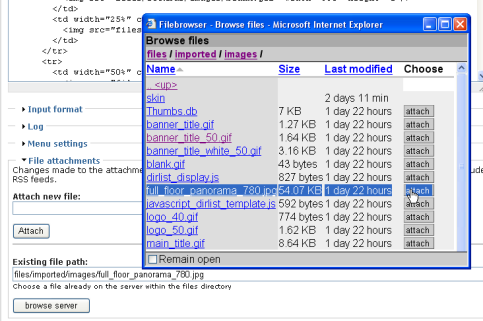
I developed a little module to enhance file attachments, and thought I'd leverage filebrowser to help locate files already on the server.
It works well, and here's a couple of changes I made.
-
Allow arbitrary modules to add their own columns to the file listing display. This is done following the hook methodology with invloke_all() to retrieve new cells.
I use it to add a new 'action' column for things I want to do to this file. -
Allow the filebrowser_page() to be called out of context. I use is as a pop-up window to help my form widget.
To do this, I made the argument handler a bit cleverer - it reads the context it's being called from, not $q, and rewrites links back to itself, not to the hard-coded 'filebrowser/' string.
I'll attach some info here ...
/**
 * Impliment callbacks from any other modules that wish to extend filebrowser
 * with additional columns, like data or actions.
 * A callback takes the filepath as an argument, and returns an array of table
 * cells. The table cells get inserted as part of the current row.
 * When given NULL as the argument, it returns the table column header.
 *
 */
function filebrowser_get_more_columns($fullpath = NULL,$stat = array() ){
  return module_invoke_all('filebrowser_column', $fullpath, $stat);
}

/**
 * A sample filebrowser column callback.
 * If a module implimented this, a new column would become available to
 * filebrowser with the contents of the new cell in each row.
 * It should return an ARRAY of table cells - any callback can add any number of
 * columns.
 * This function would be called filebrowser_filebrowser_column() - a module
 * would declare a function modulename_filebrowser_column()
 */
function hook_filebrowser_column($fullpath = NULL, $stat = array()){
  // return the column header
  if(!$fullpath){
    return array(
      array('data' => t("Type"), 'field' => 2)
    );
  }
  // Return a cell displaying the suffix. Sortable.
  $suffix = substr($fullpath,strrpos($fullpath,".")+1);
  if(strrpos($fullpath,".") && $suffix ){
    return array(
      array( 'data' => $suffix, 'sv' => $suffix )
    );
  } else {
    return array(array('sv' => ''));
    // Need to keep up the right number of table cells.
  }
}
And a screenshot of my use in action ...
| Comment | File | Size | Author |
|---|---|---|---|
| #28 | filebrowser_enhancements.patch.txt | 17.37 KB | dman |
| #27 | filebrowser.module.txt | 17.81 KB | dman |
| #26 | formtable.module.txt | 8.1 KB | dman |
| #25 | filebrowser_26_08.tar.gz | 21.24 KB | dman |
| #17 | filebrowser.tar_1.gz | 32.38 KB | dman |

Comments
Comment #1
dman commentedThe patch itself...
Comment #2
dman commentedAnd here's an entire module that uses this hook and handle - I don't know if I can be bothered releasing it as a project, but it's something I've needed for a while when dealing with legacy sites - the ability to 'attach' existing files to nodes.
If only I can find a way to turn OFF the date column, filebrowser will be a useful widget to use for many things.
.dan.
Comment #3
dman commentedI've done a significant rewrite - Adding AJAX updates and made bits more configurable.
The results are demonstrated in a sandbox here.
CHANGELOG
danm - July 2006
Added AJAX inline requests for subdirectories.
Added new menu callbacks :
filebrowser_raw, the AJAX Callback
filebrowser_lite, a demo on how to select columns
filebrowser_popup, a widget that can be used from other places
Adjusted the page callback to take the path as arguments, not just from GET
Re-worked the table construction to use a set of column callbacks,
to allow caller to define which columns get displayed,
and to extend with their own columns.
Abstracted all the column layouts into their own function.
Column cells are now named arrays, not indexed numerically.
better for arbitray column sorting, and allows better CSS styling
Added some css to stop date column wrapping, and tighten layout.
Fixed problem where an empty directory request would list root (!)
Modified README to describe the new method of table building, and give sample code.
Added help page (pipes the README and displays demo code)
Comment #4
ak commentedNice work you did there dman, I must say. The original contributor of this module must decide if this functionality will make it in this module or if you rather should contribute it as a new one. Viewing the source I saw that you heavily extended the filebrowser.module file it self. I just was thinking if it would make sense to extend the original filebrowser with minimum needed to easily hook in to it and split your work into a seperate module that extends it. A filebrowser_attach.module or so.
Although there are some related projekts listed below that I would like to point out here. Every single one has it's own advantages and disadvantages. I'd love to see them merged somehow to a solid solution with the best out of them all. This may should be discussed in depth further. Nevertheless I think your work seems to be a good startingpoint for such an approach. What do you think?
http://drupal.org/project/ezdownload
http://drupal.org/project/fileshare
http://drupal.org/project/filesystem
http://drupal.org/node/43600
Comment #5
dman commentedI actually started with disknode, but didn't think it was appropriate for the functionality IT provided to be building the browse routines.
I actually modeled the pop-up widget on the disknode code.
I found filebrowser a bit simple, (not much different from a default apache directoryindex) but liked the descript.ion support.
Yeah, I ended up with what looks like a significant chunk of new code, but most of it was just pulling the table row renderer out into a set of table cell renderers.
I can easily abstract the AJAX additions out into a sub-library of their own.
The actual points of contact with the orginal code are probably 6 lines.
Thanks for the links ... I tried to get ezdownload working, but it's 4.6 and PostGres only. It sounds like it handles user roles more usefully, but I couldn't see any inspiration in the docs or code.
... and had a look at filesystemapi . Again, pretty good on authentication but no UI to speak of.
Filebrowser is definately the one I'm plugging closest into. I can strip the code a bit (into an external library) if that would make it easier to see and adapt to...
I have two other modules in the works that will be using this, I can also see it becoming an in-page selector thing with a bunch of UI uses.
Comment #6
dman commentedFWIW, here's a version with the optional extras (AJAX and sample code) split out from the core modifications.
We can compare the relevant changes without being distracted by the new bits.
That's all part of what I put the new hooks into it for anyway.
As before, the main change was to the engine in the middle -
from
to
Everything else is gravy.
Comment #7
gábor hojtsy@dman: indeed, I would like to see simple modifications to filebrowser, and possibly a module in the same folder or as a completely new module if you would like to have more development freedom. From your excerpt, it seems it is not possible to add extra columns anymore (the $extrainfo appending is gone). I developed filebrowser for drupal.hu originally where we use it as a Drupal translation browser. We heavily use the extra column addition possibility. Like we add translators and translation status columns in folders where appropriate, eg. http://drupal.hu/filebrowser/drupal-4.7.2-hu (note that we also have the description in the same cell as the filename and icon, which is easily doable with filebrowser for Drupal 4.7)
Comment #8
dman commentedHey :)
The extrainfo is the column called 'info'!
Previously all the cells were built in the array, and the extra info was fetched from a separate call.
Now ALL cells are built from individual calls - the way extrainfo does.
I really like the descript.ion support, and I think the parser *callback* idea works well (although it puts code in a funny place).
I've built RDF parsing for metadata alongside files as well (historically).
I haven't got the best answer yet for adding multiple cells in one callback, (descriptions are parsed, but not extended ones) but the way I'm thinking, each type of column would be fetched individually.
So 'translator' and 'status' could be turned on and off independant of each other, could be swapped in position, and be sortable or filterable.
I know I moved the icon out of the filename cell. That's just to make it optional. Problem?
And, well now you can place the description wherever you want.
$cols = ('icon','name','info','size')
$cols = ('icon','name','size','info')
Or if you really want, we can add a merged version.
$cols = ('icon','name+info','size') ... but I don't know why.
Comment #9
ak commentedjust my two cents
@goba This realy seems to be a great extention with out breaking any old functionality, rather adding some cool new options in a modular way and it won't change much of your original code as well. This could become the one and only directorybrowser for our drupal sites which other modules could hook on to.
+1 for icons in single cell (it renders better as bevore because the hyperlink underline doesn't cross the icon anymore)
+1 for placing the description wherever you want
+1 for the ajax and popup functionality in a contrib subfolder of filebrowser
@dman did you evaluate the fileshare.module
Comment #10
dman commentedI just went and had a look. Currently a bit broken it would seem, but the public demo works nice in FF. The promise of actual file management is good, but I really don't like how everyone defines their own content type for every job they want to do.
Having the ability for attach a node to a folder (cool, I was planning that myself) is not a node definition, it's a property a node may have. This is what turned me off disknode and into my own version.
Plus, from looking at the code (it just won't run for me, looks like the formAPI rendering is gone wrong) I really dunno why it tries to replace the normal file upload.module instead of just enhancing it.
Anyway, on this project, there IS a small amount of breakage in that (as I mentioned) one cell callback cannot currently create two columns. It's not happy about inventing new cells on the fly.
To work exactly as gobas example does right now, two custom functions for the two custom columns must be written.
Then the display request would become
$cols=array('icon','name+description','size','age','translator','status');must be created in a way similar to how the filebrowser_get_cell_info() works now.
So not a totally seamless change.
Alternatively, we could just tack the old $extrainfo on the end, but it won't work with the AJAX, and ... I can't disable it!
Comment #11
ak commentedYes, I totally agree with your opinion on the property stuff. Great thoughts. Attaching folders to nodes would be wonderfull. Are there other cool things you have planed that we don't know about? While thinking about this I've got some ideas. How about a options colum for deleting, editing and renaming files? Or is this going beond your intentions?
Thanks for clarifying the differeces between your version to me. Although I'm not that advanced to understand the problems that occure in depth. So to bad that I can't help you solve youre issues. Nevertheless I'll stay tuned to your work (it's great) and will be a happy beta tester or give feedback where ever desired.
Comment #12
dman commentedAdding an actions column to provide a delete button or even 'move' is now almost trivial - but that's certainly a separate module - just one that happens to use this new widget.
'editing' is not gonna happen, and renaming is possible, but inappropriate.
However an 'attach *to*' button will happen, and possibly a 'describe'
I came up with the idea for attaching folders following a client request for bulk (zip) uploads.
By tricking the upload.module 'files' value into pointing at a dir, then using this filebrowser table to render an enhanced view of that dir, I think I've got it sorted. ... without custom SQL and without custom content types.
Unreleased yet is the tiny itch that started it all - the attach.module seen at the top of this discussion. It now runs on my AJAX filebrowser instead of the one in the picture.
Comment #13
ak commentedYes, I almost totaly forgot about that one. +1 for the attach.module. I'll use it right away if you're intending to contribute and support it. Are you going to?
Btw the contrubutor of the image.module released a image_attach.module in cvs that may be related to your work and as the todo's of that module read there are some features on the roadmap that you have implemented in your version already. you're module may could help out there.
Ok, the edit button probably goes beond your intentions. I just was thinking of a perfect filebrowser. One that may point to the themes folder where people can work on together as there is a module that was doing so, but it isn't being updated to 4.7. Maby a small space where I can give it a try to extend my skills. It would be handy I think.
Comment #14
dman commentedI've thrown up a sandbox Demonstrating the updates in action. See the popup and autocomplete demos towards the bottom.
If you try making a page (anonymous uploads are OK for there) You can see the widget doing magic as an upload and browse attachments handler.
I still need to pretty up the UI (fighting with forms API still) but the power there is a leap beyond the previous file management utils!
Note the attach module (which provides the 'find' and 'save as' functions) is separate from the filebrowser, but works close with it, for obvious reasons.
Some of the JScript may be a bit funky - browser testing as I go.
The latest version of the bundle is pretty stable, and (as before) has the enhancements in a different file from the original core.
.dan.
Comment #15
dman commentedDoh! Preview is your friend.
I'm just sick of my attachments getting lost when I try to preview in this interface... sorry.
Comment #16
gábor hojtsyPlease give me some time to test this. I am going on a few days vacation soon. This patch is definitely not forgotten.
Comment #17
dman commentedHere's the latest refinements, including :
Added extended demo to the help page
Support whole-site browsing
Added support for displaying selected cols via the http request
Added recursive/non-recursive flag
Added list rendering support, a semantic alternative to tables
I also bundled my (alpha) 'attach.module' do show a few ways I'm using the filebrowser in action.
it allows browsing existing attachments from the node edit, a 'save as' browers for uploads, an attachment-centric browser (here's the file, where's the owner?) and allows folders to be 'attached' to nodes - and a listing viewed inline with the node body.
I've made almost no changes to the actual filebrowser.module since last time (just a tweak on the way info is cached), all dev is happening in the 'extension' file.
Comment #18
dman commentedSorry, I moved the sandbox.
demo at http://www.coders.co.nz/drupal_development/4.7/node/10
and README at http://www.coders.co.nz/drupal_development/4.7/node/2
and yes, you can try the attachment upload live if you want.
Comment #19
bomarmonk commentedI am checking out your attach module and your additions to filebrowser. These are excellent improvements. One issue I have with just the filebrowser: if I FTP a file into a directory accessible by filebrowser, the file shows up properly but cannot be viewed or downloaded. I am probably just not able to see something simple that is wrong with my configuration. Any ideas? If I go directly to the url of the file, the file behaves properly (path-> files/myfolder/mypage.html). If I select the file through the filebrowser interface (embedded in the node), I get a "number 2" displayed on the page and no display of the file (path ?q=files/myfolder/mypage.html).
I have other file modules working properly: disknode and the core upload module... any ideas why filebrowser isn't getting the right path? Is it trying to use a path in the database that does not exist, because I have FTP'd the file? This was my thought.
Comment #20
dman commentedA bit odd.
"Number 2" ?? No way would it be inventing that string.
It's not relying on the database file registration table at all - I went this direction because I don't trust it at all, and it's specifically to support the finding and absorbing of unknown (Legacy or FTPed) files that I made it.
I have a suspicion I left a small piece out of the bundle - I'll try a fresh install on yet another shell site to see what's happening. Drupal 4.7 stable, not CVS, though I don't think that would be a problem.
(PS, my email to you earlier today appears to have bounced, I'll forward my reply through Drupal.org...)
Comment #21
gábor hojtsydman, I tried to look into your changes, but these does not seem to be as simple as advertised.
For starters you added a lot of files into the filebrowser folder. Like you have a filebrowser-extensions.inc, which is for some reason always included in filebrowser.module.
There are a lot of translation unfriendly parts, like the inclusion of the readme in the help hook, or these kind of code: t("Unable to get files for this directory '$subfolder'") This is impossible to translate. It should be t("Unable to get files for the %subfolder directory", array('%subfolder' => theme('placeholder', $subfolder))) Look around, there are others like this, eg. in the theme('image'...) call, or in this one: drupal_set_message($folder." was not readable");.
You use different non-Drupalish coding styles. Like if($_REQUEST['edit']['cols']){$cols = $_REQUEST['edit']['cols'];} should be on at least three lines (the if, the body and then the closing parenthesis). Then the if and the ( should have a space inbetween, etc. There are a lot of these, like drupal_set_html_head( theme_stylesheet_import( url( drupal_get_path('module','filebrowser') . '/filebrowser-tree.css' ) ) ); should not have space between the parenthesis.
Watch out for your documentation. You have @param $columns documented, while the param is named $cols.
I am willing to support your fantastic looking efforts, in case you can provide an absolute minimal set of changes I should make to the filebrowser module, to let you build on it. Filebrowser is supposed to be as lightweight as possible, especially without core patches. As far as I see, your powerful extensions (autocomplete, popups, javascript goodness, etc) should go to a different module. Did you request a CVS account already? You should do so. Point to this issue to prove you have existing work to commit.
Comment #22
dman commentedThe 'extensions' file was specially created on request further up this issue thread.
It's to separate the changes to the lightweight core that I needed from the additional functionality.
So that the volatile bits can be reviewed without getting confused by the new goodies.
If the base changes are made to filebrowser.module, the extensions CAN indeed just become its own optional module. That's the idea.
I added the js for Ajax, another js to support a 'select-all' and 'select contents' checkbox for the recursive tree-view filemanager, the demo just because I like verbose documentation. All the resource files are conditional, and all do distinctly different jobs (apart from one which is totally redundant and shouldn't be there :) Whoops.
I know I've been a bit lazy on the error-message translation strings. They are trivial to tidy up, and were not really a priority during testing. Can probably get them fixed in minutes.
If I thought it was at all likely that anyone would be translating the entire README document into multiple languages, then including it as a help file might look less clever. I've not seen them around much. The include trick is just a quick hack that makes up for having NO help at all. I'd consider having README.en.txt or something instead. Could work.
I can easily run a pretty-printer over the code, spaces between paranthesis didn't really seem a problem at the time. Normally I stretch things out lots, the only one-liners are no-brainers.
I've got CVS for some of my other projects. I do need to do a bit more dependancy testing. I use some other libraries for nicely rendering forms inside tables, and I'm just looking for the best way to include them.
Comment #23
bomarmonk commentedAh, I may have been a bit unclear: I am getting a number two-> 2. The 2 has a couple of lines under it. This seems to also happen with nodes when a user is denied access. Is this some odd access control issue? I'm not sure... Thanks for your response to my problem. Again, these modifications are very nice! Keep up the good work.
Comment #24
bomarmonk commentedWell, something is still keeping Dman's filebrowser from working properly. All other file modules are working as expected. Only this modified file browser is giving me trouble (although it provides the functionality that I would really like implement). I wish I knew how to get this working! It properly exposes the files to the filebrowser, but the links to the files aren't working properly.
Comment #25
dman commentedSorry, I haven't forgotten this.
As requested above,
I've reworked all strings to be translatable, and run a lint-beautifier over the code.
I've mostly renamed the 'extensions' into a module of its own.
This is almost identical to how the code was structured before, but with more Drupal scaffolding.
I'm just trying to triple-test to make sure there's no dodgy dependancies, and things work PHP4/5 and with good and bad file directory settings.
Um, I can't recall whether I fixed the '2' problem, although I think I did see it once.
Off to yet another fresh install... But you can try this bundle in the meantime.
Comment #26
dman commentedOh fart. I'd left this out (I keep them in another dir, because I use them in multi places)
I guess I could embed them, but it'd be wrong.
Comment #27
dman commentedAs requested by Goba, Here is just the original filebrowser.module file with the modifications needed for my new hooks to work.
I actually decoupled the 'extensions' into a separate module in the tarball I sent last week, and this file hasn't essentially changed from that version.
However, for cleanliness, from now we'll leave the filebrowser as much as-is as possible, and I'll go start a new project for the extensions.
The following version of filebrowser.module is expected to behave exactly as before - only the internals have changed to make extension possible.
- the description callback functionality should still work, but may need review, as I didn't impliment/test it myself.
Comment #28
dman commentedOr if you'd prefer a patch (with 1/3 of the code somewhat modified, the patch is as big as the original) here it is
Comment #29
dman commentedThe extensions now all live on their own in a new project
Comment #30
gábor hojtsyI did try to review this patch, and found that it does not go in a way I would like it to go (like allowing arbitrary GET parameters for column names; storing dynamic, folder dependent filebrowser context in variables; allowing for the browsing of usafe folders, etc). I figured it might be better after all to keep my module simple as it is, and let you include this more complex/versatile version in your filebrowser extensions module pack.
Excuse me for hammering all along with this to be made a patch, but this was the only way for me to find out whether I like the changes or not. I was about to look into updating filebrowser for Drupal 5, and figured it is better to clean this up first.
Comment #31
dman commentedI agree.
I soon figured that allowing the arbitrary columns to be defined from the GET was indeed too flexible - IE not restrictive or 'safe' enough.
It was fun to test during dev, but then I soon went with admin-configurable profiles - which were attached to their respective subdirectories - instead. It's a little more complex to maintain, but allows the granular access control I needed to support multiple, parallal archives and invocations.
Other tweaks, controlling 'unsafe' folders etc were added later also.
One requirement (for my use) was for admin users to be able to browse and link to files from anywhere in the webroot - not just /files/ - because I wanted to rebuild a legacy site in-place without breaking or moving any of the archived resources. Thus, finding a safe way to set the filebrowser_root to '/' was needed.
Comment #32
bomarmonk commentedI just wanted to add that I have cl