

Closed (outdated)
Project:
Commerce Core
Version:
7.x-1.x-dev
Component:
User experience
Priority:
Normal
Category:
Task
Assigned:
Unassigned
Issue tags:
Reporter:
Created:
25 Feb 2010 at 14:05 UTC
Updated:
22 Feb 2019 at 17:43 UTC
Jump to comment: Most recent


Comments
Comment #1
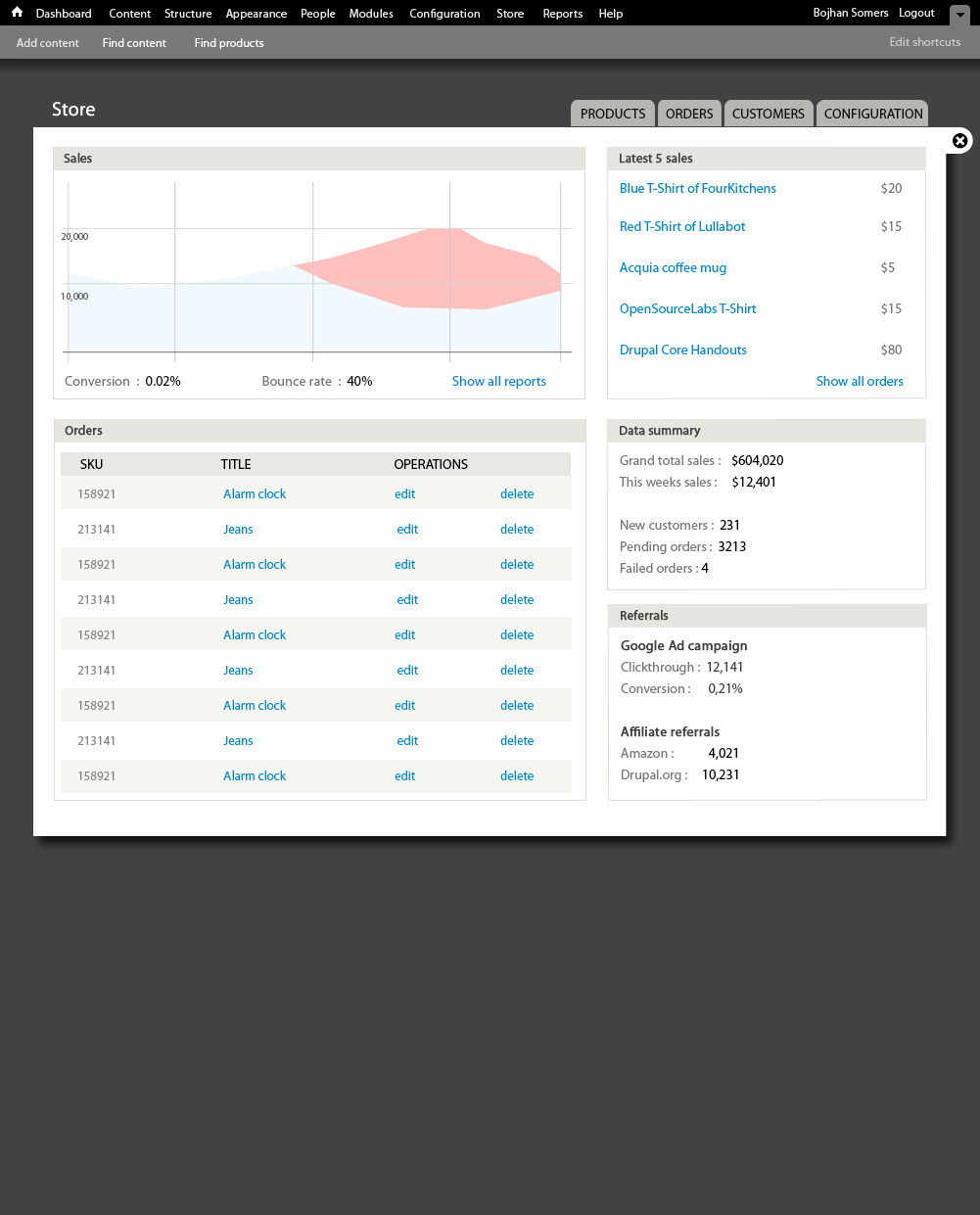
rszrama commentedSweet action. The bottom left pane doesn't make sense, though. The title is "Orders" but the content is a View of products in the store. If that is indeed the most recent orders, perhaps make it a View with columns showing the Order ID, Customer (first / last name), Total (dollar amount), and Operations (view / edit).
Users have preferred a view link to a clickable order ID in the past, but I think my preference would be to just have both. I think. Any thoughts? I believe their rationale was that for lower order numbers it's a tiny link and that their customers were just missing the link.
Comment #2
redben commentedAn interesting pane to add to the dashboard would be "Tasks", that list for example orders that need action, products of which stock threshold has been reached and need action. Ad hock tasks or an other thing. But this might mean coding a little "tasks framework"...
Comment #3
Bojhan commented@rszama Agreed, obviously the title is incorrect. However I am unsure of making the order ID a link - although I agree it might make more sense, but there would be very limited visual distinction then between the items in the columns. I think this is something we can decide when there is a .patch we can try, and tweak.
@redben Right, I thought about that but figured that would need far more hashing out to be useful.
Comment #4
rszrama commentedI'm going to postpone this and possibly won't fix it in the future if it does indeed fit better in a contrib module. At the current rate of development, this probably won't be a 1.0 feature, though. Related issue:
http://drupal.org/node/725592#comment-3052272
Comment #5
DjebbZ commentedI'm thinking about creating some more blocks and put them in the install profile, so the dashboard can much nicer, because it's really a central place for shop managers and marketing people and co.
Some ideas of blocks :
Products related : Best sales, Worst sales, Latest sales, Most viewed, Least viewed
Data summary (if possible)
User related : New customers, Best customers (by Total and Number of orders)
Carts related : Abandoned carts (% of total carts)
I don't know if all blocks are possible, but I'll try ! I'm not trying funky stuff, basically most blocks (if not all) will come from Views.
Comment #6
DjebbZ commentedAfter a discussion with rszrama and damien most of these blocks should belong to a report module, which doesn't exit to date. I'll file an issue (edit: done here #1031134: Report module) for that. So we should just restrict those blocks for day-to-day store management tasks.
Comment #7
DjebbZ commentedHere's a first block : "Latest orders", which is just a block version of the "Orders" admin page. I refreshed the code in the commerce_order_ui.default_views.inc with the whole export code from Views. Added a 'more link' to the admin page, and limited the number of items to 5.
https://github.com/DjebbZ/drupalcommerce/commit/a917384ac1bb9180f7fb2b0d...
Comment #8
DjebbZ commentedChanging tags.
Comment #9
DjebbZ commentedAs we can't track paid orders, i.e. actual incomes related to products and orders and users etc., other blocks are nearly impossible to create...
Comment #10
DjebbZ commentedSources of ideas for dashboard/report information :
http://www.magentocommerce.com/product/features/analytics-and-reporting/...
http://www.flickr.com/photos/ans/4539585089/
http://www.prestashop.com/en/allfeatures#stat
http://wordpress.org/extend/plugins/wp-e-commerce-dashboard-widgets/scre...
To be able to create the "Best sales", we need to count total quantity of line items referencing the product on orders NOT in the "canceled" or "cart" state. - @rszrama. So I'm going to try to create a views handler that will do the quantity part, the order part being just a filter that already exists.
Comment #11
DjebbZ commentedDone ! Views handler done ! So happy :) :)
https://github.com/DjebbZ/drupalcommerce/commit/a917384ac1bb9180f7fb2b0d...
Comment #12
DjebbZ commentedBetter handler here (with sorting and filtering) :
https://github.com/DjebbZ/drupalcommerce/commit/cad9bae62ae14b27818653ed...
The "Best orders today" block is almost ready, but the views filter for "Order status" doesn't work, so I can't filter for actual orders.
Comment #13
DjebbZ commentedThanks to the previous handler, the "Best orders today" block for the dashboard is now ready. But when added to the Dashboard it produces this Debug notice :
So I might did something wrong with the handler...
Comment #14
DjebbZ commentedThe previous bugs were stupid bugs. Fixed ! So here's the code for a proper Views handler that really displays the total quantity of items for an order.
https://github.com/DjebbZ/drupalcommerce/commit/05c2178ffa08e25603ff8910...
But I removed the filter and sort handlers, because the quantity is calculated on the fly. So they just can't work. We need to figure out a way to use them, especially the sort. Without the sort, the "Best orders" dashboard block cannot exist.
Comment #15
DjebbZ commentedMaybe the total quantity should be an actual field of the order, updated some way (Rules ?), so handling it with Views will be easy.
Comment #16
pcambraActually, if you add the "group by" option in the view, you can show, filter and sort by line items of the orders using the relationship out of the box, so there is no need of the extra field.
Comment #17
Bojhan commentedIt's likely this won't be part of Drupal commerce package, but an installation profile.
Comment #18
ranx commentedsubscribing
Comment #19
jakonore commentedsubscribing
Comment #20
recidive commentedI think some of this, like the summary blocks could be generated by Drupal Commerce. And then a install profile could just place them into the dashboard, and implement more if needed.
I'm going to do some work on this.
Comment #21
pixelsweatshop commentedsub
Comment #22
gamepaused commentedsub
Comment #23
cprouvot commentedWhat do you think about create a module for this?
I think it's a really important part of Drupal Commerce. Do you think that it will be integrated into Drupal Commerce on next version?
Comment #24
jurriaanroelofs commentedI've been working on a dashboard and it's quiet near ready for a closed beta release. Here is a sneak preview video:
http://youtu.be/L1-9-fgXRJg?hd=1
Snapshot of the backend:
http://i.imgur.com/rgzMW.png
If you have any comments or requests feel free to make an issue in the sandbox:
: http://drupal.org/sandbox/peach/1571178
It's built with views, skinr and a custom module to provide ajax-views integrated SVG google charts in a responsive layout.
Comment #25
rszrama commentedWow, thanks for sharing! : )
Comment #26
Bojhan commentedWhoa, this is exciting :) If you could release a sandbox, or more detailed screens I would love to take a look at them.
Comment #27
cprouvot commentedYes impressive!! Really excited to test it!
Comment #28
jurriaanroelofs commentedupdate: you can now use the Commerce Compass dashboard without the need to patch anything: http://drupal.org/project/commerce_compass
Comment #29
alexander.sibert commentedVery cool work!
Comment #30
alexander.sibert commentedI want to add: We have in Germany a new E-Commerce Solution which is in some points better than Magento. For more informations you can visit http://www.shopware.de
Here you find a live backend demo of shopware with their Dashboard:
http://www.shopwaredemo.de/backend/
Sometimes it is good to use inspirations from other well shop solutions.
Comment #31
lsolesen commentedSee also http://drupal.org/project/commerce_reports. This issue should probably be closed, as contrib modules which can provide the suggested functionality exists?
Comment #32
tim.plunkettFixing input format.
Comment #33
bojanz commentedClosing issue. Commerce Reports is the module that should be providing this page.