

 Come together with the global Drupal community in Rotterdam, 28 Sept – 1 Oct 2026. Sessions, contribution, connection, and Early Bird savings until 8 June.
I know this module is not finished yet, but still.
When I add 2 fields to my checkout page, these fields are duplicated and displayed twice. I also get a bunch of errors:
Upon deleting a field:
user warning: Can't DROP 'ucxf_client_fax_billing'; check that column/key exists query: alter table uc_extra_fields_values drop column `ucxf_client_fax_billing`, drop column `ucxf_client_fax_delivery` in /home/hms1bme/public_html/dev/drupal/sites/all/modules/uc_extra_fields_pane/uc_extra_fields_pane.module on line 181.
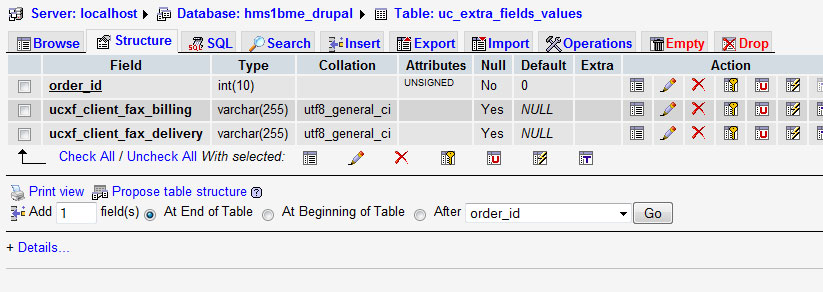
Upon creating a new, unique field, I also noticed that in the dbase the fields are created twice:
http://drupal.org/files/dbase_problem.jpg
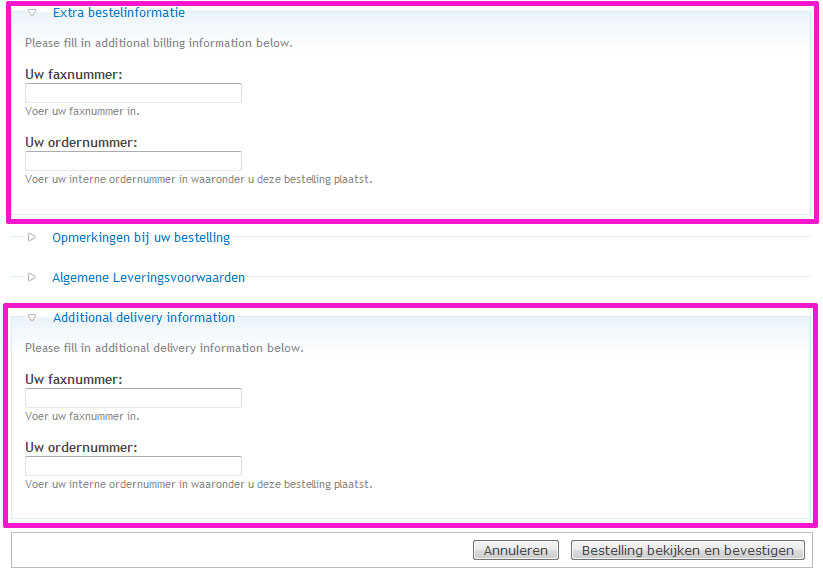
Which results in in a checkout page like this:
http://drupal.org/files/error_duplicate_fields.jpg
when I delete 2 of the 4 rows created in the dbase, nothing happens:
http://drupal.org/files/nothing_happens.jpg
So, there must be something wrong :)
| Comment | File | Size | Author |
|---|---|---|---|
| #12 | itworks-thnx.jpg | 51.47 KB | JayNL |
| #7 | error_upon_checkout.jpg | 86.14 KB | JayNL |
| nothing_happens.jpg | 34.66 KB | JayNL | |
| error_duplicate_fields.jpg | 65.33 KB | JayNL | |
| dbase_problem.jpg | 76.32 KB | JayNL |


Comments
Comment #1
maurizio.ganovelliHello,
Upon creating a new, unique field, I also noticed that in the dbase the fields are created twice:
This is the normal behaviour for this module. If you create a new address field (in your case "Client Fax") this field values must be stored for billing and shipping addresses. So it's normal that two fields are created in database (i.e. ucxf_client_fax_billing and ucxf_client_fax_shipping) and
Which results in in a checkout page like this:
it's normal that this field appears "twice" in checkout page: one is part of "billing address" the other is part of "shipping address".
when I delete 2 of the 4 rows created in the dbase, nothing happens:
This module installs two tables: uc_extra_fields and uc_extra_fields_values. You have deleted rows from uc_extra_fields_values: it's normal that fields are still visible since fields definitions are kept in uc_extra_fields table. This deletion causes the error reported upon deleting a field!
Your issue seems to be a "feature request" instead: you need a "unique" field in checkout page.
Please, let me know your needs as accurately as possible: i will check if proposed features can be integrated in this project.
Bye.
Comment #2
JayNL commentedHi,
sorry i always find it difficult to explain what the problem is, especially since English isn't my native language.
Nevertheless, what I require is an extra, collapsible field that contains 2 fields:
Client Order Fax
Client Order/Purchase Number
I added those 2 fields, and after submitting the fields are displayed twice. As you said above that's for billing and shipping address, but that's indeed not what I need. I just need one extra fieldset with 2 custom fields.
Did I make myself clear now? I hope so :)
Comment #3
maurizio.ganovelliI don't know if can be a good solution for you, but you can try this:
1. in http://.../admin/store/settings/checkout/edit/extrafields define the two fields as needed;
2. in http://.../admin/store/settings/checkout/edit/panes deactivate one of two checkout panes "Additional delivery information" or "Additional billing information";
in this way you have only one panel visible during checkout with two fields.
Hope it helps (Let me know!).
Bye.
Comment #4
JayNL commentedthat's a cool solution, let's have a look at it. Thanks for now, much appreciated!
Comment #5
maurizio.ganovelliComment #7
JayNL commentedhi blackice, it actually works partially. The second pane is indeed not showing, perfect. But when I checkout my order I fill in both fax and order number and click review this order, and after that I'm presented with an error as attached.
Can you please help me again?
[Edited by kiamlaluno]
Comment #8
maurizio.ganovelliSeems like fields values table is corrupted (maybe due to deleted rows through phpMyAdmin). Try to:
1. deactivate module in /admin/build/modules
2. uninstall module in /admin/build/modules/uninstall
3. re-activate module in /admin/build/modules
in this way the module rebuild its necessary db tables.
After that you must recreate the fields as seen before (uninstall delete also these data): let me know if the error persists.
Comment #9
maurizio.ganovelliI'm sorry but i can't delete posts. I'll try to contact drupal.org administrators.
Comment #10
JayNL commentedUpon deleting the 2 fields, I also got another error. My multi-domain ubercart powered drupal 6 install is currently installed to www.example.com/dev/drupal and upon installing one of the fields, I get redirected to a confirmation screen "Are you sure you want to delete....", when I confirm, I'm redirected to this page:
http://example.com/dev/drupal//dev/drupal/admin/store/settings/checkout/...
As you can see, /dev/drupal is there twice.
I will completely remove the module now and see what happens. Thanks again blackice78!
Comment #11
maurizio.ganovelliJayNL,
I sent a request to delete the post above to webmasters (http://drupal.org/node/733700).
Can you open a new issue with comment #10 please (redirect problem after delete)?
In this way i can handle issue queue more easily (since it's not related with current issue).
Thanks.
Comment #12
JayNL commentedblackice78, the next issue is added to the list #736080: deleting a custom field redirects to wrong page.
Sorry i wasn't able to respond earlier, I was abscent during weekend.
I've completely removed your module, went into the database to delete all and everything.
After re-installing the #736080: deleting a custom field redirects to wrong page bug persisted, but at least the errors were gone. It works! Please see attached screenshot to see this beauty in action. Thanks a lot for your assistance with this!!
Comment #13
maurizio.ganovelliI'm very happy to see this!!
I've already tracked down the issue #736080. As soon as possible i'll make a patch and commit it to repository.
Bye!