I have been trying for the Past 3 days to get FFMpeg working with Media Mover.
(I Have Drupal installed on a windows machine on my Local Host)
- I have the right FFmpeg Path and Path to the FFmpeg vhook libraries.
- I can see all the supported file formats and Installed Codecs.
However when I try to do a Test Conversion the Following things happen:
- When I use a particular file to run the test on, the JQuery Returns
file information but all fields except File Name (File) are empty (or) na
- Errors found: FFmpeg Wrapper can not decode this file: !file
I tried to apply the following patch but it didn't help:
The same problem I'm having is described in this forum
but no solution has been posted:
I tried everything possible and double checked all my installation requirements.
Nothing seems to work. Can somebody please help me with this, Help greatly
appreciated! Thanks!!



Comments
Comment #1
rick_1809 commentedComment #2
rick_1809 commentedComment #3
rick_1809 commentedComment #4
rick_1809 commentedCan someone please help with this issue
Comment #5
arthurf commentedYou might want to try out the 2x version- I rebuilt the conversion testing from the ground up.
Comment #6
rick_1809 commentedHey Arthur, Thanks for your Reply! I figured out the problem, Media Mover
Doesn't seem to be working with the Later Versions of FFmpeg, I finally installed
an older version SVN-r16573 and then everything fell right in place. Still have the
missing argument for option '-v' issue but its not affecting any of the tasks I want
to perform.
Thanks! :)
Comment #7
arthurf commentedthere are some fixes in the works for newer versions of ffmpeg. I'm hoping to have that release together shortly.
Comment #8
harcher commentedWhere do you get the path to the vhook directory???
I get:
"The vhook directory was not found on the path you specified"
Comment #9
tipplefip commentedComment #10
forestmars commentedIs the path outside your Drupal install? That may be the issue.
However, ffmpeg_wrapper should work even if it cannot find the vhook directory.
In fact, vhooks have been deprecated (in favour of LibAVFilte) and development is strongly discouraged, except for bugfixes.
(as per: http://ffmpeg.arrozcru.org/wiki/index.php?title=Building_VHooks)
~ Forest Mars
Comment #11
harcher commentedThe path to the ffmpeg.exe file is outside the drupal install. So when I add this path into the module, I use absolute path (C:\xampp171\ffmpeg\). Could this be the problem?
I'm running this locally on my windows xp.
drupal 6.16
xampp 1.7.1
php 5.2.9
I've setup ffmpeg and this is confirmed on phpinfo() page (see image "phpinfo ffmpeg").
All I need is to convert video files to flv format.
When viewing the video module setup page, admin/settings/video, I get an error (see image "error" from post below)
When viewing the ffmpeg_wrapper setup page, admin/settings/ffmpeg_wrapper/test, I get an error (see image "error2")
EDIT: image 'error1' is wrong and I can't delete it...
Comment #12
harcher commentedComment #13
harcher commentedOK, I managed to fix...
The path to the file ffmpeg.exe was causing the problem. I placed this file in the root of the drupal installation and set the path to: ffmpeg.exe
Now it displays the ffmpeg version and all the supported formats and codecs on the ffmpeg_wrapper module page.
See image attached
Comment #14
tribsel commentedim using ffmpeg_wrapper 6x2x-dev, ffmpeg-0.6.0, php53 and have similar problem - can not see any info in ffmpeg wrapper's settings. no formats, codecs, ffmpeg version.
Comment #15
arthurf commented@tribsel where is ffmpeg installed on your server and what path are you using in the ffmpeg settings?
Comment #16
tribsel commented/usr/bin
Comment #17
arthurf commentedAre you sure that your web server can execute ffmpeg?
Comment #18
tribsel commentedvia command line yes. i converted video this way without any problems.
Comment #19
arthurf commentedRight, but the web server user has to be able to execute it. Can you go to the ffmepg settings page and then check your logs?
Comment #20
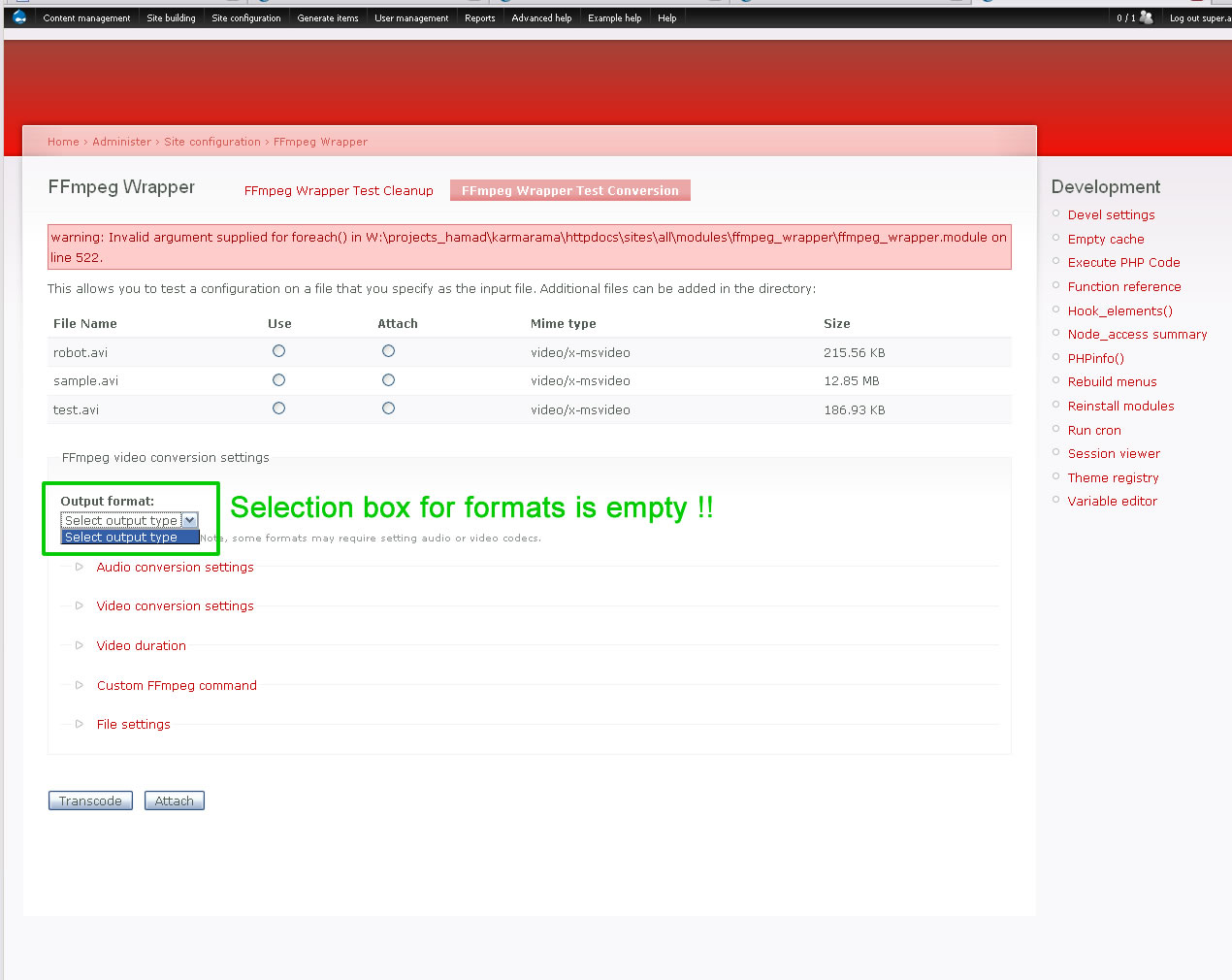
tribsel commentedthere is nothing in apache error log or drupal's log. after going to ffmpeg wrapper's settings. When I try to convert test video, this happens:
in source file details, there is just filename filled in. format, bit rate, Total bitrate... all other fields are either na or just empty.
Transcode using settings: Output format dropdown is empty. But I can submit form anyway by pressing Transcode button. Then I get this error:
There were errors during the conversion! There were errors during the conversion! (twice the same).
Errors found: The file could not be transcoded because this version of FFmpeg can not decode this kind of file
but this is the same file I transcoded via command line before.
Comment #21
arthurf commentedSo what are you seeing on the ffmpeg settings page? FYI, you should probably upgrade to the 2.x version as there are a number of fixes in there for newer versions of ffmpeg