

Closed (fixed)
Project:
Drupal core
Version:
7.x-dev
Component:
block.module
Priority:
Normal
Category:
Bug report
Assigned:
Unassigned
Issue tags:
Reporter:
Created:
8 Mar 2010 at 07:07 UTC
Updated:
3 Jan 2014 at 01:08 UTC
Jump to comment: Most recent, Most recent file




Comments
Comment #1
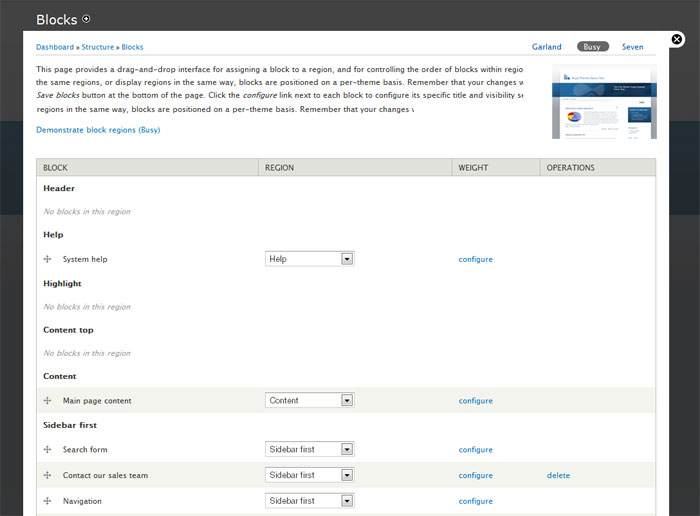
eigentor commentedIt also strikes me that jumping to the blocks page defaults in opening block editing for Seven theme. While this may make sense as it opens the theme that is active in the screen you look at, in much more than 80% the user will want to edit the blocks for the default front end theme. So this should default to the default theme. This reduces the error this issue strives to solve for most users, and the screenshot should kill it for the rest.
Comment #2
yoroy commentedInitially showing the blocks for the default front end theme is a much bigger win. I know I have been spent minutes wondering where my sidebar regions went only to find out I was looking at blocks layout for Seven instead of Garland. Repeatedly.
I'd much prefer to work on the show-default-theme block settings that than adding the screenshot.
Comment #3
eigentor commentedI agree the default setting is more important. Stborchert also does not like the screenshot :P. Still we need something more than the teeny tiny tab to indicate what's the Theme we ard setting the blocks for.
Comment #4
eigentor commentedChanged title to better reflect the issue
Comment #5
andypostAlso @Add new block@ is lost
Comment #6
yoroy commentedandypost: that's another, and known issue: #556872: Action links do not work on all levels (example: 'add block' action link does not appear)
Comment #7
Bojhan commentedCan we perhaps change the title of the page? Ie Blocks of Seven?
Comment #8
andypost@Bojhan Good idea and it's easy to implement
Comment #9
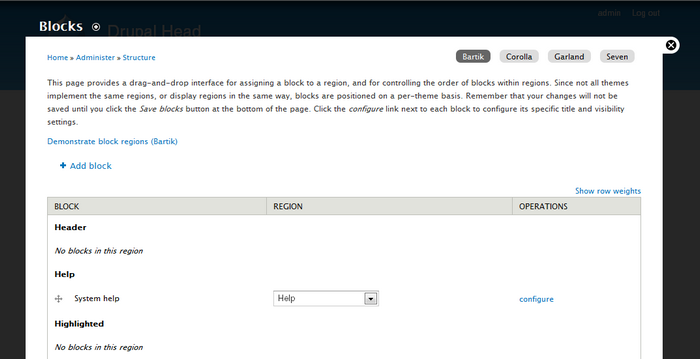
johnalbinSo, I was noticing this oddity about the block admin page yesterday. It has no primary tabs. In D6, the tabs were "list" and "add block", but "add block" was rightly converted into a local action link, leaving "list" as the sole and pointless tab. (Plus if there is only one primary tab, it gets hidden by default.)
Why not convert the block admin's secondary tabs into primary tabs?
Here's a screenshot and a patch.
Comment #10
johnalbinReview, of course!
Comment #12
johnalbinFixed the block tests.
Comment #13
johnalbinFixed the help text so it displays on all tabs. Fixed the links to the demo pages. And fixed a link from the dashboard to the block admin.
Comment #15
johnalbinThe patches above were pretty small, but I actually made them much more complex then they needed to be. I didn't need to remove the "list" part of the path, I just needed to remove the "list" primary tab; then the secondary tabs got an automatic promotion. The "list" part of the path are actually necessary so that you can have themes named "manage" or "demo" or "ADD" or any other path that a contrib module wanted to add underneath admin/structure/block.
Here's a much simpler patch that does the same thing. I ran some of the simpletests on my system, so I don't expect it to break any tests when the bot gets a hold of it.
Comment #16
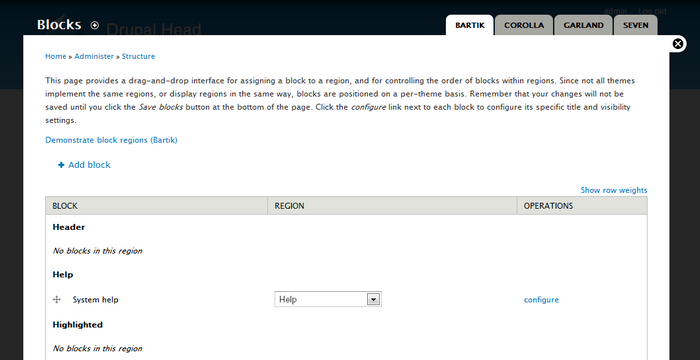
eigentor commentedThis is looking much better. Cannot judge the code quality, just reviewing Design.
For direct comparison before and after:
Without Johns Patch:
Improved Version with Patch applied
This is how it looks with Bojhans idea to also write the theme name into the title:
Bit of a mixed bag, this last version. While it sure helps to know which themes blocks you are editing, the word "Blocks" is not as prominent as before, so it might take longer to scan that you are on the blocks page.
Comment #17
johnalbinI just took a look at block_menu() and from a technical aspect, I don't think it is possible for tabs to affect the title of the loaded page. Maybe with a title callback on the parent path? :-\
Also, I personally think the primary tabs make it much more obvious which theme the blocks are being configured for; altering the title doesn't seem necessary.
Comment #18
yoroy commentedNice catch JohnAlbin! This is essentially a UI bug and the fix looks good. Worth committing, this is much clearer. Adding the theme name to the page title would be additional polish, which I hear is not what we're supposed to be doing these days :-)
Comment #19
jacineThis is MUCH better. Yay!
I hope this is committed. I agree that the way it is now is very confusing and to be completely honest, the secondary tabs all by themselves just look like crap. I think that's what's so confusing about it. It's just not designed to be used that way.
Comment #20
jacineHmm, actually I think the weights need a little work. The breadcrumb trail is wrong.
Testing with Seven as default theme and the overlay disabled, I get the following:
path | breadcrumbs
admin/structure/block | Home » Administer » Structure
admin/structure/block/list/bartik | Home » Bartik » Blocks
admin/structure/block/list/garland | Home » Garland » Blocks
I guess this could also be an unrelated bug (maybe #907690: Breadcrumbs don't work for dynamic paths & local tasks #2), but I'm not sure. Any ideas?
Comment #21
sunGood idea. Can't reproduce what Jacine reported. Perhaps she didn't rebuild the menu after applying the patch (which just landed).
However, I'm getting other odd results, but which are only related to #550254: Menu links are sometimes not properly re-parented
Comment #22
dries commentedCommitted to CVS HEAD. Thanks.