image_import works fine for me as long as my images are small enough. When I upload a directory of images that are c. 500KB, everythign works as expected.
If I try the exact same procedure with a few (1-5) images as they come from my camera, c. 1.2MB each, I get the following results:
1. Error mesage:
"imagecreatefromjpeg(): 'files/images/DSCN0662.JPG' is not a valid JPEG file in /homepages/2/d98664611/htdocs/travel/includes/image.inc on line 284."
2. The images _are_ imported, but no preview or thumbnail is created.
3. The images are inserted full size in the target gallery. See
http://pooleweb.com/travel/image/tid/267
for an example.
Administer settings tells me
"The built-in GD2 toolkit is installed and working properly."
and
Maximum total file size: 0
Enter 0 for unlimited.
Maximum resolution for uploaded images: 0
Set to 0 for no restriction.


Comments
Comment #1
L. Allen Poole commentedI've tested back on my development environment, and the problem doesn't exist there... seems to be specific to my hosting environment (1and1.com).
The patches for similar problems I've seen suggested for image.inc don't apply to my (slightly older) version.
Suggestions will be much appreciated!
Comment #2
L. Allen Poole commentedI've looked at my phpinfo
http://www.pooleweb.com/travel/phpinfo.php
and it looks like memory is set to 40M, which should be plenty for handling a 2MB file...
Comment #3
L. Allen Poole commentedI'm using image_import.module
$Id: image_import.module,v 1.15.2.1 2005/11/20 03:20:25 syscrusher
and image.module
$Id: image.module,v 1.146.2.12 2005/12/16 18:19:50 walkah
Here are some tests of import.module, uploading and importing just one photo at a time:
Here's an exaple of the errors I get from one photo:
warning: imagecreatefromjpeg(): 'files/images/temp/DSCN0700.JPG' is not a valid JPEG file in /homepages/2/d98664611/htdocs/travel/includes/image.inc on line 284.
warning: imagecreatefromjpeg(): 'files/images/temp/DSCN0700.JPG' is not a valid JPEG file in /homepages/2/d98664611/htdocs/travel/includes/image.inc on line 284.
warning: Cannot modify header information - headers already sent by (output started at /homepages/2/d98664611/htdocs/travel/includes/common.inc:384) in /homepages/2/d98664611/htdocs/travel/includes/common.inc on line 192.
Here's the result:
http://pooleweb.com/travel/nikonTest
Oddly, images shot with this same camera _did_ import correctly when the site is hosted on our testing server.
Here is the error message generated for another photo, shot with a different camera:
Unable to create thumbnail image
Unable to create preview image
Your image was created.
Your image was created.
Note that this second photo DID correctly get a thumbnail and preview image created:
http://pooleweb.com/travel/OtherTest
Comment #4
L. Allen Poole commentedWhatever works/fails for image_import.module also works/fails for image.module, so I'm moving this report to image.module.
Presumably, if image.module can be made to work, image_import will also work.
Comment #5
L. Allen Poole commentedI upgraded to the latest version of image.module
$Id: image.module,v 1.146.2.14 2006/02/23 04:06:33 walkah, now that I'm image (not image_import) is the module encountering the file size problem.
Previewing an import of a 1.4mb image, I get the same error messages as before, but this time in the preview step, rather than the "submit" step:
warning: imagecreatefromjpeg(): 'files/images/temp/IMG_0378_1.JPG' is not a valid JPEG file in /homepages/2/d98664611/htdocs/travel/includes/image.inc on line 284.
warning: imagecreatefromjpeg(): 'files/images/temp/IMG_0378_1.JPG' is not a valid JPEG file in /homepages/2/d98664611/htdocs/travel/includes/image.inc on line 284.
Same end result as before, just with more warning:
http://pooleweb.com/travel/image/testing_gallery/168
Comment #6
L. Allen Poole commentedTrying now to install ImageMagick... can't quite get it yet:
http://drupal.org/node/66311#comment-144309
Comment #7
L. Allen Poole commentedProblem solved:
A helpful php developer suggested that the fault may be in the GD toolkit, rather than in image.module as the error messages reported.
I learned that my testing environment did not have ImageMagick installed after all, so I decided to try it instead of GD.
Using my hosting provider's instructions
http://faq.1and1.com/scripting_languages_supported/ssh_secure_shell/9.html
(Note that, at the time of this writing, 1and1's instructions are slightly out of date. A newer version of ImageMagick is available, and the instructions need to be revised with the new version number.)
I installed & compiled ImageMagick, and revised the paths to the convert binary specified in image.module accordingly. I was able to exectute convert from the command line, but drupal wasn't able to use it.
My hosting provider then recompiled ImageMagick with the following additional argument in the ./configure step:
--exec-prefix=/path/to/your/htdocs/im
This variation allowed php to execute ImageMagick binaries.
image.module and image_import.module now handle all jpegs, regardless of size or source!
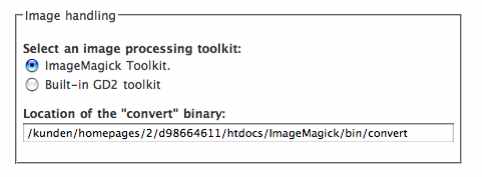
Attached is a screenshot of the setting at /admin/settings. It shows how the option to choose ImageMagick appears once it's installed, how you have to choose it explicitly, and how the location of the convert binary is displayed for reference.
Comment #8
Axel_V commentedI'm with 1and1 and I don't have root access. Installation of ImageMagick luckily worked out without them having to recompile. Only difference: my convert file is located in /utilities (ImageMagick 6.2.9). There is no /bin folder at all in my ImageMagick installation.