

Closed (duplicate)
Project:
Views (for Drupal 7)
Version:
6.x-3.x-dev
Component:
exposed filters
Priority:
Normal
Category:
Support request
Assigned:
Unassigned
Reporter:
Created:
15 Mar 2010 at 07:36 UTC
Updated:
1 Aug 2010 at 08:56 UTC
Jump to comment: Most recent file


Comments
Comment #1
merlinofchaos commentedWhen you're in an autocomplete, when you press enter, the normal behavior is to add the autocomplete info to the box. I can't really affect that behavior. That's standard Drupal.
Comment #2
YK85 commentedsorry for re-opening but it seems from your explanation about that my issue is not the normal behavior.
Pressing enter is not adding the autocomplete info to the box, but rather just reloading the view from start.
scenario 1: user types in Apple, sees the autocomplete, clicks it, Apple is in the autocomplete box, presses enter => views page reloads to all defaults.
scenario 2: user types in Apple, sees the autocomplete, presses enter => views page reloads to all defaults.
Comment #3
dawehnerI suggest you to try it out on a clean drupal installation with just views installed, with garland. This is the default behavior.
If you want different behavior you need custom code.
Comment #4
Bilmar commentedI thought I noticed this as well and just did some testing (vanilla install with garland).
I found the issue happens when the Reset button is enabled.
When a user presses Enter key after typing into a filter, the Enter key will press the Reset button instead of the Apply =O
If I change the views-exposed-form.tpl.php to have reset button printed after the search button, it works fine..but the design will be affected
I wonder if there is a possible fix for this?
Regards
Comment #5
YK85 commentedThank you for the troubleshooting!
The normal action of a user is to either press ENTER or to click Apply.
With the reset button included in the view, when the user clicks ENTER it is resetting the view, which is an issue for the user's experience.
Is there a possible fix for this?
Comment #6
greenreaperI have something like this on an exposed filter even without a reset button. Here's the sequence of events:
* User types in part of a term
* Term autocomplete dropdown appears
* User presses down key to select an autocomplete entry
* User presses enter
* Form submit fires, sending only what they typed in
* Text in term box is updated
* Form returns with an error
This behaviour is unexpected. The box should be updated before the submit fires.
Note that this does work as expected on Google Chrome, but not Firefox 3..5, IE8 or Opera.
Comment #7
ndame commentedI noticed something similar. When using autocomplete to select a term as a filter while editing a view, if Enter is pressed, the whole view seems to "lock up."
Haven't done extensive testing, but it was similar so maybe worth mentioning.
Comment #8
YK85 commented@ndame - Could you please further test your issue and share the details of your findings?
@GreenReaper - I have also found that the result differs from one browser to another. I wonder if it is possible for Views to be able to be compatible with the major browsers?
I have disabled the reset button for now as all testers of my site have reported problems with the search exposed filters (they press ENTER after typing in a term to search for which is resetting the filters instead of applying the search). I hope there will be a fix possible for this.
Thanks!
Comment #9
funkytraffic commentedTaxonomy Autocomplete Exposed Filter do not work in exposed blocks.
The search works but not the autocomplete.
Latest Views 2.* Release
Comment #10
dawehner@funkytraffic
You should provide more informations. Here it works fine both in normal exposed form and in the block.
Comment #11
rjbrown99 commentedI'm experiencing this as well with 6.x-3.x-dev, as of the 2010-Jul-10 release. I'm using an exposed filter as part of the Apachesolr Views module. It's not an autocomplete, and Ajax is disabled on this view. My filter is just a free text search box. I am using an exposed form, basic, with a reset button. I'm testing with Firefox 3.6.7 at the moment.
When I type in the box and hit enter, it reloads the page with no change. If I type in the box and hit apply, it applies properly. In the same view, with the reset button disabled, it does properly "apply" the argument.
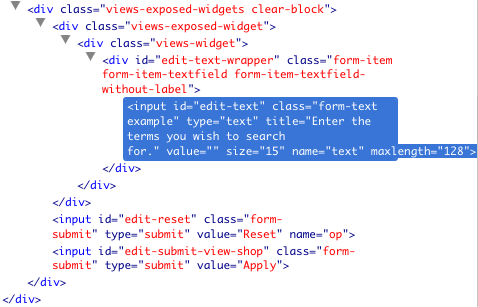
I believe this may be because the reset button is appearing in the markup before the apply button. I attached two screenshots of the Firebug output, one without the reset and one with.
I can't yet confirm it, but I am guessing that since there are two submit actions, when the reset button is present and it's the first submit, that's what gets called when the user hits enter. I theorize that switching the order of the submits would fix this. I'll dive into code-land shortly to see if I can figure out where this is being generated.
Comment #12
rjbrown99 commentedYep, that was it.
In views/theme/views-exposed-form.tpl.php, modify as follows.
Original:
Modified:
I'm using a theme override for this form so I can't as easily test this. Can someone else here please make the change and let me know if it works? If so I'm happy to roll a patch.
Comment #13
YK85 commentedHi, this did fix the issue. Marking this as a duplicate of #785960: Reset button should be added to exposed filters form AFTER Apply button where dereine already created a patch.
Thanks!