

Closed (fixed)
Project:
Rules
Version:
6.x-1.x-dev
Component:
Rules Engine
Priority:
Normal
Category:
Bug report
Assigned:
Unassigned
Reporter:
Created:
16 Mar 2010 at 21:00 UTC
Updated:
9 Dec 2010 at 11:20 UTC
Jump to comment: Most recent


Comments
Comment #1
fagoI think you shouldn't activate a feature on the site you built it - I think features generally won't play well with that?
If you enable it on a clean site it should work right.
Rules has to rename the rules to prevent name collisions. That way the rule in the feature is a different one as the original one, so you get two. If you want to use the feature on the same site though, just delete the original rules.
Comment #2
franzNo, that's not how features works with everything else. Features has a revert 'function', which is able to, on most cases, remove the database version of the element. It works with views, with context, with node types... It shouldn't be any different on rules.
Also, you haven't touch the subject of the double category (the category and the feature). I think it should be the category only.
I haven't really check the code yet, but I've been working on this integration within other modules already, so I think I can help.
Comment #3
fagoThe double category issue has already been fixed.
So does features invoke the revert function when enabling the feature? Well with views and such, which have machine readable name, the problem probably won't occur as the name of the configuration in the db and in code is the same - but it isn't for rules, so both show up.
Reverting all rules with the given category name on 'revert' should be save though.
Comment #4
wizonesolutionsSubscribing. If there are any tasks I could take on for this...let me know, and if I have some time I'll take a stab.
Comment #5
fagoYou could have a look at implementing the "Reverting all rules with the given category name / feature name after enabling a feature" idea.
Comment #6
fagoComment #7
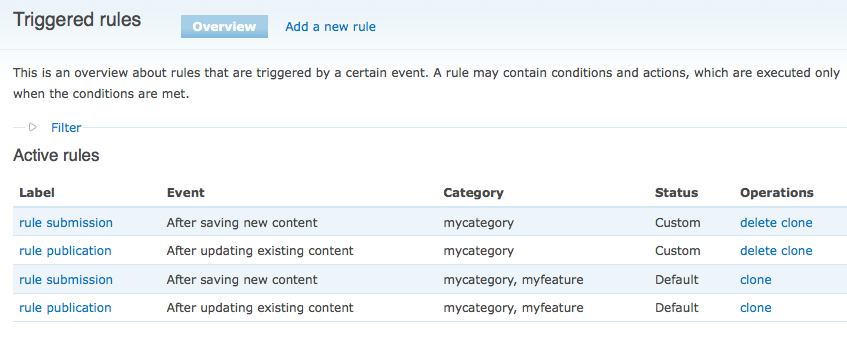
Anonymous (not verified) commentedI'm not seeing how this is fixed. I'm trying out the 1.x-dev branch and whenever I create a feature that includes a rules category, the triggered rules are duplicated.
Comment #8
Anonymous (not verified) commentedDigging into the code, the duplicates are created because the original rule is not replaced by the rule classified by the feature name. I was able to work around this, by giving the original rule the same category as the feature. When reverting, rules_delete_item will correctly delete the original rule and replace it with the exported feature.
Comment #9
fago>I was able to work around this, by giving the original rule the same category as the feature.
I see. Then automatically assigning the feature tag to the original-rules upon feature generation should do it. @FilmKnurd: Does features automatically invoke the 'revert' when the feature is initially enabled or have you done that manually?
Comment #10
Anonymous (not verified) commentedNo, it shouldn't. When enabled, a feature is compared with the database and reports back the resulting status. You then have the option of reverting the feature at that point. I believe reverting is always manual.
Comment #11
Anonymous (not verified) commentedI just tested it, and you have to manually revert after *creating* the feature for the rule to be replaced.
Comment #12
wizonesolutionsIn my case, I can't even revert.
Here's what should happen in order to be consistent with other similar modules (Views and Panels, to name a couple).
1. When I create the Feature, the Rules are saved in code. This works.
2. The in-code Rules are immediately available, whether I enable the Feature or not. That's just how it goes.
3. If I revert, then I expect the DB versions of the in-code features to be deleted. Otherwise, I've suddenly got dupe sets of rules, which in my case was making things happen twice.
4. Instead of "clone," I expect to see "override" on in-code Rules. The database Rule that I then create will be used instead of the in-code Rule. The Status will be "Overridden" and a "revert" option will be able, which will do the same for this rule as Step #3 in my steps here.
Let me know the extent of changes needed to get it working this way. I'm not sure if I really have the time to do it, so it might be more of a wish list. For now, I can manage working around it and am glad just to be able to move my Rules around...
Thanks!
Comment #13
fago? The existing workflow should be fine, we just need to find a way to let the feature disable the original not-renamed rules upon activation.
Comment #14
wizonesolutionsThanks for the quick reply.
Ah, I forgot about disabling them. Well, if you are able to tell which Default rule came from which DB rule then you could do it in Features's Revert phase. Except that if I then edited the DB rule, how would this translate? Would it know that the Default rule that got created should be Active (or are all Default rules always active?) but the DB rule should remain disabled?
The problem I am getting is that even though I Revert the "Rules categories" category, it still says that they are Overridden - even if I delete the DB rules.
What do you think?
Comment #15
fagohm, but we cannot revert by default upon feature activation.
I just realized features has a hook_features_export_rebuild() now. We could use that and delete any rules having the feature-tag + not the right prefix - that should do it.
Comment #16
franzBump.
Would be nice to have this polished and released...
Comment #17
fagoThat should be fixed with the commit of http://drupal.org/node/874802 - please test the next dev snapshot.