

 Come together with the global Drupal community in Rotterdam, 28 Sept – 1 Oct 2026. Sessions, contribution, connection, and Early Bird savings until 8 June.
I've noticed that filters doesn't works as expected:
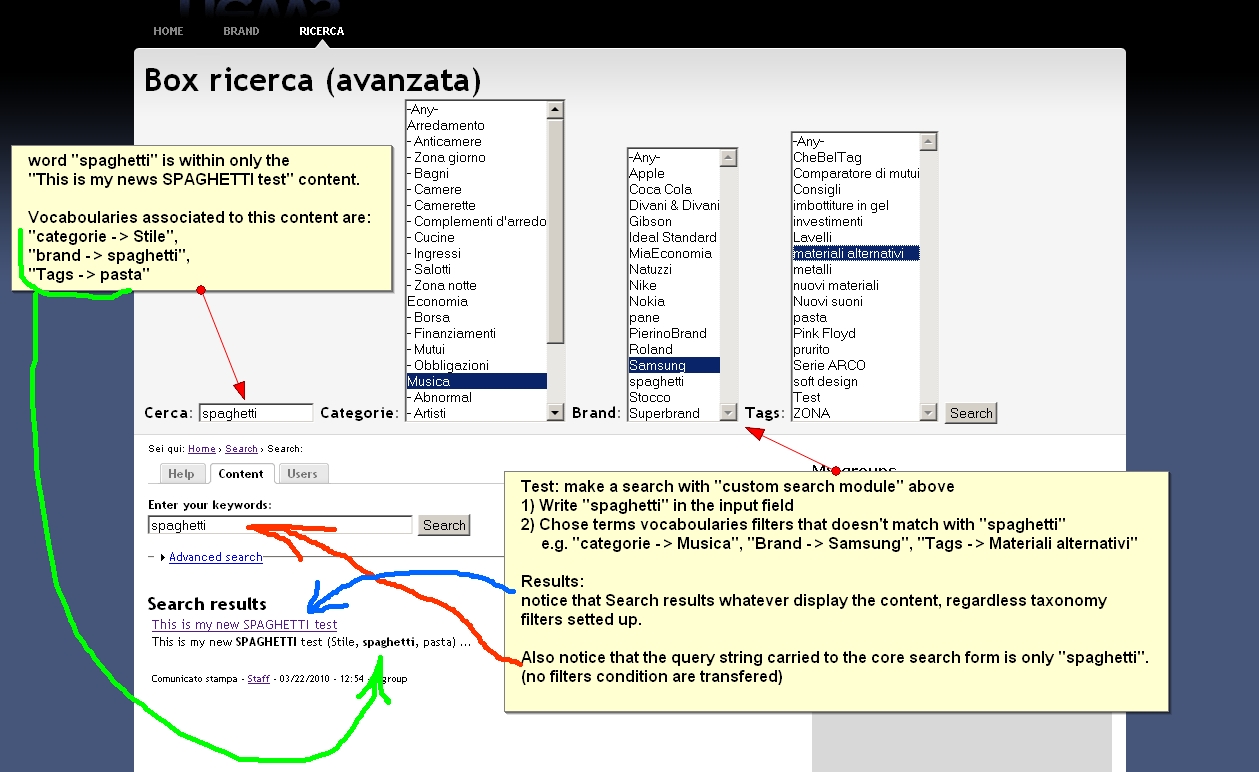
I have 3 vocaboularies and I made this test:
- I searched for a word I'm sure exists in my contents
- I choose taxonomy terms from taxonomy filters. These terms I'm sure are not connected to the word I put in the input field
Results display anyway content containing the word I searched, regardless taxonomy filters I've setted up
I did the same test with CORE advanced search form and no results were shown, as expected.
It seems like the search query utilize OR instead of AND to concatenate filters.
Thank you!
MXT







Comments
Comment #1
jdanthinne commentedHi,
Can you tell me how the custom search taxonomy settings are configured (screenshot), and a concrete example of content and what you're typing in the search box and what is the url generated for the resulting search results page.
Thanks.
Comment #2
jdanthinne commentedOk, I've found what's the problem. The taxonomy filter doesn't work when there's more than one taxonomy filter enabled... I'm working on it!
Comment #3
jdanthinne commentedCan you try this patch? It corrects a bug with multiple taxonomy vocabularies.
But I don't know if it corrects the OR/AND problem, because I'm using the default Drupal search behaviour, so try the default Drupal advanced search and then the custom search and compare the results.
Comment #4
mxtIn can't apply the patch because it's already available in the latest DEV version (I hope I'm not wrong...)
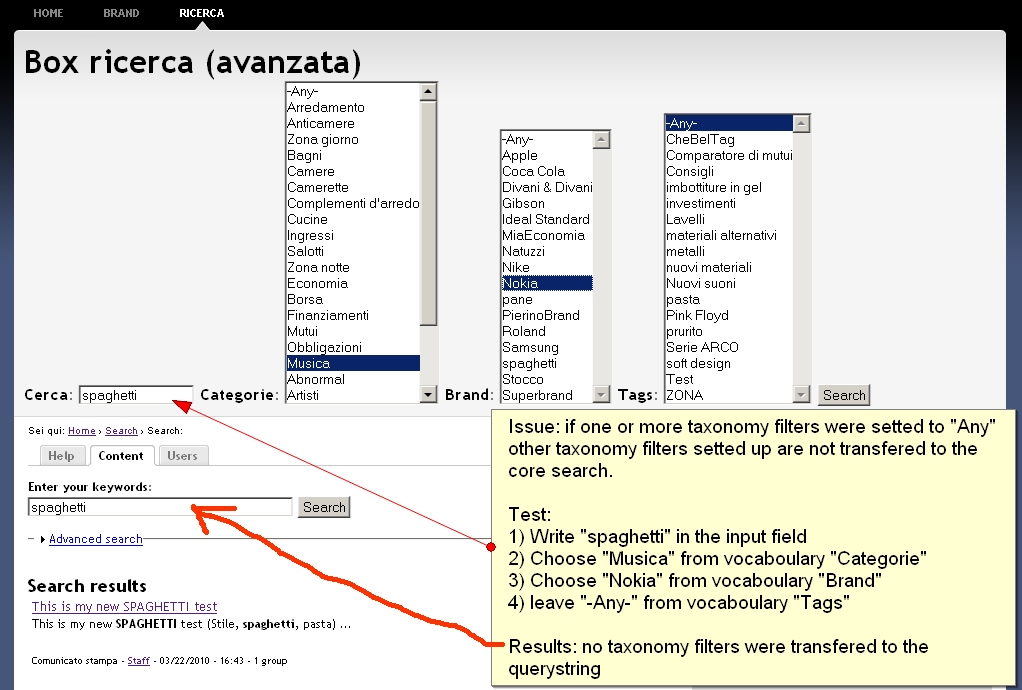
Anyway I've attached 2 images to explain the issue better.
Thank you very much for your work
MXT
Comment #5
jdanthinne commentedOk, please try the latest dev version. And tell me if it works better for you, and tell me what is the url generated when you hit "Search" with test1.jpg
Comment #6
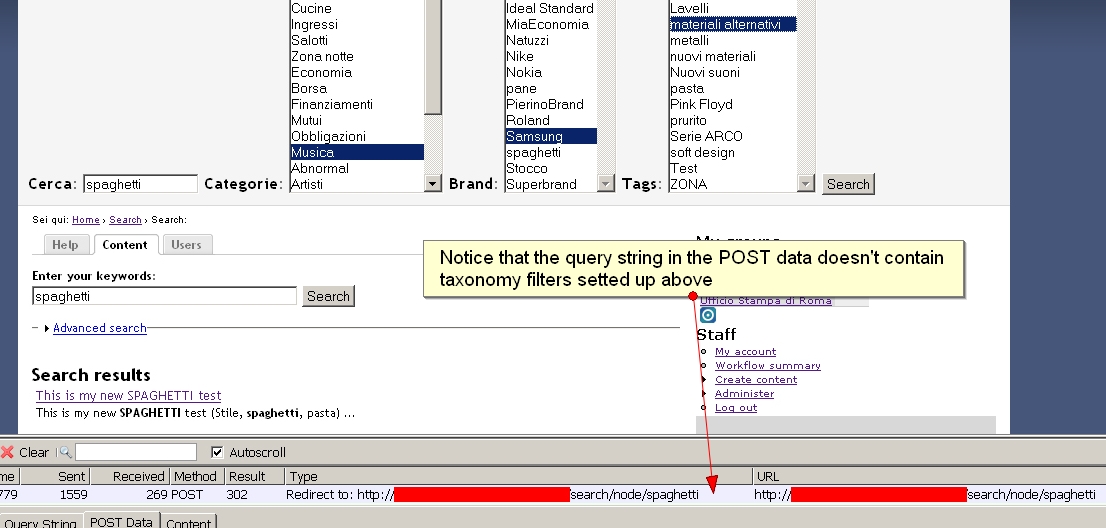
mxtI tried latest DEV version: already taxonomy filters aren't transfered in the query string (see image in attachment).
MXT
Comment #7
jdanthinne commentedMmm... this is really strange...
I've just reinstalled the very last dev version (from today 22 March) on a fresh drupal install, added content in the same way as you, tested it, and taxonomy is passed in the url (see screenshots).
Comment #8
mxtI tried with a clean installation too and the issue doesn't happen.
So, at this point, I think there is some conflict with other modules/settings I have in my site.
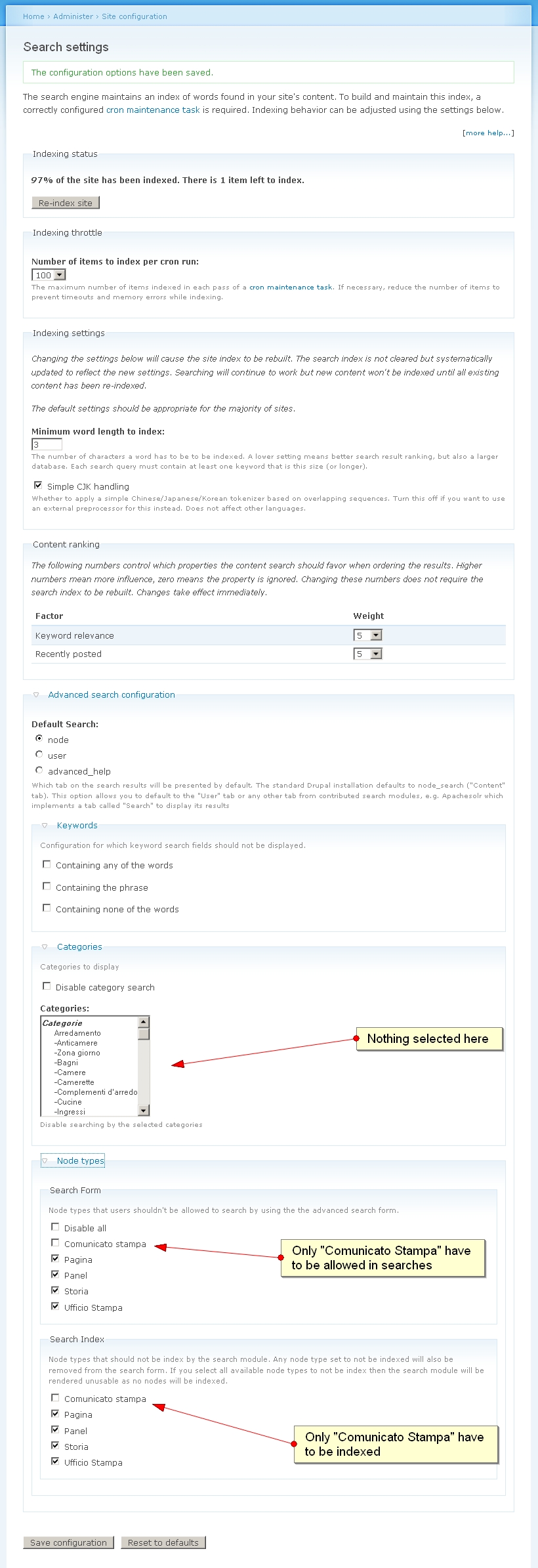
The first suspicious module is "Search config" that i use to reduce content indexing only to content type I need, and to hide all content type in the search options only to one content type.
I'll take some check and will report here
Thank you for the moment
Comment #9
mxtDeactivating the "search config" module the issue doesn't happen: so there is a conflict with this module.
Notice that I must use "search config" for this reason:
1) It allow to reduce content indexing only to content type I need (e.g. only content type "article" is indexed, while "content type "department" is not indexed - > excluded from search results)
2) It allow to hide particular content types filter options in the advanced search form
How can we proceed?
Comment #10
jdanthinne commentedMmm... I think this other module is the problem.
I need to check how it works and how I can remove this conflict (I think it has to do with the order Drupal runs the two modules, so I suppose I have to change my module's "weight").
I get back to you as soon as possible.
Comment #11
jdanthinne commentedI've just enabled "search config", and everything still works fine.
How have you configured this module? Which options have you enabled/disabled?
Comment #12
mxtPlease see image in attachment to view my settings.
Anyway I tried to "reset to default" but the issue is always present, regardless settings I make.
I don't know what to think...
Comment #13
mxtI noticed that if I write the entire querystring in the input field, the querystring itself is transfered correctly to the core form.
(see image in attachment)
Comment #14
mxtPerhaps I have found the problem.
Drupal CORE search offer 2 types of search form:
1) Block search form (placed in blocks)
2) Theme search form (place directly in your site template, e.g page.tpl.php)
Well, only Block search forms works correctly in a "custom-search - serach-config" modules context.
It seams that using Theme search forms additional taxonomy filters setted up with custom search module are not transfered to the querystring.
Is this issue solvable?
(please see image in attachment)
Comment #15
jdanthinne commentedThanks for your investigation!!
Now that I know that it works in blocks, I can concentrate on why it doesn't work with theme search form.
I get back to you as soon as I have some time to understand why…
Comment #16
jdanthinne commentedOk, I fixed the problem and commited the patch to -dev.
In fact, in the "theme version", search_config is doing some stuff and no other module can interfer with search.
I've increased my module weight, so it runs after search_config, and works as needed.
Comment #17
jdanthinne commentedAnd don't forget to run update.php, the fix is done there.
Comment #18
mxtOk things works better now, but still there is an issue: if a taxonomy filter is setted to "any", other taxonomy filters setted up weren't transfered to the querystring (no matter if the form is "theme" or "block").
See image in attachment
Thank you for your work!
Comment #19
jdanthinne commentedComment #20
jdanthinne commentedStrange once more, because it's working fine here on my clean install, with search config enabled et configured like you. Have you any other module enabled dealing with search?
Not easy to find the problem without having access to your site.
Comment #21
mxtUsing "one choice" drop down like you things works right, have you tried using "drop down with multiple choices" for taxonomy like me?
Comment #22
jdanthinne commentedYou're right, multiple choices is guilty.
Working on it…
Comment #23
mxtAlso I've noticed that terms indentation is not kept using multiple choices drop down lists.
Comment #24
jdanthinne commentedJust fixed those two problems (indentation and multiple choices) in DEV.
Nasty ones!
Comment #25
mxtYEAH! Seem all work fine now!
THANK YOU VERY MUCH FOR YOUR WORK!!!
MXT