

Closed (duplicate)
Project:
Theme developer
Version:
6.x-1.x-dev
Component:
Code
Priority:
Normal
Category:
Bug report
Assigned:
Unassigned
Reporter:
Created:
21 Mar 2010 at 18:10 UTC
Updated:
5 Nov 2010 at 12:35 UTC
Jump to comment: Most recent file

Comments
Comment #1
alex dicianu commentedComment #2
strixv commentedMy problem has a similar symptom, except that the problem is reversed: It occurs on the production linux hosting server. My localhost windows xampp environment works fine.
I get the following warning message on the linux hosting server. The first part of the warning refers to a path in my localhost environment. The second part refers to a path in the hosting server:
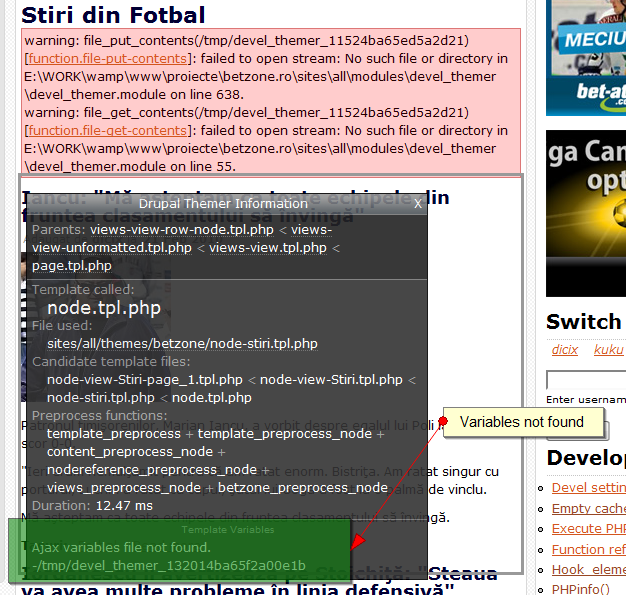
warning: file_put_contents( ... \xampp\tmp/devel_themer_9297420694ba92eef1190a) [function.file-put-contents]: failed to open stream: No such file or directory in ... /public_html/ ... /sites/all/modules/devel_themer/devel_themer.module on line 638.
Update (3/24):
I got rid of the warnings. I used the Devel Mod's Variable Editor, which showed me that variable file_directory_temp was set to the \xampp\tmp path in my localhost environment (I presume it was set to the xampp value because of my uploading files from my local host to the hosting server?). I set file_directory_temp to /tmp for the linux server using the Variable Editor.
I have not had to redo this editing in subsequent visits to the web site. Is this path saved to the database only once when drupal is installed? I'm new to Drupal and haven't had a chance to poke around enough to understand what's going on. I got as far as finding that file_directory_temp is set in /includes/files.inc, devel_themer.module, and 4 other files.
If there is someone out there who can tell me without much effort what's going on, I would greatly appreciate it.
Comment #3
Tom Ash commentedI get a similar error, although it didn't appear instantly after enabling Theme Developer - I had loaded at a couple of pages with Theme Developer enabled before getting it:
warning: file_get_contents(/tmp/devel_themer_18451864374bcc04a2f2ad2) [function.file-get-contents]: failed to open stream: No such file or directory in /mnt/www/html/historytoday/docroot/sites/all/modules/devel_themer/devel_themer.module on line 55Theme Developer still appears to work normally, as far as I could tell from my limited use.
Comment #4
mlconnor commentedTheme Developer outputs massive files to your tmp directory. I use BlueHost and they don't allocate a lot of space for the tmp directory. After running theme developer all day my tmp directory ran out of disk space, file pointers, whatever. BlueHost suspended my account and it was a pain to get them to turn it back on.
Comment #5
jdvc commentedI had the same error and fixed it by going to site configuration > file system and then clicking reset to defaults. This resets the tmp directory to the one currently being used on my local server.
Comment #6
drgoettel commentedI also fixed the problem that way, but I think that the problem, at least for me, is that the tmp directory starts filling with lots of files, one per click when you are logged as administrator.
Is it possible to stop saving these files??
Comment #7
barbidouille commentedhi all, I had exactly the same kind of error on my localhost. I fixed the error by creating a tmp folder and pointing the 'temporary directory' (site configuration > file system) path to it.
Comment #8
JeremyFrench commentedThere are two issues here:
Theme developer requires a writable temp directory to work. This should be handled by Drupal rather than this module. You can check the temp directory at /admin/settings/file-system, allthough drupal dosn't check that it exsists and is writable.
The second issue is that theme developer creates lots of files and can cause issues on some hosting providers. This is a duplicate of #647536: Theme developer creates too many files, which I am looking at.
Comment #9
JeremyFrench commentedThere are two issues here:
Theme developer requires a writable temp directory to work. This should be handled by Drupal rather than this module. You can check the temp directory at /admin/settings/file-system, allthough drupal dosn't check that it exsists and is writable.
The second issue is that theme developer creates lots of files and can cause issues on some hosting providers. This is a duplicate of #647536: Theme developer creates too many files, which I am looking at.