Closed (fixed)
Project:
Drupal core
Version:
x.y.z
Component:
update system
Priority:
Critical
Category:
Bug report
Assigned:
Reporter:
Created:
22 Jul 2006 at 10:52 UTC
Updated:
25 Sep 2006 at 08:16 UTC
Jump to comment: Most recent file


I set the component as update system: should there be a component install system, or are both considered equivalent?
Anyhow, I tried installing Drupal with the new install system, but I cannot configure the Database. Whatever I input (valid or invalid settings), when I press submit, I am back to a blank form.
Preliminary testings show that the function install_settings_validate is not being called at all when it should. Is that a problem with the FAPI during the install process??
| Comment | File | Size | Author |
|---|---|---|---|
| #24 | install_fails4.patch.txt | 1.14 KB | nickl |
| #22 | install_fails3.patch.txt | 1.19 KB | beginner |
| #20 | install_fails2.patch.txt | 738 bytes | beginner |
| #18 | install_fails.patch | 666 bytes | erdemkose |
| #17 | status.png | 12.57 KB | erdemkose |



Comments
Comment #1
beginner commentedfor some reason, the form validation process fails precisely in form.inc here (line 124):
Comment #2
beginner commentedok. This is caused by a redirection because the $profile is not set:
Comment #3
inforeto commentedWith a fresh download of drupal-cvs on july 31 i got this same result.
On the html output --->
form action="install.php?profile=" method="post" id="install_settings"
Comment #4
inforeto commentedAlso, saving the html output to add the selected profile and then call install.php directly took me to the next page.
A page where you can select profiles, with default and civicspace (which is there only as a test).
From there it goes to welcome page.
This makes me think there's no need to seek the profile from the first page if it will make you choose it from a list at the second page.
Comment #5
paranojik commentedWorks fine for me. Latest CVS takes me directly to the install.php?profile=default page. After filling out the form, Drupal installs smoothly.
Comment #6
beginner commentedthe latest cvs still fails for me, at exactly the point I mentioned above.
I investigated but could not reproduce with a mock-up test code.
This issue is very strange and may be related to some arcane server config, but which one, I have no clue!
Comment #7
beginner commentedJust in case it is of interest to others who have this problem.
In order to be able to carry testing Drupal HEAD, I must circumvent this problem by modifying install.php:
Comment #8
erdemkose commentedI also had the same problem on IIS and I solved it by passing $profile parameter to the related functions instead of using
global.Comment #9
nickl commentedTested but could not reproduce.
Removing profile completely gets the attached screen correctly reporting that there is no profile.
Multiple profiles returns a page to choose profiles.
No problems with DB install form testing it since mid July.
The code being referred to also changed:
Instead of the reported
Not related to $profile but still different.
Could it be that this problem is fixed?
If not please give more information.
Do you have a schema installed already?
What database are you using?
Does this happen everytime or only in certain scenarios?
Please give a detailed scenario.
Comment #10
beginner commentedI just tried again, with today's cvs, and Revision 1.15 of install.php and I have the same problem.
Obviously, not every developer is facing this problem. It is a fairly critical issue that would have been fixed a long time ago otherwise. It must depend on some local parameter, but I have no idea which. the following code in install_change_settings() is simply ignored or doesn't work:
global $profileI am at a loss as to why the global declaration is not acknowledged.Another reporter above said he was on IIS. I am on Mandriva 2006 with a traditional LAMP stack.
Is there anybody using Mandriva NOT having this problem?
Comment #11
nickl commented@beginner please give more information about the bug.
Give us a detailed explanation from installation, step by step, explaining each step; what you're doing , which form elements you are filling in, what you are filling into them(rather exactly for more information you can skip password) and what you can see until you get to the problem. Then you can save the html or as you explained before that it is definitely a blank page with no rendered html when you view the source.
It would also help if you give us a rundown of your system. Which database and version you're using, which version of php and apache comes with your lamp stack. The more information you give the easier you will make it for someone to try and replicate the problem and possibly fix it.
It is really not clear from this issue what you are experiencing this is what I'm getting:
I removed the global $profile from install_change_settings() in install.php as you say it is being ignored so maybe I will be able to reproduce the error if I remove it.
This is what the function looks like now:
Comment #12
nickl commentedWhen I acces my new drupal installation on http://localhost/bugfix/ it immediately redirects to http://localhost/bugfix/install.php?profile=default
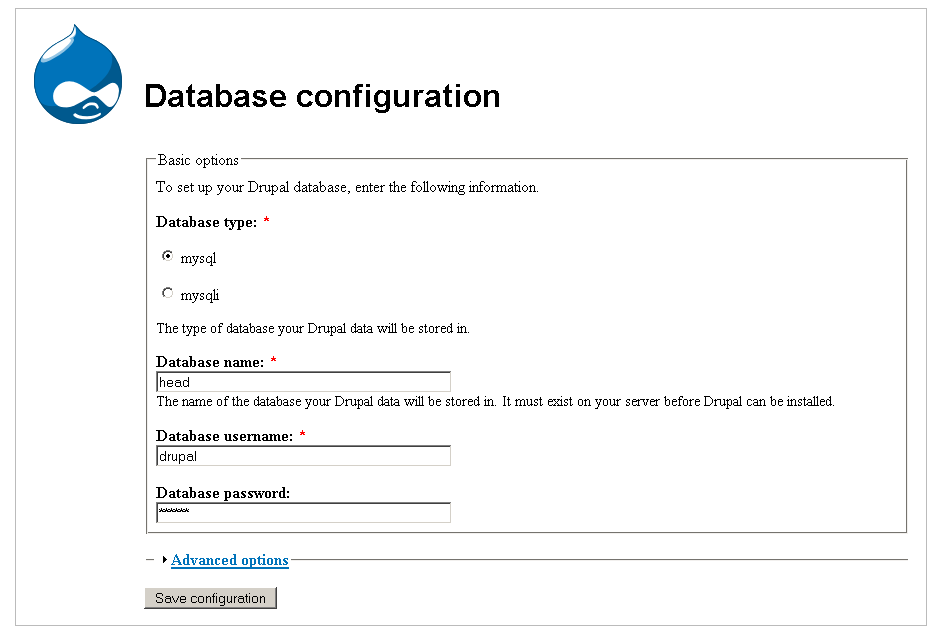
I fill in the form as per the screenshot attached:
Not changing advanced setting and only filling in my database name, username and password.
Comment #13
nickl commentedWhen I now press submit I get back to the same screen as per the screenshot above on a blank form.
Attached is the html source of the response.
Looking at the form action:
which, if I put the profile variable back, should be
And the proceeds to install the site correctly.
My Configuration:
Apache/2.2.2 (Win32)
PHP/5.1.4
MySQL - 5.0.21-community-nt
Comment #14
beginner commentedyes. by removing
global $profileyou can perfectly reproduce my problem.This is already described in #2.
I know the problem still exists because I install a new drupal several times a week to review patches. I always have to use the trick explained in #7 to be able to go forward.
My setup:
Linux Mandriva 2006,
Web server Apache/2.0.54 (Mandriva Linux/PREFORK-13.2.20060mdk)
PHP 4.4.0
MySQL database 4.0.26
The solution might be the one suggested in #8: pass $profile by reference, instead of using global.
Comment #15
nickl commentedThank you for the information, now we're getting somewhere.
If you think the solution is in #8 then why don't you roll the patch so that others can test it and we can move this along. Since it is not a very common problem you stand in a better position than me and many others to fix this issue and since you're reviewing patches I'm sure you can roll one too.
These patches don't roll themselves...
I will see if I can get a similar environment up and running.
In the meantime this excerpt from install.php seems to be where the $profile gets initialised.
Comment #16
nickl commentedTested on:
mandriva LE 2005 kernel 2.6
mysql 4.1.11
Apache-AdvancedExtranetServer/2.0.53
PHP 4.3.10 (cli) (built: May 11 2006 12:07:42)
Copyright (c) 1997-2004 The PHP Group
Zend Engine v1.3.0, Copyright (c) 1998-2004 Zend Technologies
Drupal doesn't seem to like the setup much, attached screenshot of: admin/logs/status
Yet she installs first time no problems.
More information he needs.
Moving along...
Comment #17
erdemkose commentedHere is my configuration:
I cannot install Drupal on this configuration. "Database settings" form doesn't have the profile information in its action (http://localhost/drupal-cvs/install.php?profile=).
I also tried to install at the root directory but it also cannot continue.
Comment #18
erdemkose commentedHere is the patch that I use to install Drupal CVS.
Comment #19
erdemkose commentedComment #20
beginner commentedTrying to apply the patch #18, I had the error:
patch: **** malformed patch at line 11
I am not senior enough to know whether this is the right fix or not. I tested and it works for me though.
I attach a new, clean patch which includes only one change: I remove the redundant $profile and $install_locale from the global line.
Comment #21
drummLooks like we could pass $profile to that function as a normal argument. No need to remove the global with this patch, but we should move in that direction instead of adding duplicate code to manage global variables.
Comment #22
beginner commentedI don't know about $install_locale, but I have included it because erdemkose has reported he needed them set this way, too (erdemkose: can you confirm?).
I must remove the two variables from the line with the global definition, otherwise the install fails for me.
I'm not sure what the default for $install_locale should be. 'en'?
This patch works for me.
Comment #23
beginner commentedComment #24
nickl commentedTested and still works on systems not experiencing this issue.
Making the default $install_locale = '' will be sufficient because it is converted to boolean and omitted if blank.
Fixed comments no need for full doxygen IMO and if it is needed then type indicators should be removed in @param.
@erdemkose please test the patch and RTBC if it works for you.
Comment #25
erdemkose commentedIt works for me.
Comment #26
drummCommitted to HEAD.
Feel free to reopen this and remove the rest of these globals. I only see them used in one other place.
Comment #27
(not verified) commented