

Closed (duplicate)
Project:
Administration menu
Version:
7.x-3.x-dev
Component:
User interface
Priority:
Normal
Category:
Bug report
Assigned:
Unassigned
Reporter:
Created:
23 Mar 2010 at 20:30 UTC
Updated:
6 Feb 2018 at 18:24 UTC
Jump to comment: Most recent

Comments
Comment #1
comparellc commentedI also have the issue. PHP is 5.3.2, so maybe it has something to do with it..
Comment #2
irishgringo commentedI had a problem like that a while ago. I think it was because I installed a newer version of ADMIN MENU over an older one, and had not uninstalled everything. So, I had to re-install the older version, enable it, then disable it, then uninstall it. Then had to do the same thing with the newer version... Something like that. But it fixed the problem. Dont remember all the specifics. I also think it had something to do with not completely uninstalling the version 2 when I installed version 3.
Comment #3
sun#1 would be #586228: Doesn't work with PHP 5.3.0
#2 is perfectly possible, too, as mentioned on http://drupal.org/project/admin_menu
Comment #4
flock commentedI had same issue.
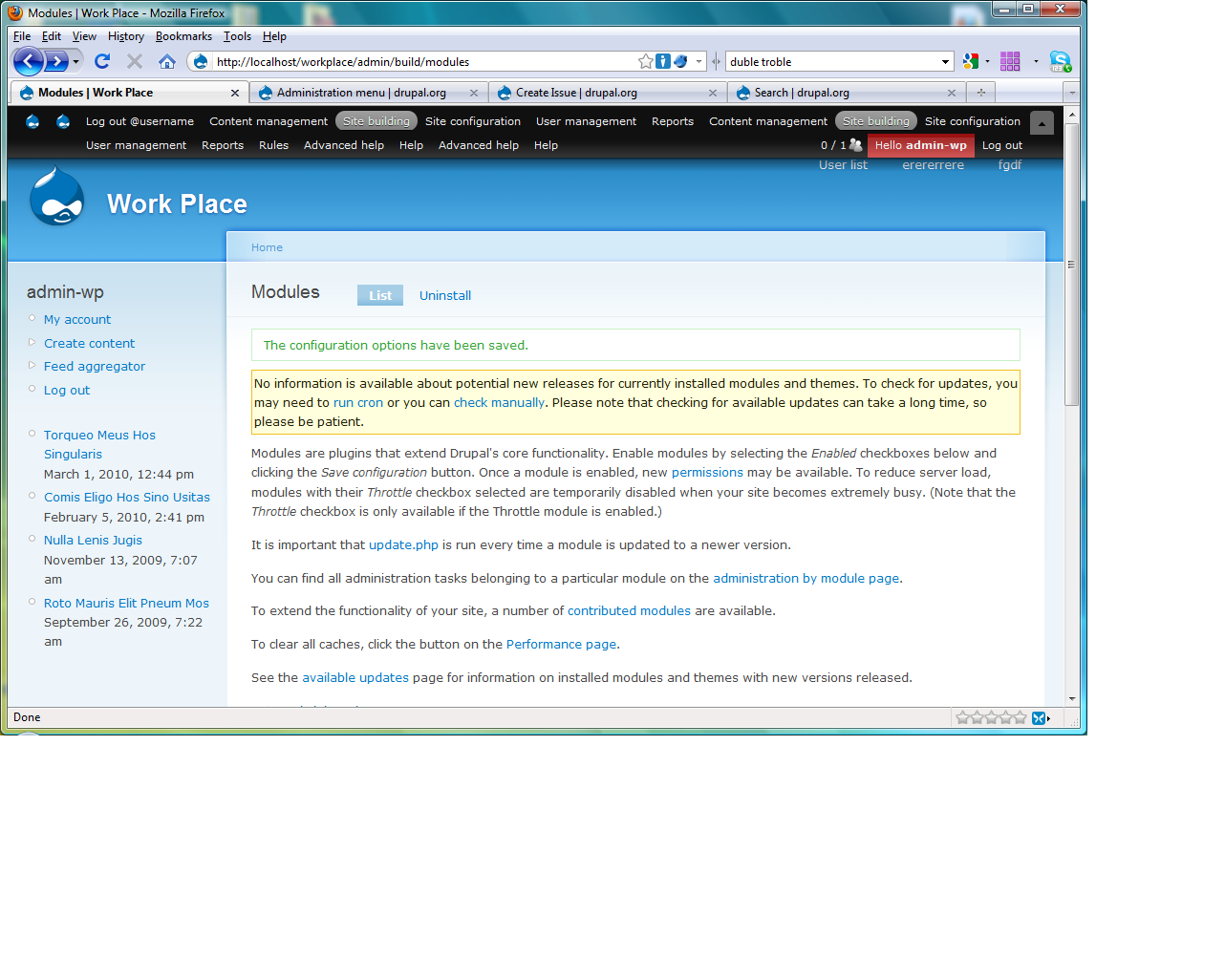
Disabled the "Toolbar" module, under modules, refresh the browser and it worked.
Comment #5
red18 commentedI had the same problem. I resolved it as follows:
1. Go on the following link to flush the cache for the admin menu.
/admin_menu/flush-cache/admin_menu?destination=node%2F1
This will get rid of most of the duplicity.
2. I still had some spurious drupal icons and some strange html garbage links, 3 in total. I had to delete these manually from the 'menu_links' table in the database. If you just hover over the link on the webpage you can identify the id of the link then just delete the corresponding record from the 'menu_links' table in the database.
Comment #6
nattyweb commentedExcellent - this solution worked for me. Thank you!
Comment #7
jaesperanza commented#4 worked for me. I'm on drupal 7.8 -
. Note: encountered on a restored backup from localhost.
Comment #8
userofdrupal commentedComment #4 here worked for me. Thanks.
Comment #9
ligongx commented#4 works for me. This duplicated admin menu error happens on my Drupal 7.14. After disabling the core toolbar module, admin menu flies again.
Comment #10
collinsfm316 commented#4 -> thanks!
Comment #11
seeamkhan commentedThanks! It works perfectly. :D
Comment #12
usaginyunyu commented#4 Worked for me :)
Comment #13
pm5 commented#4 works for me. Is this going to be fixed somehow?
Comment #14
hamburger commented#4 Thanks. This bug is still alive and kicking 4 years after its first reported sighting.
Comment #15
MtRoxx commented#4 worked for me, and as far as I'm concerned it's not a bug when I have two modules active and they are both working. I only need to use one menu module. :)
Comment #16
bitrabitra commented#4 Thanks, it worked for me too.
Comment #17
Michael G commentedThank you #4. Worked for me too..
Comment #18
jorge_vicente commentedThe comment #4 works perfectly.
You can use the defect toolbar (of the drupal core) or the administration menu toolbar (better tolbar). So you have to disable one of them.
Regards!
Comment #19
surendra77c commentedDisable 2 core drupal 7 module to remove the error showing two menu .
1. Overlay
2. Toolbar
Comment #20
tonylegrone commentedI'm having this problem and I don't have overlay or toolbar enabled. I can't seem to find the solution.
Comment #21
tonylegrone commentedTurns out it was because of the adminimal_admin_menu module in my case. See https://www.drupal.org/node/2538914.
I had assumed that their module was only theming, but they actually alter the menu output.
Comment #22
adeleke.akinade commentedNumber #4 worked for me too, thanks!
Comment #23
melissa.evans commented#4 worked for me --- thank you!
Comment #24
StevenSpinoza commentedMaybe if there is something like "likes", intead of repeating another comment "#4 worked for me" will save some server resources, and, by the way, #4 worked for me, too.