

Closed (fixed)
Project:
Custom Search
Version:
6.x-1.x-dev
Component:
Miscellaneous
Priority:
Minor
Category:
Support request
Assigned:
Reporter:
Created:
25 Mar 2010 at 19:16 UTC
Updated:
19 Jun 2010 at 09:40 UTC
Jump to comment: Most recent file


Comments
Comment #1
seehawk commentedSame problem in Google Chrome. Bumping to critical status, since this issue makes the module unusable in a majority of browsers.
Comment #2
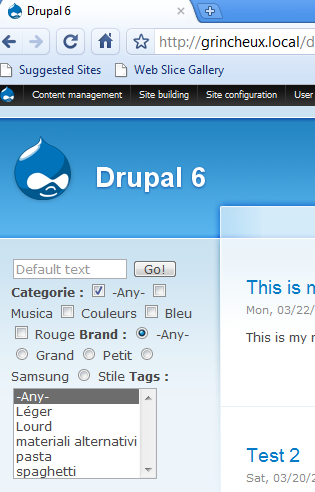
jdanthinne commentedJust tested on a fresh install, on IE8, IE7, Firefox, Safari and Chrome, and everything is OK (see screenshots).
Can you try with the DEV version (and run update.php)?
Have you correctly uninstalled Custom Search Box?
Comment #3
areikiera commentedFigured it out!
It was a permissions problem. Go to the anonymous user's permissions page (or any other role you want to grant the use of custom search), and in the custom_search module section, check "use custom search".
It wasn't apparent that permissions would need to be set for this; could that information be added to the README.txt file? Maybe it would be useful to make the use of the custom search box available to everyone by default, but in the admin area, an option could be added to enable permissions control?
What do you guys think?
(thanks seehawk for mentioning the chrome issue; it led me to the permissions problem. and thanks jdanthinne for your suggestions and maintaining this great module.)
Comment #4
jdanthinne commentedRight, I've added the information in the README file.
As with any other module, permissions are never set on install, but I've added some code that display a message with a link to the permissions page right after having enabled the module.
Comment #5
seehawk commentedCustom Search Box doesn't show up under the Uninstall tab after it's disabled. Is there additional work that needs to be done in order to remove it?
Comment #6
jdanthinne commentedNo, nothing else is necessary.
Have you still problems with IE, even after changing permissions?
Comment #7
seehawk commentedNever mind #5. I hadn't refreshed the page since this morning. I'll try the permissions thing. Thanks!
Comment #8
seehawk commentedComment #9
areikiera commentedThanks for updating the module and it's README file! For some reason, I don't remember setting up permissions for Custom Search Box before I switched to this, so I assumed that this wouldn't need it. My mistake!
Thanks so much for your quick responses to this, and for adding the additional info to the module for newbies like me. Very, very much appreciated!
Comment #10
jdanthinne commentedYou're welcome.
At first, I hadn't included the permissions section, but someone asked me to do it (because the normal search has also permissions).
But now, with the README addition and the message on install, I think people won't forget it :-).
All those fix are in the DEV version, but I'll release a stable one in a few days, because I've changed and added many things this week (this module is only 2-weeks old).
Comment #12
jdogrulz commentedI have the same problem and Permissions do not have anything to do with it. I have used it, saved configuration and looks great in Firefox but nothing in IE8 or Opera. I think there is still an issue. Please let me know.
Thanks,
Jeff
Comment #13
jdanthinne commentedCan you be more precise?
What are your settings? Do you have screenshots (both Explorer & Firefox)?
Are you logged with the same user on each browser?
Have you a test url for me to look at? (use private messaging if you don't want it public)
Comment #14
jdogrulz commentedHi Again,
WOW you are right on top of things. Thank you for your quick response. Well, you know how us newbies are!! :-) I got it working...
Your Module works GREAT!! Thanks for all of your work. I set the permissions in the block but not on the Mod itself... I am sorry about that.
I cant tell you what a big help this was. Trying to preprocess this was a pain..One time it would work and the next... WSOD!!
Keep up the good work.
Thanks again,
Jeff
Comment #15
jdanthinne commentedHappy that you've found your problem :-)