

Closed (fixed)
Project:
Bartik
Version:
7.x-1.x-dev
Component:
User interface
Priority:
Normal
Category:
Feature request
Assigned:
Unassigned
Reporter:
Created:
5 Apr 2010 at 14:58 UTC
Updated:
1 Jun 2010 at 01:00 UTC
Jump to comment: Most recent file

Comments
Comment #1
jensimmons commentedComment #2
jacineOk, well we know you are doing the footer... Is there anything else that needs to be colorable? Headings would probably be a good candidate.
Comment #3
Jeff Burnz commentedFieldsets and Tables - these appear to be crucial, because in the current state if a user goes for a dark color scheme and sets the Text Color as white bad things happen.
I'm working on a patch now for both.
Comment #4
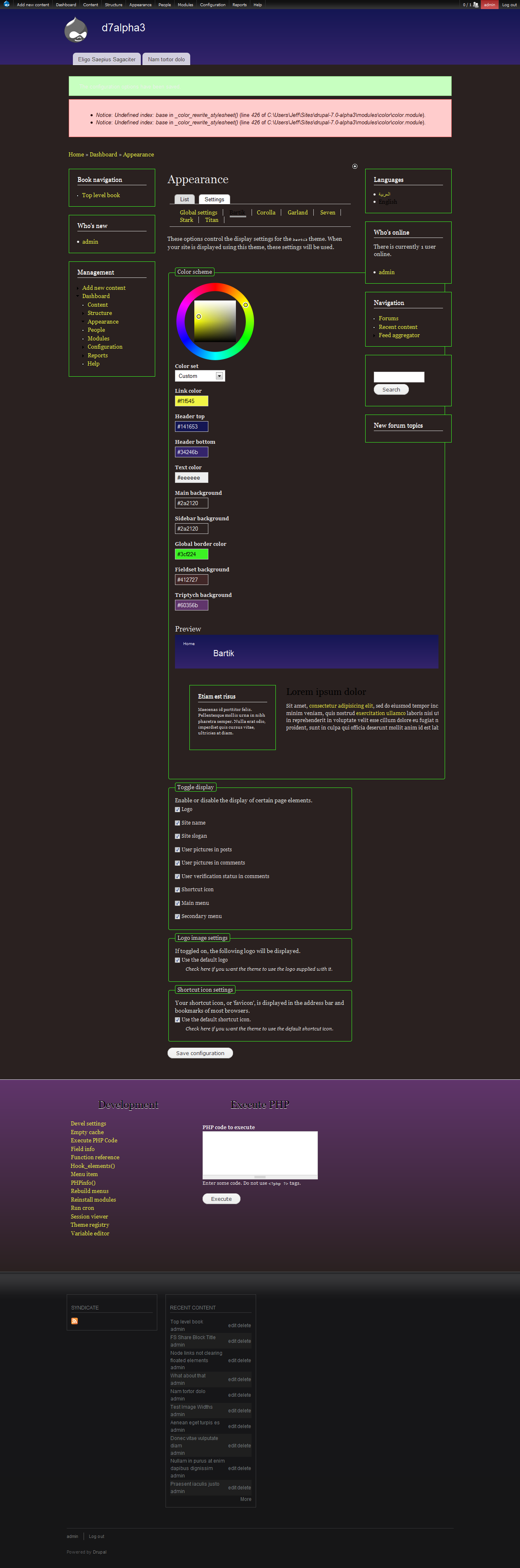
Jeff Burnz commentedI've been messing around with this for a couple of hours and decided to just dump out a patch to show you where I think we could go with this - after quite bit of playing there seems to be many things not re-colorable, which is kind of odd for a colorable theme.
Colors like node body text and field descriptions are not re-colorable at the moment - that is not so good given the user can choose a dark color scheme.
Heres a patch, its pretty wild and is really just an example, but I ask you to review it, apply and start setting up some crazy color schemes to see what I mean - I attach my crazy color scheme aslo...
This could be going way to far of course, and we just live with users being able to set unusable color schemes, after all Garland allows you to do that (white text on a white background is doable in Garland).
Comment #5
jensimmons commentedYeah, I think what you are talking about Jeff is way beyond what we want Bartik to do. I get that perspective.... especially since you make crazy powerful awesome themes for people all the time! But I want to dial back the plan away from crazy drawings like the one you posted in comment #4. Thanks, but uh, let's keep things way more simple.
Here's what I'm thinking. Let's colorize the footer. And NOT the footer text, links, or lines..... yes, it will only work with dark colors. People can leave it dark grey / black. Or change it to say, dark blue or dark red. Yellow won't work. Light green won't work. If people want to go nuts they can a) dig into the CSS, or b) use another theme.
That's a good example of what I'm thinking all over. Keep stuff SIMPLE. The color module interface is a *terrible* place to have 29 things to color. Garland has 5. I'm thinking Bartik will have like 7 or 8. Maybe. It's just about having a few options. It's not about having every single thing in the theme be colored by magical robots. There's no way.
Bartik won't work light text on dark background. Ever. Unless someone makes a contrib theme like that.... :P
Comment #6
Jeff Burnz commentedLol, yeah, I'm with you on KISS, right on.
Comment #7
bleen commentedjust a note when implementing colorization of the footer, be sure to refer to #781572: Whitespace below the footer when there is not enough content on the page first so that short pages dont look wonky
Comment #8
jensimmons commentedI'm working on this. It's kicking my ass a bit. :(
Dang color module preview won't load revised style.css. It caches it? And keeps it no matter what I do? Cleared caches. Turned color module on and off. Switched themes. Still, color module preview is using CSS from hours ago. Any suggestions?
Comment #9
jensimmons commentedComment #10
steven merrill commentedThe attached patch makes border recoloring work for blocks and the footer recoloring work as well.
Comment #11
steven merrill commentedStatus change.
Comment #12
joachim commentedRe: mysterious caching. Color.module saves the palette colour list in a variable:
(BTW: probably a WTF, predates the Drupal cache system -- someone please file a bug on color.module!)
It gets cleared when you submit the colour settings page; alternatively clear it with devel module or with a variable_del() in the PHP block :)
Patch works great. RTBC :)
Comment #13
bleen commentedpatch in #10 works great for me
Comment #14
jacineCommitted patch in #10! Thanks :D