user warning: Multiple primary key defined query: ALTER TABLE views_display ADD PRIMARY KEY (vid, id) in /var/www/public/includes/database.mysql-common.inc on line 374.
The primary key pair still get created though, if u do a desc views_display;
+-----------------+------------------+------+-----+---------+-------+
| Field           | Type             | Null | Key | Default | Extra |
+-----------------+------------------+------+-----+---------+-------+
| vid             | int(10) unsigned | NO   | PRI | 0       |       |
| id              | varchar(64)      | NO   | PRI |         |       |
| display_title   | varchar(64)      | NO   |     |         |       |
| display_plugin  | varchar(64)      | NO   |     |         |       |
| position        | int(11)          | YES  |     | 0       |       |
| display_options | longtext         | YES  |     | NULL    |       |
+-----------------+------------------+------+-----+---------+-------+
But just in case, you can drop and recreate that index:
alter table views_display DROP INDEX `PRIMARY`, ADD PRIMARY KEY (vid, id);
Cheers


Comments
Comment #1
axel pressbutton commentedI've also just updated a site to 2.9 and received the following warning;
Update #6008
Update #6009 ran OK
Also updated this issue to Critical due to the nature of the release and suspect others may run into this problem
Comment #2
timnorman commentedYes. I also received the same error on updating this morning.
Comment #3
merlinofchaos commentedIf the key gets created, that makes it not critical, doesn't it?
Comment #4
axel pressbutton commentedSorry, I don't have access to the db at the minute so was unable to check. I did an export with Backup and Migrate and had a look;
Comment #5
gmh04 commentedHi
I've just updated to 6.x-2.9 and got this error. However I have lost all my views settings. The basic setting are ok but Fields, Relationships, Arguments, Filters, Sort Criteria and Page setting have all gone. Can someone help this. is on a live site.
I am using postgres 8.1.
Comment #6
gmh04 commentedThe primary key is there:
Table "public.views_display"
Column | Type | Modifiers
-----------------+-----------------------+----------------------------------------
vid | int_unsigned | not null default 0
id | character varying(64) | not null default ''::character varying
display_title | character varying(64) | not null default ''::character varying
display_plugin | character varying(64) | not null default ''::character varying
position | integer | default 0
display_options | text |
Indexes:
"views_display_pkey" PRIMARY KEY, btree (vid, id)
"views_display_vid_idx" btree (vid, "position")
Comment #7
merlinofchaos commentedThe missing settings issue is http://drupal.org/node/765352
Comment #8
gmh04 commentedI have a screenshot of my first error:
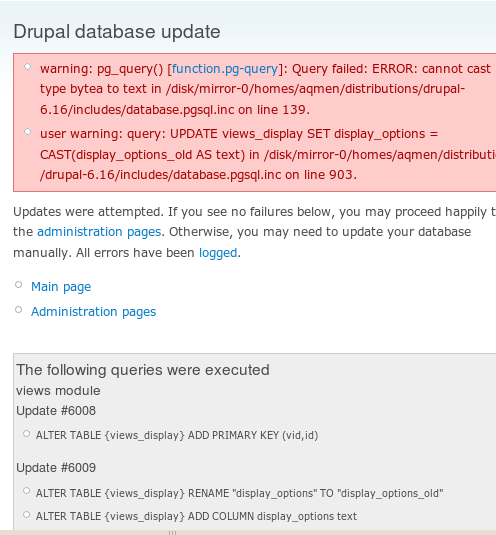
"Failed to cast type bytea to text"
My display_options of views_display is now empty, hence the reason for my views to be empty I assume.
Comment #9
merlinofchaos commented#8: That issue was linked in #7. Please post in the right place.
Comment #10
tsssystems commentedSame issue with error on update:
The following queries were executed
views module
Update #6008
* Failed: ALTER TABLE {views_display} ADD PRIMARY KEY (vid, id)
Now when I look at the table itself in phpMyAdmin, it looks like the primary key is correctly defined:
Indexes:
Keyname Type Cardinality Action Field
PRIMARY PRIMARY 17 Edit Drop vid id
vid INDEX None Edit Drop vid position
Could this error be caused by the fact that this key was already defined this way in an earlier version of views? This update was from 2.8, but have used dev versions previously.
So this is an error that can be ignored if the primary key in this table is correctly defined and everything else works correctly.
Comment #11
j0k3z commentedEdit: nevermind, I dont have this issue
Comment #12
jcmartinezSame error here.
In case it helps, looking at the table views_display with phpMyAdmin, I get this warning: PRIMARY and INDEX keys should not both be set for column `vid`.
I can see under Indexes:
Keyname PRIMARY Type PRIMARY uses Fields vid and id
Keyname vid Type INDEX uses Fields vid and position
Comment #13
adpo commentedSame error here.
Comment #14
josh waihi commentedIn PostgreSQL, the primary key fails to be implemented because the duplicate values break the unique constraint possibility. IMO, this should've happened in MySQL too as there isn't much point to having a primary key column if you can't guarantee unique results.
Error:
Table structure post upgrade:
Note: no primary key present
I used this query to find out how many of my rows contained duplicate values:
* MySQL users will want to replace TEXT with CHAR
I found that most my views had two entires in the views_display table for each display.
From what I could see, the rows in the table that had duplicate vid and id fields, also had identical data in the other columns. So I was able to remove the duplicate rows with a PostgreSQL specfic query (I'm sure MySQL has an equivalent):
Running that before the upgrade should make the upgrade work. I changed views_update_6008 accordingly:
Comment #15
merlinofchaos commentedHmm. So the question is...how did you get those duplicate entries? They absolutely should not have been duplicated. In fact that seems like it should have totally screwed up your Views.
Comment #16
josh waihi commented@merlinofchaos, my guess is that Views code would only expect 1 row to return so in most cases when View retrieves information from this table it does
$row = db_fetch_object($rs)rather thanwhile ($row = db_fetch_object($rs)) {and so the duplicate key is never retrieved.Comment #17
merlinofchaos commentedNo, there are multiple displays per view, so it definitely uses the while loop when doing this. I'm really weirded out by your database ending up in that condition, and am uncomfortable putting in a general patch to correct it when it shouldn't be happening.
Comment #18
josh waihi commentedIt may have been subject to features import and exporting?
Comment #19
dcolburn commentedHow do we fix this?
Comment #20
josh waihi commentedtry this: http://www.justin-cook.com/wp/2006/12/12/remove-duplicate-entries-rows-a...
Comment #21
dawehner@Josh Waihi
The link is not accessible anymore can you help us here with another link? Thanks!
Comment #22
iamjon commentedIt seems the link is back. In either case here are the highlights:
Step 1: Move the non duplicates (unique tuples) into a temporary table
CREATE TABLE new_table as
SELECT * FROM old_table WHERE 1 GROUP BY [column to remove duplicates by];
Step 2: delete delete the old table
We no longer need the table with all the duplicate entries, so drop it!
DROP TABLE old_table;
Step 3: rename the new_table to the name of the old_table
RENAME TABLE new_table TO old_table;
Comment #23
iamjon commentedClosing from a lack of activity. Please feel free to reopen if need be.