Actually the menu system can handle ONLY 1 "active" menu item at a time. THis ends up to be seriously confusing the user about his actual position in the navigation structure of the site (without talking about users happening on specific deep pages directly from a search engine!)
This issue does not happen only for tabs (as stated on a previous issue here), but for every link, sub-section or secondary link. To make an example, when browsing "Accomodations" section in the following menu structure, everything works as expected:
. Accomodations
---Houses
---Condos
---Villas
but if you browse to "Condos" for example, you loose the *active* status for the parent menu item
and the result is:
. Accomodations
---Houses
---Condos
---Villas
while for good usability's sake it should be:
. Accomodations
---Houses
---Condos
---Villas
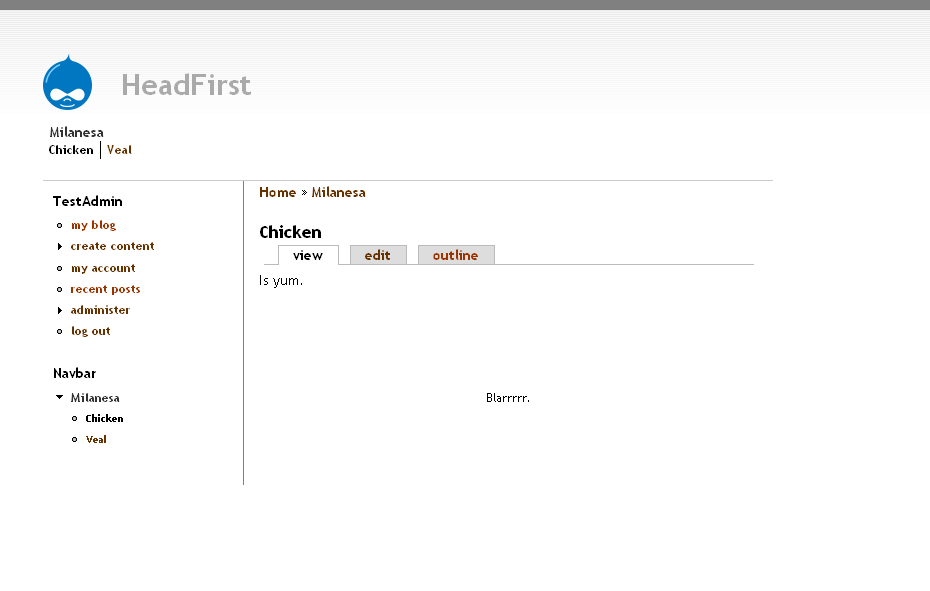
This leads IMHO to a serious usability issue expecially on Horizontal navigation menu systems where there is no vertical hierarchy to show where you are situated in the site (see attached screenshot), so i file this as *critical*.
The menu system should be able to set as *active* also the parent menu item of the currently browsed secondary one, so to let users know which section they are actually browsing, otherwise (also considering the sometimes problematic breadcrumbs issue in Drupal) they can easily get lost.




Comments
Comment #1
drupalzack commentedI agree. Otherwise the menu functionality is excellent in Drupal. But because of this bug, context sensitive menuing is serioulsy broken.
Comment #2
beginner commentedComment #3
rkerr commentedI've solved this before with custom theme functions in template.php instead of the default theme_menu* functions.
Checking template.php from the Mollio theme might give you a good starting point, but I agree it would be nice to have this as the default core behaviour.
Comment #4
webchickI'd like to see this fixed. No idea where to start looking though, apart from "somewhere in menu.inc" ;)
Comment #5
vatavale commented+1 I'd like to see this fixed too!
Comment #6
markdingemanse commentedYes, I'd like to see this fixed too. It's an important usability issue. FYI, the least dirty solution to this problem I have seen so far is this one.
Comment #7
markdingemanse commentedSeeing that 5.0 is coming around and that some other changes have been made to the menu system already (i.e. primary and secondary links returning structured links, see here), I have changed the status from normal to critical again. If we're going to improve the menu system in 5.0, we better do it really good.
Comment #8
marcoBauli commentedGood news: i've committed a developer to fix this issue :)
Please find attached the relative patch against menu.inc from Drupal 4.7.2
No programmer here, so cannot really tell much more about what changed in the code and if it is a general solution or something specific to my site.
What i can say is that works fine for me, so maybe it can help as a starting point! Setting this as 'code needs review' then.
Comment #9
Jaza commentedAfter hunting through the code, it turns out that the function responsible for setting
class="active"on menu links is NOT in menu.inc. It is thel()function in common.inc (and therefore,class="active"should also be getting set for all other links generated byl(), if there are any others that link to the current page).I have attached a new patch, that does the following things:
l()function, to output a special class not just for links to the current page, but also for links to a page in the current active trail.@kiteatlas: while the approach in your patch works, I think that mine is an improvement, because it is consistent with the way that things currently work in core (i.e. the logic is all in the
l()function, rather than in menu.inc functions), and because it provides the potential for any other 'active-trail' links to be styled (e.g. tabs, primary/secondary links, non-menu-item links, etc), rather than just sidebar menu items.Please see below for some screenshots of what the core themes look like with this patch applied. Feedback on both the code and the new colours is welcome (I'm no artist, so I may have picked ugly 'active-class' colours!).
Comment #10
Jaza commentedComment #11
Jaza commentedComment #12
Jaza commentedNote that although this patch adds the 'active-trail' class for all relevant primary and secondary links on a site, it does not make ALL of the core themes apply any special styling to these links. Bluemarine and Pushbutton currently don't apply any special styling to 'active' primary/secondary links, and so this patch keeps that behaviour consistent, and doesn't apply any styling to 'active-trail' primary/secondary links for these themes.
However, Chameleon and Marvin DO apply special styling to 'active' primary/secondary links, and this patch extends that styling to include 'active-trail' primary/secondary links. For other themes, of course, whether and what to style is completely up to the themer. :P
Attached screenshot shows what 'active-trail' primary links look like in Chameleon with this patch applied.
Comment #13
marcoBauli commentedJeremy: your patch looks better/shorter than mine (ehm..me no coder :P ). Is fine for me as far as it works on 4.7 !
Comment #14
Bèr Kessels commentedThis patch only adds "active" to the link, most often a much better option (design-wise) is to set it on the surrounding LI.
The other benefit is that its easy to pass a class from an LI down to the contained A, but impossible the other way around:
">
print theme('menu_item' $item, $active)?>
is simple, but once the class is only available inside the theme_menu_item() you cannot extract it and print it in the LI.
But taken that into consideration, this patch is better then nothing. At least far better then what we have now.
Some alternative way to achieve this at http://webschuur.com/node/658
Comment #15
magico commentedI complete agree with Bèr. This patch needs some work, because it's the
When we are talking about styling this, if the active is only on the link we can do nothing aout styling it's
Comment #16
magico commented(note to myself: "never, but never give examples of tags using the TAG, and ALWAYS do a post preview")
I complete agree with Bèr. This patch needs some work, because it's the
LItag that is active and not theAtag.When we are talking about styling this, if the active class is only on the link we can do nothing about styling it's
LI container.Comment #17
Bèr Kessels commentedattempt to fix HTML
Comment #18
Will White commentedmoving. +1
Comment #19
hickory commentedmoving again (+1: active primary links aren't highlighted when in a subfolder)
Comment #20
joshk commented+1 for this functionality. You can fake it now by writing your own functions to generate the primary_links which pass along the $mid. Basically we want to get it to where any menu_link checks its own id against the active trail and adds a class. I've done this with theme_menu_item_link by passing it the $mid and doing as follows:
Comment #21
dvessel commentedHere's another alternative. Sets an 'active-trail' class to li instead of anchors (agreed with Bèr Kessels). I really needed this feature and the previous posts lead me to this..
Comment #22
hickory commentedI don't know if something changed, but this seems to be almost working ok for me in 5.0 now... The only change I had to make was in menu.inc, changing
$index .= "-active";to$index .= " active";Comment #23
m3avrck commentedAgreed, this functionality needs to be there, such a pain for us themers *heh*
Comment #24
adrinux commentedThis works in Drupal 5 if one sets the menu entry to the actual path of the home page. For instance if you are using the default front page of 'node' and set the path to 'node' the home page primary link is set to active, even at the base url: http://example.com/ and not just /node.
Marking this fixed, I don't see the need to add more code for this.
Comment #25
forngren commentedI believe this is still an issue. If you set your menu item to match your front page path, your path will be added at the end of the url. Not very nice looking, and could potentially hurt your SEO. One shouldn't have to hack to get an acceptable default behavior.
Comment #26
patrickharris commentedYes - I really think this needs to be fixed. I don't want home page links to be 'mysite/node'!
Comment #27
chx commentedComment #28
dvessel commentedMaking a note that this was incorporated into D6. :-)
http://api.drupal.org/api/HEAD/function/theme_menu_item
Comment #29
dvessel commentedWhoops. Setting it to fixed.
Comment #30
(not verified) commentedComment #31
hansBKK@drupal.org commentedBut is there yet a clean solution for those of us that still need to develop in D5?
Yes this might be a duplicate of http://drupal.org/node/274532, I just got frustrated working my way through the whole thread to then finally see what I perceive as a "it's not so important" attitude, when so many less wizardly users have been expressing frustration over this core issue for so many years.
Comment #32
sutharsan commentedMoving all usability issues to Drupal - component usability.
Comment #33
nancydruThis is not completely fixed in 6.16 either.
Comment #34
nancydrucomponent got messed up
Comment #36
dpearcefl commentedConsidering that no new features will be added to D5 and that no one has shown any interest in this issue for a long time, I am closing this issue ticket. If you think we still need this feature request, please reopen it and move it to the D8 issue queue.