Active
Project:
Flexifield
Version:
6.x-1.x-dev
Component:
Code
Priority:
Critical
Category:
Support request
Assigned:
Reporter:
Created:
19 Apr 2010 at 22:45 UTC
Updated:
30 Nov 2011 at 14:10 UTC
Jump to comment: Most recent file


Setting flexifield sub-fields as required stops node saving, with msg "Required fields" although, these required fields contains a regular values and they aren't empty as drupal think.
I've tried to set these fields as not-required, node saving works well and no problems launched.
How can i use required fields and save the created node correctly using flexifield. Probably we need to insert more fakes (patch) to make all field validations pass.
Note: the required fields that encounter a saving-problem are text and numeric fields.
Are you get this problem before? Can u help me?
Thanks.
| Comment | File | Size | Author |
|---|---|---|---|
| #4 | flexifield-widget-775882.patch | 740 bytes | manur0 |
| #3 | FlexifieldError.png | 17.57 KB | creeksideplayers |

Comments
Comment #1
bjaspan commentedThis looks like a D6 flexifield support request, not a D7 Field API bug report.
Comment #2
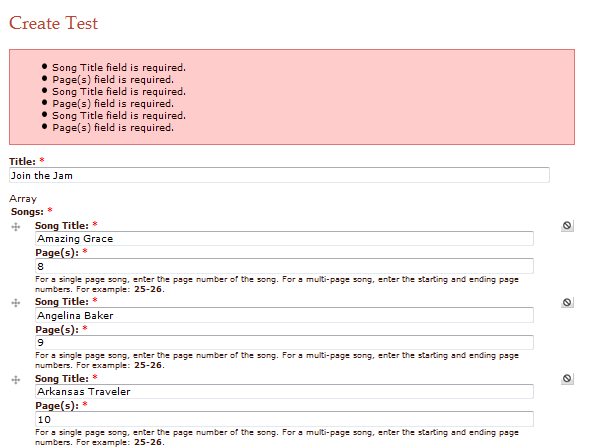
creeksideplayers commentedI'm using the latest 6.x-1.x-dev of this module (2011-Feb-25). I'm having the same problem. I have a content type that contains two fields that are both require. I put this content type into a flexifield and made the flexifield required. When I try to save the content, all my required fields are showing up with a message that says the field is required even though I've entered a value.
Comment #3
creeksideplayers commented6.x-1.0-alpha5 is doing the same thing.
Comment #4
manur0 commentedHere is a patch with only one line commented.
It corrects this issue but I am not sure on side effects regarding the comment in source code just above "Clean up what was done by forcing #input in order to have this function run".