

 Come together with the global Drupal community in Rotterdam, 28 Sept – 1 Oct 2026. Sessions, contribution, connection, and Early Bird savings until 8 June.
Masking would be awesome - take png file with transparent background, draw any form with black fill and anti-aliased sides, upload in action and IC takes dynamic image and fills black area with that image. Complete freedom for designers - images in custom shapes with awesome border effects etc.
| Comment | File | Size | Author |
|---|---|---|---|
| #11 | transparency-custom-action---sydneyshan.jpg | 525.89 KB | sydneyshan |
| #9 | imagecache custom action - mask (PHP code) | 1.35 KB | sydneyshan |
| #2 | maskingstoryboard1.png | 221.25 KB | henrijs.seso |


Comments
Comment #1
henrijs.seso commenteddeleted comment
Comment #2
henrijs.seso commentedhere is code example that does this: http://php.amnuts.com/index.php?do=hide&id=15
even working example http://php.amnuts.com/demos/image-mask/
good folk at stack overflow also has suggestions here http://stackoverflow.com/questions/2702769/image-gd-and-png-masking
could somebody make action out of this?
another illustration:
Comment #3
dman commentedI already have/had a working algorithm for full transparent mask from image.
It's is canvasactions.inc:canvasaction_mask()
Was used for rounded corners - until a more efficient version of the same job replaced it.
We can ressurect it, and probably expose it as a standalone action. Seemed like a useful tool ... but didn;t have much of an actual use for it.
Comment #4
henrijs.seso commentedi see code there, true. some way of mask upload is needed and separate action. i am making a web site with grungy look and want to use imagecache to create crazy masked images (they are not so crazy actually, all are pretty much standard thumbnails, just edge is cut not straight). there are 3 lead stories on main page and some thumbnails for galleries and stuff. I will make view (or theming) for each story to use different preset and therefore different mask. what would really kick ass is possibility to upload multiple masks (like 3-5, not more, otherwise all point of imagecache is lost) and then use them randomly, but thats probably too extreme and views method should be used :)
or maybe im thinking wrong and some kind of jquery solution is needed
Comment #5
henrijs.seso commentedi will use this meanwhile: http://www.netzgesta.de/edge/. this is ugly :(
Comment #6
dman commentedActually, a randomizer option is not so silly.
We've currently got the aspect switcher, which delegates to other presets.
So you could define several styles, then create a master style with a 'random' switcher.
Note that here - as with other requests for 'dynamic' features, imagecache is a cache so 'random' only creates a new result the very first time. after that, the image has been saved in the cache and will remain.
Comment #7
henrijs.seso commentedI know, but i just didnt want to go to extremes, like photo gallery with 30 random thumbnails on same page. But seriously, yes, random could be an option, i am very familiar with aspect switcher functionality as well as 'dynamic' features. I would see how this could be useful.
Comment #8
RobW commentedI am looking for this functionality too, something where you specify a custom black and white image that an action uses to create a png alpha mask. Thanks for posting some current possible starting points; if someone created a standard Imagecache Action that accomplished this it would be very cool.
Comment #9
sydneyshan commentedI've been using a custom bit of code for the last 4-5 projects (see file attached). One day I'd like to give it a UI within Imagecache, but not sure when time will be available.... If anybody else would like to do so and submit it please do so!
Comment #10
dman commentedLooks like a fine idea.
I'd have thought that GD may have had a mask action built in instead of the per-pixel approach, but per-pixel is reliable - if not fast.
Thoughts on a UI for this? I imagine the scaling etc may cause issues in general production use. Would it be best to precede the mask action with a fixed-size scale first?
Screenshot example of your use-case? I don't have any ideas for this yet, but I can imagine someone does.
Comment #11
sydneyshan commentedHi dman,
Yes you'd definitely want to scale/crop images before using the code.
I haven't got the spare time to invest in to this add-on at present, but if anybody else does please feel free to use my code as a base...
I've attached a snapshot of my usual workflow using the Custom Action code...
Comment #12
dman commentedAh, Vignette!
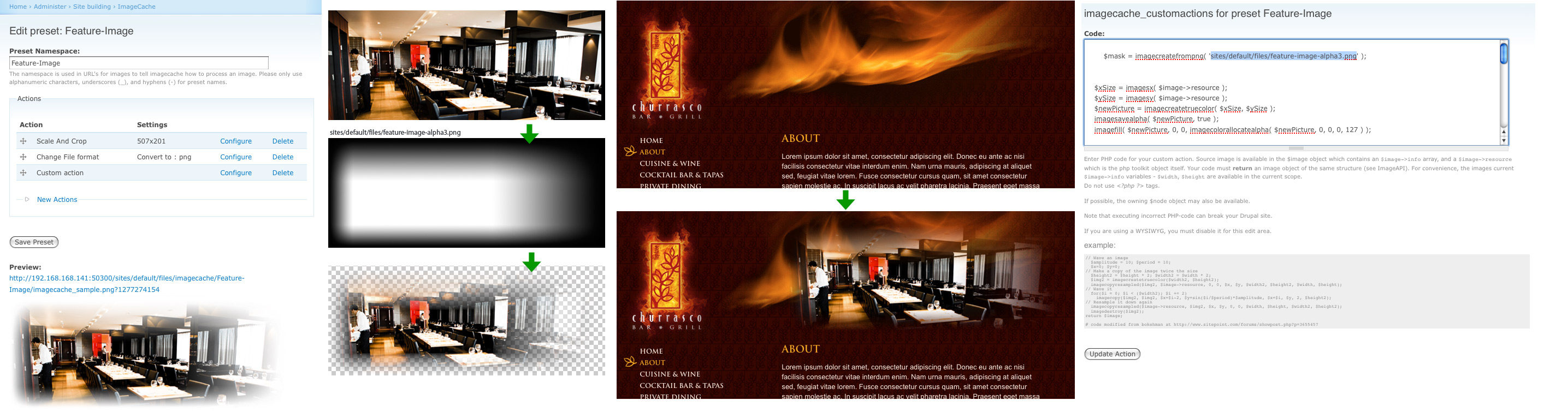
Yes, that's a worthwhile use for full-alpha-masking.
... I just couldn't imagine what for OTTOMH, but this makes sense.
I'll stick it on the to-do list.
Comment #13
sydneyshan commentedThanks, dman. Love your work.
Comment #14
puya commentedThis is awesome.. is this going to be added as an action (preset) or do we hand code it in?
Comment #15
sydneyshan commentedHi puya,
Thanks :) as far as I am aware this is still on dman's to-do list... Until then you'll need to use my custom code found in #9 comment...
-Shan
Comment #16
puya commentedThanks a lot Shan, where do I put this code in? should I use the custom action preset?
Comment #17
sydneyshan commentedHi puya,
Yep - just place the code into the Custom Action preset and adjust the path to the image mask manually.
Comment #18
puya commentedThanks a lot Shan, Awesome I'm gonna try it. do I need the <?php tags?
Comment #19
sydneyshan commentedHi puya, no <?php tags are required.
Comment #20
puya commentedThanks a lot. Would this be committed to head sometime?
Comment #21
sydneyshan commenteddman, I haven't forgotten about this ... just looking in to getting git set up to contribute to this module.
Comment #22
sydneyshan commentedHi all, I've spent some time this week implementing this in to the Canvas Actions module for the 6.x-2.x-dev branch. It works well from what I can see, however the following 'TODO' items are left:
1. Change the Imagemagick operation(s) so that the target image's transparency is retained (currently it is lost) - this isn't an issue if you're feeding the action an image without transparency (which is usually the case)
2. implement offset support (this could open up the module to a whole range of uses)
Please try it out and let me know what your feedback is.
Comment #23
puya commentedthanks a lot.. will try it out for sure.
Comment #24
JacobSingh commentedI tried this, works. Pretty cool.
Comment #25
sydneyshan commentedGreat to hear! Dman, are you thinking we should commit this to a 6.x-2.1 branch?
Comment #26
dman commentedyeah i think so.
I've noy had enough time to tend to these things this month - big sites going live elsewhere - but yep, these new features can become a new release number!
Comment #27
nancydruI'd love to have a vignette action (or documented technique) in both 6.x and 7.x.
Comment #28
fietserwinThe 6.x-2.x version has been discontinued. Please read this comment #1591826-1: 6.x-2.x-dev is no more supported . Please reopen this issue in another version (6.x-1,x-dev or 7.x-1.x-dev) if you still want the feature over there.
Glancing quickly over this issue I think that, at least in D7, the "Image mask" effect is what is asked here. Not sure if that effect is based on this code or not, and whether it is available in 6.x-1.x or not.