I am having some issues. Here is what I have:
lead node 29->campaign node 6=>user3
(-> stands for node reference, => stands for user reference)
I want lead and campaign nodes to only be visible to user2 and admin/manager. I only want user2 to have 'view' access.
As per my understanding of this module, lead node and campaign node should both be viewable by user2 because of the references. Right?
I first started out using the dev version of this module but got these errors: http://drupal.org/node/780282 and nothing seemed to work. So uninstalled the module and started again...
I used view own (dev) to block out 'view' access for all users.
Using version 1.0 of n.a.auto.ref. campaign nodes are visibile to user2. It says: Connected: YES; Path between user 3 and node 6: Array ( [0] => field_campaign_client|uid|3 ). Leads are not visable (access denied) to user3, it says Connected: NO; Path between user 3 and node 29: n/a
I uninstalled view_own it still tells me that lead is not connected to user3. (I didnt think it would help, but thought I would try it).
I install the dev version of n.a.autref. Run an update.php just in case. I refrest the lead node and now it says Connected: YES; Path between user 3 and node 29 (lead_basic): Array ( [0] => 6|campaign|field_campaign_client|uid|3 [1] => 29|lead_basic|field_lead_campaign|nid|6 )
GREAT, we are now being connected. I re-enable view_own then rebuild permissions (I don't get this error anymore:http://drupal.org/node/780282 ... weird)
I check: Log all permission changes, Show connection messages, Show more connection messages and Disable connection caching in n.a.suto.ref settings. I then check my permissions; nothing checked in "nodeaccess_autoreference module", nothing checked in "view_own module"... good
This is where it starts screwing up. User2 now has access denied for campaign node, it says:
Connected: YES; Path between user 3 and node 6 (campaign): Array ( [0] => 6|campaign|field_campaign_client|uid|3 )
Connected: YES; Path between user 3 and node 6 (campaign): Array ( [0] => 6|campaign|field_campaign_client|uid|3 )
Access is also denied for lead node, it says:
Array ( [0] => 29|lead_basic|field_lead_campaign|nid|6 )
Connected: YES; Path between user 3 and node 29 (lead_basic): Array ( [0] => 29|lead_basic|field_lead_campaign|nid|6 [1] => 6|campaign|field_campaign_client|uid|3 [2] => 29|lead_basic|field_lead_campaign|nid|6 )
Array ( [0] => 29|lead_basic|field_lead_campaign|nid|6 )
Connected: YES; Path between user 3 and node 29 (lead_basic): Array ( [0] => 29|lead_basic|field_lead_campaign|nid|6 [1] => 6|campaign|field_campaign_client|uid|3 [2] => 29|lead_basic|field_lead_campaign|nid|6 )
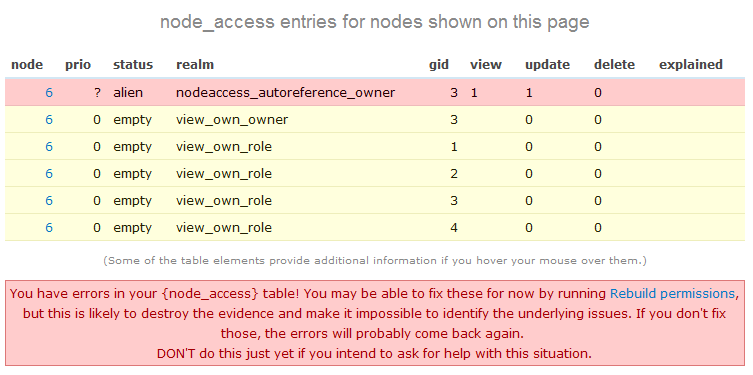
So it appears "view" grants are not being granted. I go into campaign content type and edit the user reference field (field_campaign_client) by checking the 'update' under "User access permissions for node". Now if I refresh the campaign node, user2 now has access and can edit the node (There is still Access denied to user2 on the lead node). So "update" permissions are working, but "view" permissions are not. ALSO, devel shows campaign node permissions with an "alien" status (see attached image) with an error.
I have spent a lot of time w/ this and can not get it to work. I have also tried nodeaccess and content_access with similar results.
Can you please help me figure this one out? Thanks.


Comments
Comment #1
that0n3guy commentedI checked "Check permission via owners" and rebuilt permissions at admin/content/node-settings and got this error again: http://drupal.org/node/780282
It seems to be popping up randomly now after permissions rebuilds
Comment #2
kenorb commentedThanks for reporting and sorry for delayed answer.
Base on your attached image, if you have at least 1 in your 'view' column, node 6 should be normally accessible.
Are you testing it on anonymous user?
If yes, try to clear your cache.
Make sure as well if you have disabled 'Disable updating the permissions.'. It should be switched off.
Comment #3
that0n3guy commentedI am not testing it as anon... I installed the new dev, ran update.php (just in case), cleared cache, rebuilt my permissions, and checked that 'Disable updating the permissions' is not checked (an all in one breath).
The image above is what it looks like when I go into campaign content type and edit the user reference field (field_campaign_client) by checking the 'update' under "User access permissions for node". So "view" is only being granted when "update" is enabled also.
When I don't have "update" enabled for the user reference field, as user1 looking at node6 I get the following (node access and message at the top): http://drupal.org/files/issues/naar_no_view.png
When logged in as user3, I have this message at the top of node 6: http://drupal.org/files/issues/naar_no_view_user3.png
You can see that "view" isn't being granted.
------------------------------------
Here is another test I did:
I went into permissions and under 'view_own module' gave user3's role permission for "view campaign content via field_campaign_client". Then I rebuilt permissions and user3 now has access to node6, but not because of NAAR module. See http://drupal.org/files/issues/view_own_permissionschange.png
I am using the dev of view_own.
I thought maybe this view_own permission (even while disabled) might be screwing with naar so I uninstalled it and tried content_access, still no "view". 'Update' works though just like above. So then I uninstalled content_access and installed node access. Still now "view" being granted, but "update" works :).
So, it seems like "view" is not being granted, ha. After all that the same conclusion for me. It seems weird to me that "update" works, but view doesnt.
Thanks for looking into this.
Comment #4
kenorb commentedWhich View_own version are you using? Can you try dev?
I can't reproduce it on my local environment.
If this not help, could you send me dump of your website, I'll check.
Comment #5
that0n3guy commentedSorry about the slow response.. I jumped to a diff project for a little while but I'm back to this one.
Here is the deal, created a whole new acquia install, enabled the required modules... created 2 content types: campaign and leads. Leads type has a node reference pointing at campaign types. Campaigns type has a user ref.
I created 2 new users, client1 and client2.
Turned on naar, enabled some stuff in the config, rebuilt permissions. Enabled devel and some of its settings.
I create node2 of campaign type point it at client1 (I just created that user also). Then I created node3 of lead type that points at node2.
I turned on view_own, rebuild permissions. client1 can not view nodes 2 or 3 (client2 can't either... but thats good).
If I go into the campaign content type and turn on "update" under the "User access permissions for node: " section of the user ref field... rebuild permissions. client1 now has view and update access to both nodes 2 and 3, so that works. Client2 does not have access, so that works.
If I disable the "update" setting under the campaing content type user ref... rebuild permissions, client1 looses view and update access.
I can give you a DB dump if you want... but thats all I did. I'm going to start from a scratch drupal 6.16 site and see if its something acquia has going on.
-Peter
Comment #6
that0n3guy commentedWell, I created a plain drupal install, pulled in my content types with features. It still doesn't work.
No access to client1 for node 2.
Here's the references node2-(noderef)->node1-(userref)->client1. I am expecting client1 to have access to node1 and node2 because they are "somehow" reference to client1.
Attached my sql dump and all the modules I had in the modules/ directory.
Just add to a normal drupal install.
Also, I'm using "XAMPP for Windows Version 1.7.1" on windows 7. Maybe I should try this on my linux machine or my server... but I just don't see how that would make a difference.
Comment #7
kenorb commentedThanks, I'll have a look.
Comment #8
that0n3guy commentedThanks kenorb, Its driving me crazy :P. With my luck though, it'll probably work just fine for you, ha...
Comment #9
kenorb commentedThanks for reporting.
Fixed in http://drupal.org/cvs?commit=374938
Issue related to: #754164: Feature Enhancement Patches
Comment #10
iLLin commentedMan I just haven't had time to get back to this... All that had to have been done was adding the 'View' to the options checkboxes on line 107 in nodeaccess_autoreference.module.
Really sorry I haven't had time to get back to this.
Comment #11
that0n3guy commentedThanks for the commit kenorb... I'll prolly test it out tomorrow or monday-ish.