Active
Project:
Acquia Prosper
Version:
6.x-1.0-beta4
Component:
Code
Priority:
Normal
Category:
Support request
Assigned:
Reporter:
Created:
28 Apr 2010 at 21:49 UTC
Updated:
11 Jan 2013 at 17:46 UTC
Jump to comment: Most recent file


I am attempting to omit the submitted by info. I am most interested in removing this from my product page. For example, I currently have a product that shows with the following under the title: Submitted by Anonymous on Sun, 04/25/2010 - 12:37 and I would like to omit this line completely.
Any ideas on how to achieve this?
| Comment | File | Size | Author |
|---|---|---|---|
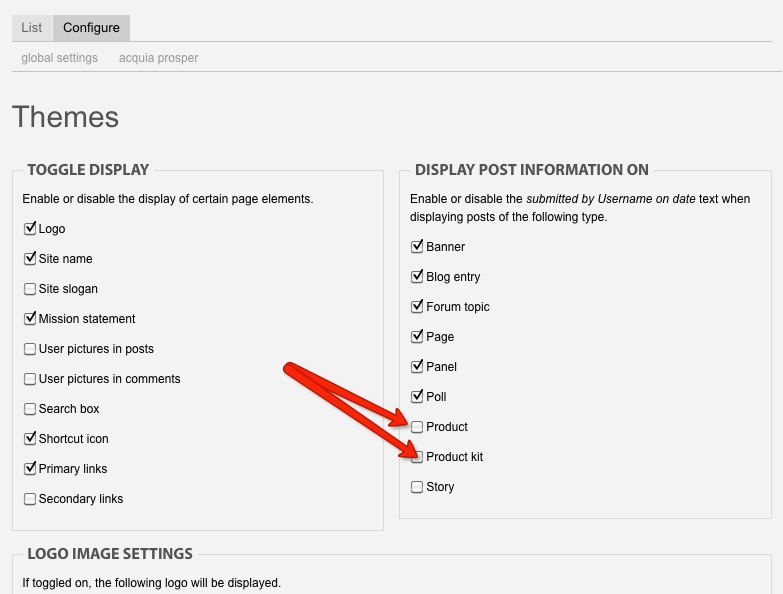
| #1 | submitted.png | 73.11 KB | jeremycaldwell |

Comments
Comment #1
jeremycaldwell commentedYou can disable the submitted by text by going to your theme configuration page (/admin/build/themes/settings/global) for the global settings. Uncheck the boxes for product and product kit and then the submitted text will be removed. Attached is a screenshot of the options.
Comment #2
jlschiller commentedPerfect! Thank you so much for the quick response! Is it just as easy to turn off commenting globally? I thought I had that turned off, but now while reviewing the product, I see something that says "Add new comment". How do I turn that off?
Comment #3
jeremycaldwell commentedYou can go to your content type (/admin/content/types) and disable comments for the product content type. Or you can edit the product node and disable comments on the specific node. These changes aren't theme related and are global Drupal settings so it will be done like that for all other themes too.
Comment #4
jlschiller commentedI see what happened now after seeing your comment. I turned off comments for content/types and I thought I adjusted everything that would be needed. What I didn't realize until reading your comment though is that I had changed that global setting AFTER creating some of the product content, thus the initially created content still has comments enabled. I just went back and turned it off for those.
Sorry to have bugged you with a global Drupal question like that. I just figured while you were responding I should ask the question just in case it was in fact a theme issue.
Thanks again for your help. It is very much appreciated!
Cheers! Jeff
Comment #5
jeremycaldwell commentedNo problem, glad I could help!
Comment #6
Emma commentedHave tried this but its not working - if I change theme to garland they go, but come back again when I switch to Prosper?
Using the beta4 version of prosper, drupal 6 etc.
Comment #7
jeremycaldwell commented@Emma, what are you having troubles with? Disabling comments or disabling the "submitted by" text? Doing both are outlined above so that should work for you as well.
Comment #8
Emma commentedIts the disabling the "submitted by text" I'm having problems with. I have unselected all the tick boxes in the global settings bit (/admin/build/themes/settings/global) but they are still showing. Only way to get rid of them is to change theme eg to Garland.
Am viewing in Safari but also the same in Firefox.
Comment #9
Emma commentedJust found a similar issue - the temporary fix at http://drupal.org/node/675876#comment-2460300 seems to have worked for now but suggests there is a bug here somewhere.
Comment #10
jeremycaldwell commentedComment #11
rnguyenc commentedThe global theme settings gets overwritten by the selected theme you are using. Make sure that both have everything checked off.
Good luck!