

 The 2026 Drupal Business Survey is open. Your response will help shape the future of the Drupal business ecosystem.
I am a relative beginner to Drupal and not a PHP guru, so I don't feel able to get involved in resolving the critical issues, but I can do some testing. So I thought I would have a go at an upgrade from Drupal 6.16 to Drupal 7 alpha 4.
Setup
Virtual machine (Sun Virtual Box) running Windows XP SP3 with Apache 2.2.15, PHP 5.2.13 and MySQL 5.1.40-community. Browser Firefox 3.6
Drupal 6 site
Fresh install of Drupal 6.16.
- Taxonomy (loaded via Taxonomy XML) is a species list of two families of flies with a four-level hierarchy and some synonyms
- Nodes: Created two node types using CCK:
- species accounts for these flies (c. 350 loaded via Node Import). CCK used to add Nomenclature, Description, Biology, Distribution and Status fields (all textareas). Each node tagged with a species item from the vocabulary.
- species images. CCK used to add fields for image (ImageField/ImageCache), credits (text) and date created (Date). A dozen or so images loaded manually. Also each tagged with a single species item from the taxonomy.
As I understand it, this should all be supported in core by Drupal 7 without the need for contributed modules.
Attempt to update to Drupal 7
- Made a backup of the /drupal directory
- Visited localhost/drupal and logged in as the Administrator (only user)
- The theme has not been changed from the default (Garland) - so no action needed there.
- Disabled all modules apart from Core modules.
- Put the site into maintenance mode.
- WITHOUT CLOSING MY BROWSER, deleted everything from the /drupal directory and then unpacked drupal-7.0-alpha4.tar.gz there.
- Copied settings.php and my /files directory from the backup made in 1 into /drupal/sites/default
- Switched back to the browser and visited localhost/drupal/update.php
Result
WSOD!
Error in PHP error log file:
[29-Apr-2010 10:40:07] PHP Fatal error: Class 'PDO' not found in C:\WebStuff\www\drupal\includes\database\database.inc on line 178
I searched drupal.org and found two existing reports of this problem at http://drupal.org/node/784958 and http://drupal.org/node/721466 - but neither seem to have been followed up and the latter was closed.


Comments
Comment #1
StuartJNCC commentedTagging for upgrade path.
Comment #2
StuartJNCC commentedSorry! - stupid mistake. I didn't have PDO enabled in my PHP.ini.
Anyway, fixed that and on to the next error:
On visiting localhost\drupal\update.php, it now shows an orange box with:
Error
* Notice: date_default_timezone_set(): Timezone ID '3600' is invalid in drupal_session_initialize() (line 211 of C:\WebStuff\www\drupal\includes\session.inc).
* DatabaseSchemaObjectExistsException: Table date_formats already exists. in DatabaseSchema->createTable() (line 605 of C:\WebStuff\www\drupal\includes\database\schema.inc).
The website encountered an unexpected error. Please try again later.
Comment #3
StuartJNCC commentedDuring a normal installation there is a step that checks that the system meets Drupal's requirements. Should not this also be run at the start of the upgrade process to catch problems like PDO not being enabled?
Edit: I see that in Update.php
368 // Check the update requirements for Drupal.
369 update_check_requirements();
Looks as if this does such a check. Perhaps not early enough in the process?
Comment #4
StuartJNCC commentedUpdate.inc makes a load of changes to the D6 database. These include creating indexes, tables and fields:
327 db_add_index('system', 'system_list'
329 // Add the cache_path table.
335-7 db_add_field('url_alias', 'source' & 'alias'
339-50 db_add_field('menu_router', 'delivery_callback' 'context' 'tab_parent' 'theme_callback' & 'theme_arguments'
352 // Add the role_permission table.
376 db_add_index('semaphore', 'value'
462 db_create_table('date_format_type'
463 db_create_table('date_formats'
464 db_create_table('date_format_locale'
All of these are done without checking whether they already exist - and some of them do exist in my D6 database (e.g. tables date_format_type, date_formats and date_format_locale - presumably added by the Date module).
There is also the problem that, if a user has attempted to run update.php, gets some sort of problem reported, fixes the problem and then tries again, these changes may have been applied the first time round. They will then fail on the second attempt.
It therefore seems good practice to check whether tables exist and drop them (as is already done for example with the "queue" table in lines 511-13) and to drop fields or indexes before trying to create them.
Here is a patch which does that (this is a unified diff created by TortoiseMerge and converted from Windows CRLF format - not sure whether that is an acceptable format here).
Comment #5
StuartJNCC commentedWith that patch applied, the update runs through.
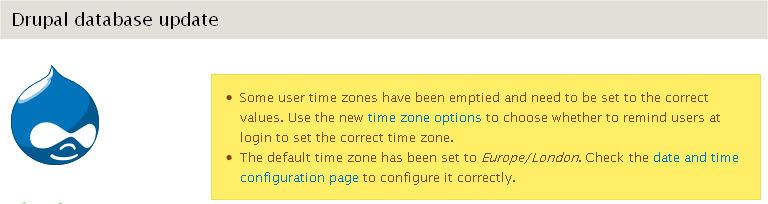
The first screen (entitled "Drupal database update") (see screen_shot1) shows the orange timezone error message twice. Subsequent screens show it once. The final screen, shows a yellow message stating that the timezone has been updated to the default (see screen_shot2).
In the variables table in the Drupal 6 db "date_default_timezone" has the value "i:3600". In a fresh Drupal 7 install, this variable has the value "s:13:Europe/London" (which is the time zone I selected during the installation). Presumably the D6 timezone code is no longer understood by D7 - hence the error. But it seems to be fixed by the update - so, after the update, the value is "s:13:..." as above (which it presumably gets from my Locale since I wasn't prompted for it).
The issue is therefore, that this error message needs to be suppressed. I'm afraid I have no idea how to go about that!
Comment #6
scor commentedI can confirm the bug. @StuartJNCC, don't forget to set the issue to "needs review" so others can review your patch ;)
You patch does not apply. You can check the documentation on how to Create patches on Windows.
Comment #7
StuartJNCC commentedThanks for the hints. I have re-rolled the patch against HEAD and, hopefully, the format is correct this time.
Comment #9
StuartJNCC commentedI don't seem to be succeeding in producing a patch! Is there a Windows user out there with who can suggest what I am doing wrong.
I read the stuff from posts on Drupal.org found by searching for "Windows diff" or "Windows patch" and thought I was following the advice contained therein. The specific instructions in "Create patches on Windows" pointed at by scor use CVS.exe - which does not exist on my system (I am using TortoiseCVS).
So, what I have done:
- used either TortoiseMerge or WinMerge to compare the original update.inc and my modified version
- saved a patch with the type set to "unified" and the context to 3 (the options are 1, 3 or 5).
- put the resulting file through a text editor (EditPad Lite) to change line endings to Unix style LF only and the encoding to UTF8
- uploaded the resulting patch file - which, it seems, does not work in either case!
Comment #10
StuartJNCC commentedTry again!
Comment #11
StuartJNCC commentedComment #13
scor commentedYou're making progress :) The only thing you need to do now is to ensure you are in the drupal root folder (where index.php is) when you roll your patch. As far as I can tell, you were located in the includes folder when you rolled the previous patch.
Comment #14
StuartJNCC commentedOK, re-rolled it from root
Comment #16
scor commentedthe 2 previous patches are exactly the same. did you upload the right file last?
Comment #17
StuartJNCC commentedYes it was the right file, I just tried rolling it again with the same result.
To be clear:
So what am I doing wrong?
Comment #18
StuartJNCC commentedApart from the patching problem, if I run the D6 -> D7 update on a patched copy of Drupal 7 Alpha 4 it works (or at least I get a site I can open successfully and view my data). If I run the same update on patched HEAD, when I attempt to open the resulting site I get:
Error
Error message
PDOException: SQLSTATE[42S02]: Base table or view not found: 1146 Table 'stuart_d6.drupal6_block_node_type' doesn't exist: SELECT module, delta, type FROM {block_node_type}; Array ( ) in node_block_list_alter() (line 2287 of C:\WebStuff\www\drupal7\modules\node\node.module).
The website encountered an unexpected error. Please try again later.
So I suspect that something committed to HEAD since Alpha 4 has broken this. I will attempt to find out where this happened and raise an issue there.
Comment #19
StuartJNCC commentedMaybe the problem is converting the patch file UTF8. Ones I have checked in other issues appear to be ANSI encoded. So lets try an ANSI version.
Comment #21
scor commentedit's definitely not an encoding issue. The problem is the path, see how your patch should look like http://drupal.org/files/issues/773828_0.patch - it seems you are having the same problems as the one described in the 2 comments at http://drupal.org/node/113172
re the issue you describe in #18, I've seen it before, you should create a new issue to discuss it.
Comment #22
StuartJNCC commentedOK, so I have edited in the includes/ by hand - lets see if it likes that
Comment #23
StuartJNCC commentedWow - it worked!
Comment #24
scor commentedok, it's fine, though you might want to find a more sustainable solution so you don't have to edit your patch file very time you roll a patch. Windows is evil for developers... Please create a new issue with the same description and patch as above so we can ignore the 23 comments noise and start from a clean slate ;)
Comment #25
StuartJNCC commentedThanks for your patience - and you are probably right about starting new issues. I think there are four seperate issues that have come up here:
Comment #26
scor commented@StuartJNCC these seem legitimate issues. please paste the links here once you're created the issue above!
Comment #27
scor commentedComment #28
StuartJNCC commentedMore appropriate title.
Comment #29
cafuego commentedI hit the same notice on an attempted D6.20 to D7 upgrade. Note that on the exact same system I have successfully upgraded other D6.20's to D7.
Notice: date_default_timezone_set() [function.date-default-timezone-set]: Timezone ID '39600' is invalid in drupal_session_initialize() (line 262 of /srv/www/shared-drupal-7/html/includes/session.inc).... and right after that it prints an actual error:
DatabaseSchemaObjectExistsException: Table <em class="placeholder">role_permission</em> already exists. in DatabaseSchema->createTable() (line 630 of /srv/www/shared-drupal-7/html/includes/database/schema.inc).and just below that:
PDOException: SQLSTATE[42S22]: Column not found: 1054 Unknown column 'ssid' in 'where clause': SELECT 1 AS expression FROM {sessions} sessions WHERE ( (sid = :db_condition_placeholder_0) AND (ssid = :db_condition_placeholder_1) ) FOR UPDATE; Array ( [:db_condition_placeholder_0] => 0eb4667dab750cf5777b04d967dbe636 [:db_condition_placeholder_1] => ) in _drupal_session_write() (line 204 of /srv/www/shared-drupal-7/html/includes/session.inc).The D6.20 was just upgraded from D5. I do not have any non-core modules enabled and the theme is Garland.