

Closed (fixed)
Project:
Panels
Version:
6.x-3.x-dev
Component:
In-Place Editor (IPE)
Priority:
Normal
Category:
Task
Assigned:
Reporter:
Created:
29 Apr 2010 at 18:51 UTC
Updated:
16 Sep 2010 at 20:20 UTC
Jump to comment: Most recent file


Comments
Comment #1
sdboyer commentedAaaand the stupid patchfile didn't post. Here it is.
Comment #2
sdboyer commentedAlso, I'm gonna out of commission for a couple days, but will be starting back in on this stuff in earnest by the beginning of next week (at the latest). My general gauge is that the really critical, release/reintegration-blocking stuff up there totals to about four good days of work.
Comment #3
sdboyer commentedFinal addendum - I've been doing all the work in git locally, and have a github mirror: http://github.com/sdboyer/panels/tree/dr_obj <-- Note that it's the dr_obj branch!
Development will continue there until this gets reintegrated, although I'll keep this post up to date with patchfiles as well.
Comment #4
joshk commentedSummarizing some discussion with merlinofchaos in #drupal-dev just now:
I'll start in on testing shortly, and hopefully we'll soon have a demo site up and running which we can use to start soliciting feedback on the UX.
Comment #5
sdboyer commentedJust noting that the original patch posted here isn't compatible with some recent changes in ctools. i'll be updating the patch presently...
Comment #6
sdboyer commentedNew patch. None of the original glaring issues addressed - just works again with the latest ctools dev.
Comment #7
joshk commentedThis patch works against current -dev branch of panels, and is functional with ctools. Basic testing is functional.
We should get UX people to recommend on the drop-areas. It could be more intuitive.
panels/panels_ipe/images/dragger.png is missing (actually the whole /images directory). My guess is it'll look a bit better when that's in place.
Comment #8
sdboyer commentedYeah, the image file doesn't come through in a patch, does it...
For those who want to see it with the dragger (which itself is done fugli-ly, and needs work), i've attached that image.
Comment #9
yoroy commentedSubscribe. I will regret this :)
Comment #10
ruplNew patch works much better than the first! Working on some UX feedback.
Comment #11
mstef commentedSounds interesting..haven't tried it yet.
Are there any plans in introducing something like per-user Panel settings coupled with this, to create a great drag-n-drop dashboard-like functionality?
Home Box is available but it doesn't use CTools or do anything great like Panels does. The architecture seems horrible too...
Comment #12
merlinofchaos commentedThe same process used for og_panels could be set up to provide user dashboards, I think. It could be done on user/%user or it could be done elsewhere (in which case not *too* much more than just managing user displays needs to be done). It's something that's been wanted for a long time. To be fair, a lot has been held off because sdboyer really wants blueprints for it, but we can do like og panels does without blueprints. It's not as good of a solution but it can still be effective.
Comment #13
mstef commentedUpdating from 3.3 to the latest dev breaks might site's old panels..Is there something that can be done?
Patch won't apply either..am I missing something?
Comment #14
merlinofchaos commentedBreaks how? (You may need to update CTools at the same time if it makes them all disappear. See the system status page)
Comment #15
mstef commentedWasn't using the latest DEV of Ctools...then I was...then ran update.php to get things running again...
Comment #16
mstef commentedHow do I try this out now? Can't find anything..
Ooh looks like I should enable the new module first..
Comment #17
mstef commentedI'm getting the save/cancel buttons duplicating a lot..
Comment #18
sdboyer commentedre: #12 - yeah, too much has been held off b/c I want the mythical blueprints to work. Probably better at this point to just start doing the one-offs. :(
@mikestefff - I know that the 'cancel' button right now doesn't appear to work (though if you hit 'cancel' then refresh the page, you'll see things back the way they were). But "duplicating a lot" sounds like something different - could you elaborate?
Comment #19
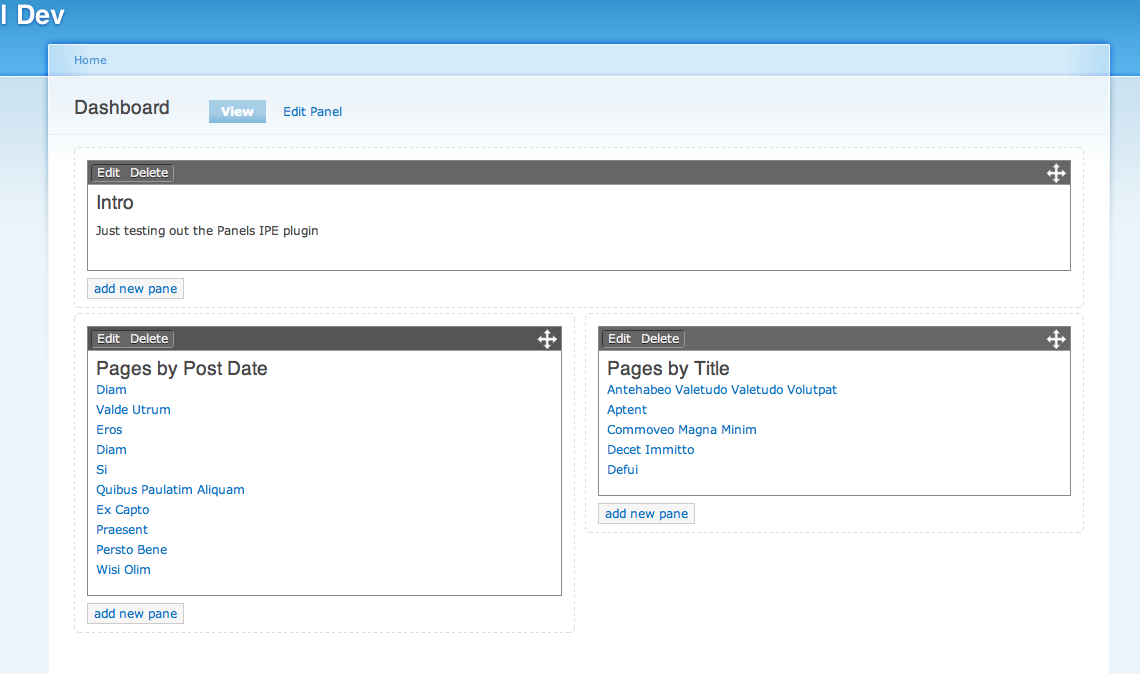
ruplHere's a first run, I tried to make it a little more familiar to current Panels users. Feedback welcome!
Comment #20
mstef commentedLooks very nice...
I'm very interested to see where this is going. On the side, I'm completely rewriting Home Box to be built more like Panels/Context, etc, in terms of architecture, exportables, etc...Mainly because I need per-user settings and the simplicity is there for a 'regular' user.
I'd be interested to hear your feedback, once completed..
Comment #21
jenlamptonUI input:
We like the improved dragger bar instead of the handle.
But we don't like having multiple "add new pane" links. They seem to be confusing when placed at the "bottom" of each region, since they hover below content instead of at the true bottom of the space. When there is no content in a region they don't appear at all (which is probably fixable) but...
It might be better to place the "add new pane" link in the same div as the "save" and "cancel" buttons, either to the right or to the left, and spaced out some. This gives people one place to go when adding something new. By default, the new panes could either be placed into the top-left-most region, and the page could scroll up to the new pane. Or, my personal preference, the pane could be absolutely positioned in the very center of the browser, until the user "dropped" it into place. Then the rest of the content on the page could move out of the way to make for the new pane. :-)
Comment #22
sdboyer commentedYeah, I've been working on the placement of the 'Add New Pane' button. Well, working on creating a better framework so it can be better placed, anyway. I do agree that they feel out of place without something that visually indicates the boundaries of the panel region itself.
Absolute-positioning-until-drop is...interesting. Feels like something difficult to do well, though - I'd like some more thoughts from other folks on that idea before I seriously investigate it :)
Comment #23
sdboyer commented@merlinofchaos: somewhere in the backscroll on IRC, I recall you saying something like "whaddaya think about making the 'Customize this page' button into a toolbar?" YES. Actually, that was the original goal, but I shied away from it because it wasn't strictly necessary to get working right away, and it was sucking up too much time. Ideally, though, that will be the place where we can stick all meta-operations, and it will happily accommodate them. So, if the IPE allows it, things like changing layouts, managing locks, facilitating blueprints interaction maybe...whatever. We tuck all of it into that toolbar.
That said, internally all those options should be a layer abstracted, so that an IPE plugin can easily choose to relocate all those things into a separate control area if it does so desire.
Comment #24
sdboyer commentedGot nearly done with the work that would handle empty regions and put the 'add new pane' button in more intelligently, then realized that I'd forgotten about the fairly standard & expected practice of putting pane separators into style plugins. Ugh. So the patch that's attached is a bit in the middle of a cycle, but since I'm going out of town and don't know how much time I'll have before Tuesday, I wanted to get this latest round of work up. At the very least, the patch will apply cleanly to the Panels 3 branch tip :)
Comment #25
squiggy commentedsubscribing
Comment #26
crea commentedSubscribing
Comment #27
sdboyer commentedWow, I left a big, fugly bug in there. New patch, this one should apply cleanly against the DRUPAL-6--3 branch tip and won't cause all your panes to disappear :)
Comment #28
Remon commented+1
Comment #29
Remon commentedThe patch in #27 applied properly on panels 6.x-3.5 with ctools 6.x-1.6 and cleared all cache but some panels has all panes dissapeared and clicking on "Customize this page" shows an alert that contains "An error occurred at /panels_ipe/ajax/edit/1. Error Description: 404: Not Found"!
Comment #30
dawehnerThen you have to clear the menu cache first.
Comment #31
Remon commentedI did but it didn't help :(
Comment #32
summit commentedSubscribing, greetings, Martijn
Comment #33
sdboyer commentedYeah, some people have been reporting problems with that latest version on clicking that link. I can't replicate it locally, unfortunately.
I'm posting another version primarily as a last-minute debugging attempt, I'm seeing some weirdness on my laptop that wasn't happening on my server last night.
Comment #34
sdboyer commentedMarking this fixed, as the IPE has been committed (which was the basic goal I had when posting this issue). I've added an IPE component to this queue, so we can open other issues under that as needed - and it will be needed, as there's a lot still to be done :)
Comment #36
merlinofchaos commentedHey rupl if you see this -- do you still have the work you did to get that picture above? I'd love to get your CSS so I can clean up the visuals on the IPE now that it's in.
Comment #37
ruplNo problem!
Comment #38
merlinofchaos commentedI've taken part of the CSS you've done (particularly the cleanup to the !important and proper spacing on some CSS elements that were not properly spaced).
I didn't like the look of some of the changes (particularly the background changes on the links made them hard to see) so I left that part out. There are some smaller changes that taken individually I maybe should have kept. If you want to continue tweaking this, let's do that in another issue.