Active
Project:
Genesis
Version:
6.x-2.3
Component:
Genesis SUBTHEME
Priority:
Normal
Category:
Support request
Assigned:
Unassigned
Issue tags:
Reporter:
Created:
3 May 2010 at 17:39 UTC
Updated:
27 Jan 2011 at 19:11 UTC


Hi Jeff,
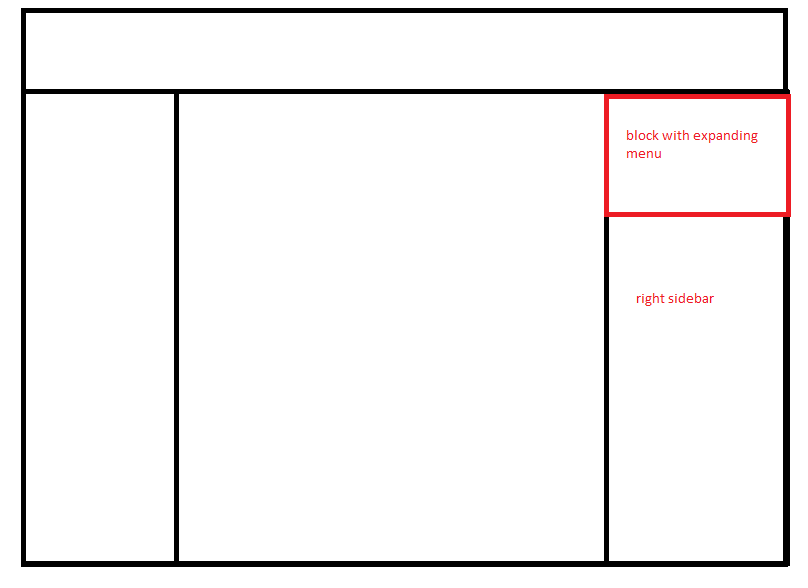
I would like to add a region above the right sidebar as shown in the picture (the red box represents where I would like to place this region). This region will contain a block with an expanding menu. I need to add it as a separate region because the expanding menu is set to position: absolute and z-index so when it expands, it expands over other content on the page. I have to put this block in it's own region because when I was printing it in the actual right sidebar, because it was set to position: absolute it was floating over the other blocks in the right sidebar.
I know I need to define it in the info file and print it in the page.tpl.php file, but how do I configure this region in layout.css to get the block to display above the right sidebar?
Attached is an image to represent the layout.
Thanks for your help. Love the flexibility of this theme!
| Comment | File | Size | Author |
|---|---|---|---|
| layout.png | 10.61 KB | mxer269 |

Comments
Comment #1
Jeff Burnz commentedActually there's two way to achieve what you want (and btw thanks for describing what it is you want to achieve).
1. I wrote this tutorial, which actually has all the information you need. The key here is the margin top on the sidebar (see this tutorial: http://bit.ly/99REGi ). The tutorial uses floats and is a very similar to how Zen positions its main navigation bar.
2. An easier way would be to use the normal sidebar and push the other blocks down - do by setting a margin-top on the next block after your expanding menu block. There is no way to clear absolutely positioned elements, so the only recourse is to use margin-top to push them down and into view.
Comment #2
hmmdinger commentedHi Jeff, this seems to uncover a limitation of Genesis I'm not sure how to overcome (in a logical way).
In my case I need a region below $left, in the left sidebar. The problem is that when content only exists in my added region, but not in $left, the theme in its default state is unable to recognize that there is sidebar content, and does not adjust the container class names to "one-sidebar sidebar-left" accordingly.
Genesis, in its default form, appears to need any left sidebar content to be within $left to apply the appropriate #container classes. Is a preprocess function going to be necessary?
My code: