

 Come together with the global Drupal community in Rotterdam, 28 Sept – 1 Oct 2026. Sessions, contribution, connection, and Early Bird savings until 8 June.
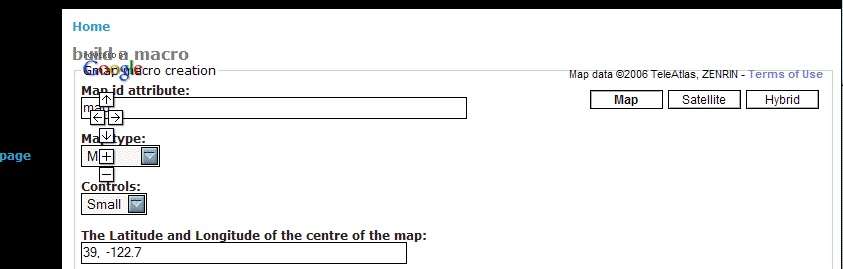
When I try to create a macro, I see the map controls, but the map itself never appears. Enclosed is a partial screen shot.
| Comment | File | Size | Author |
|---|---|---|---|
| gmap-macro.gif | 12.04 KB | hyperlogos |

Comments
Comment #1
webgeer commentedI'm going to assume that this was a short-lived error that has fixed itself.
It was probably caused by Google. I have seen similar problems in the past. If you still have this error, please reopen the issue and I can give some guidance to try and figure out what it could be.
Comment #2
hyperlogos commentedUh yeah, I still have the problem. I've had it for weeks actually, but didn't bother to file a request for a while because I figured it was transient, and then I didn't mess with it for a while.
I've tried removing the db tables gmap_* and then recreating them with the devel module, but no luck.
I also just tried the cvs version, again, no luck. One thing I did notice is that the map seems to flash into existence for just a brief moment, then disappear, leaving only the controls behind.
Comment #3
webgeer commentedFirst make sure that the default map sizes have 'px' included as part of it. So go to admin/settings/gmap and set the width and height to be something like '300px'.
If that doesn't fix it then try using a different theme. Try using the base blue maring theme.
If it still doesn't work post or email me your url and I will take a look and see if I can figure it out.
Comment #4
hyperlogos commentedAhh, the px was the problem. I see you are specifying the sizes for the window in the style directly from the gmap settings fields. Perhaps you could add a check to see if no units are specified, and add px to them if not? Or at the least make a change to the help displayed in the settings, so you know they are necessary?
Comment #5
webgeer commentedThat is probably a good idea. I started that one time, but it was a little more complicated than I first thought. However, I can do it.
Comment #6
bdragon commentedDone. The width and height controls on the settings page will now validate themselves, as of a minute ago.
Comment #7
(not verified) commented