I have a page views with selected fields to display as a table style format.
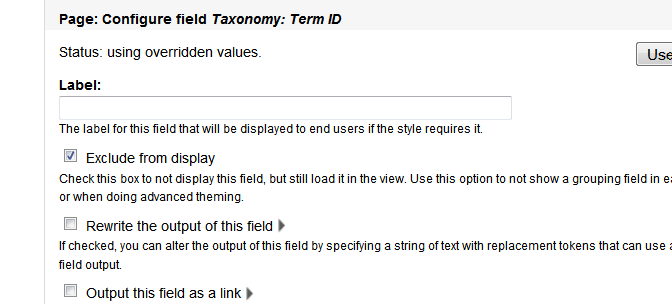
One of the field taxonomy id which I exclude from the display, (capture.png) this field will be used for views theming used for jquery stuff.
I use "Style output" suggested template, views-view-table--contact-us--page.tpl.php, where contact-us is my views name.
In the template file I did
dpm($rows) But I cannot find the taxonomy id.
From the description of 'exclude from display',
"Check this box to not display this field, but still load it in the view. Use this option to not show a grouping field in each record, or when doing advanced theming."
It said that is still load in the view but not display it.
Should I misunderstood something ?


Comments
Comment #1
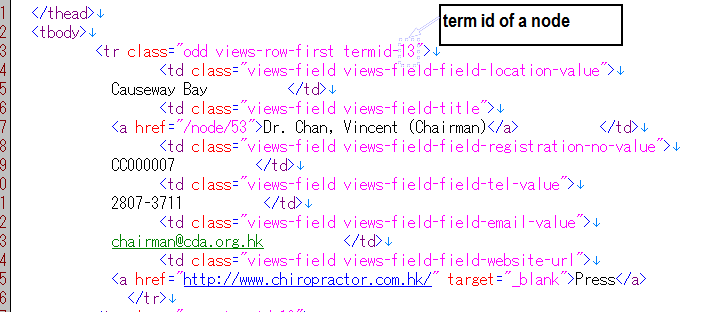
adrianmak commentedIt'll look like this
Comment #2
temp commentedFind solution? If yes, how?
Comment #3
OnkelTem commentedAny solution?
Comment #4
adrianmak commentedI modifiied the views-table template.
Checking of is this field is a tid field than put the value to a class and then don't output the tid field to table
Comment #5
OnkelTem commentedI don't get it.
If I exclude a field, its not in $rows anymore.
Also, its not in $view->result array!
Table output style is missing -fields template, instead, it is using:
-field
--table
---view
hierarchy. At any stage I can't access my fields - i.e. raw result.
p.s. I also tried to inject some vars which are probably missed in template, but in template_preprocess_views_view_table I don't get anything new.
Comment #6
adrianmak commentedSorry, I missed one point.
The tid field is not excluded in views and combine with my method on my last reply
this is my modified views-table template
may be it is not the best way but it works for me :-)
Comment #7
OnkelTem commentedWell, I found a kind of solution, but not 100% sure it will work as expected.
The problem with *-table.tpl.php template was that I couldn't find appropriate result set with "excluded" fields.
After digging I've finally found something, it is:
$view->style_plugin->rendered_fields
- an array with _ALL_ fields, including excluded :)
I added shortcut to this in a preprocess:
and now can access results in *-table.tpl.php like:
Comment #8
Letharion commentedI think this one could benefit from someone with more experience.
Comment #9
esmerel commentedComment #10
jofdesign commentedI have 2 questions :
- how does it work if the page views display as a other format (no defined format for example) and not as a table format ?
- I'd like to get a field value from an "exclude from display" field in a page-taxonomy-term.tpl.php so I can use this value out of the embedded views. How can I manage this ?
Thank you for your help.
Comment #11
mghatiya commentedSubscribing
Comment #12
merlinofchaos commentedYou an almost always find the safely rendered field value in:
Comment #13
alb commentedfor hide a field, which is the code and the right function?
I founded this functions:
hook_views_pre_render
hook_views_pre_view
hook_views_data_alter
hook_views_handlers
but not found a code example;
I want simple first that the view is visualized, hidden a field ;
by code php and not by set the option inner the view: Exclude from display
so not change directly the query but only the visualization of the page;
other hooks founded
hook_views_pre_execute
hook_views_pre_build
hook_views_data
hook_views_plugins
but think solutioin is in one hook of the first list
Comment #14
merlinofchaos commentedThe solution is in #12.
Comment #15
alb commentedok, but how can customize and which function to use?
for example for to hide a field image.
this is the view's code
Comment #17
pminfI had a similar issue: Using a list field named 'field_color' to style my row content. I have used the result array of the view object to solve it:
views-view-fields.tpl.php:
Comment #18
DrCord commented#7 worked great for me, thank you very much!