

 Come together with the global Drupal community in Rotterdam, 28 Sept – 1 Oct 2026. Sessions, contribution, connection, and Early Bird savings until 8 June.
I've checked the "dimensions" check box on the admin/store/settings/products page, but the dimensions are not showing up on my product pages. All other attributes are displayed, but not the dimensions. Any ideas? Thanks.
| Comment | File | Size | Author |
|---|---|---|---|
| #13 | dimensions.gif | 3.04 KB | clayj |
| #10 | template.php_.tar_.gz | 6.06 KB | sociotech |
| #4 | dimensions.png | 48.12 KB | jeremycaldwell |


Comments
Comment #1
jeremycaldwell commentedHave you tried using another theme such as Garland to see if the dimensions attributes show for you? If they don't then it's a permissions issue or configuration issue with Ubercart. If it does then it's an issue with the theme and we'll look into it.
Comment #2
paddy_mul commentedI'm finding the same issue. I checked with the Garland theme and the dimensions and weight both appear. When I switch back to the acquia prosper theme they are gone again.
Comment #3
clayj commentedYes, the dimensions do show up in Garland, but not in Prosper. Thanks for any help/advice you can provide.
Comment #4
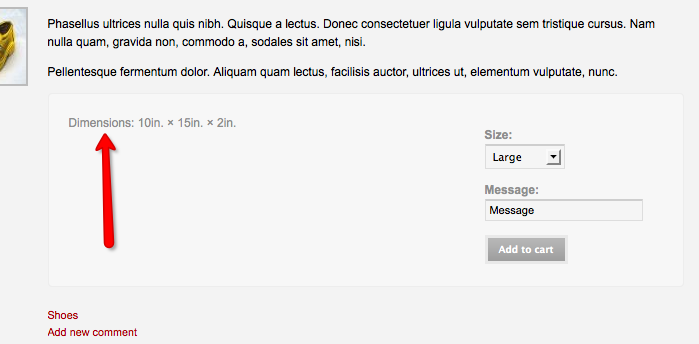
jeremycaldwell commentedI tried locally to get the dimensions to appear on my site and it works just fine. Attached is a screenshot of that in action. I went to the "Product settings" page (/admin/store/settings/products/edit/fields) and checked the box to show the dimensions and it shows up.
Not sure why it isn't showing up for others though.. perhaps try updating the Fusion Core and Acquia Prosper themes?
Comment #5
stephthegeek commentedComment #6
clayj commentedOK. I've discovered that the dimensions will display as long as there is a value for each dimension. I generally don't have all 3 values for my products, so I've just entered the height and width, or even just the height. Without all three values, nothing shows up. Is there anything that can be done about this? Also, I'd really like to identify the dimensions; i.e. 5"w x 8"d x 12"h. Any ideas for doing that?
Lastly, thanks for this great (and free) theme. Despite these minor issues, I really like it.
Comment #7
stephthegeek commentedAh this is something in Fusion so it's possible to hide fields that aren't being used, eg. for digital products that don't have dimensions. But we hadn't considered the case of partial dimensions.
Comment #8
sociotech commentedclayj,
Okay, I've got a fix for this and I'd like to have you test it out. Are you comfortable applying patches? If not, I'll post a whole template.php file for you to swap out.
Thanks.
Comment #9
clayj commentedThanks for the quick response. I have no experience with patches, but I can do my homework and figure it out if necessary--whatever works for you.
Comment #10
sociotech commentedclayj,
Okay, I've attached a modified template.php file from the latest 1.0 release of Fusion Core (which I assume you're using). Try substituting it for your current template.php file and let me know if it displays correctly.
Comment #11
clayj commentedBam! That did it. Thanks, Sociotech.
I don't suppose you have any thoughts about how to identify the particular dimensions; e.g. 4"d x 6"w x 10"h? Or how how to hide a dimension if it's "0" while still displaying the other 2 dimensions.
Anyway, thanks again for the speedy fix.
Comment #12
sociotech commentedclayj,
Okay, given the degree of control you need I'm thinking it might be better to implement a solution in your node-product.tpl.php file instead.
I think we'll probably still roll the fix you tested into Fusion Core, but here is some code that sidesteps the issue and gives you the control you're looking for:
Replace this line in your node-product.tpl.php file:
<?php print $fusion_uc_dimensions; ?>with the following code:This code will only display dimensions that have a non-zero value, and it won't display anything if there aren't any non-zero dimensions. In addition, I've added the names of the dimensions to each value. Feel free to rename or remove those as needed.
Try it out and let me know if there are any issues with it.
Comment #13
clayj commentedThank you!
It works great now. The only thing is that the "x" isn't displaying properly. Here's a screen capture to show what I mean. Based on your code and my very limited knowledge of PHP, I don't see why it doesn't work.
Anyway, I would think a lot of people might want their dimensions to display this way. Perhaps it could be an option in the next version of Acquia Prosper.
Thanks again.
Comment #14
sociotech commentedclayj,
The "x" isn't displaying properly because it's a symbol rather than the letter "x" and your machine has a different character encoding. Just replace the x symbol in the code with the letter "x" and it should display fine.
Comment #15
clayj commentedThanks once again for all your help (and quick responses). You've made all my dimensional dreams come true.
Comment #16
stephthegeek commentedComment #17
aquariumtap commentedComment #18
Poieo commentedClosing as won't fix since the D6 version is getting no new development.