

 Come together with the global Drupal community in Rotterdam, 28 Sept – 1 Oct 2026. Sessions, contribution, connection, and Early Bird savings until 8 June.
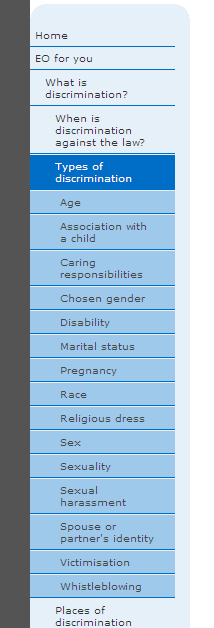
I'm trying to change the background color of the deepest level ul.menu. This way visitors can easily see in which 'section' of the menu/site they are. See attached screenshots of the menu on our current (non-Drupal) website. This is what I'm trying to recreate using Zen.
I haven't been able to do this using the active-trail class as that simply colors the background of the entire active-trail and not just the deepest level. I was unsuccessful targeting specific levels in the active-trail.
Does anyone know how to do this?
| Comment | File | Size | Author |
|---|---|---|---|
| active_menu_css2.png | 12.21 KB | RedTop | |
| active_menu_css.png | 8.18 KB | RedTop |


Comments
Comment #1
silurius commentedHave you looked at Menu Attributes yet? I have no idea if it will do what you need, but it's worth checking out as a possible alternative. You may be able to assign the appropriate class(es) there and get the same effect.
Comment #2
RedTop commentedThanks for that suggestion. :)
It looks as if that module allows me to target specific (static) menu items but it doesn't allow me to target something dynamic such as the deepest level ul.menu (sometimes a ul.menu is the deepest level and sometimes it isn't. The background-color should change accordingly).
Comment #3
hedley commentedMaybe try the Menu Trails module? http://drupal.org/project/menutrails
Or you may be looking at writing a theme function to add a class class to the current active menu or the deepest level of menu active.
Comment #4
akalata commentedThis is probably a bit of a hack, since I'm a newb at modifying the menu structure. But, you could approach it by creating a theme function to apply a class to the first
<ul>that's created by theme_menu_tree(), since the tree is built from the inside-out. Then you can use CSS to target that class within the active-trail.should generate HTML like:
and you can target the deepest active
<ul>usingli.active-trail ul.deepest {}Comment #5
RedTop commentedMarry me. :P
Not only did you hand me an excellent solution, you handed it on a silver platter as well!
+1 for adding this functionality to the Zen Theme!
Comment #6
spgd01 commentedAny one know how to adapt #4 for a multi level menu?
Comment #7
johnalbinThe 6.x-2.x branch is in bug-fix only mode.