

Closed (fixed)
Project:
FillPDF
Version:
6.x-1.x-dev
Component:
Code
Priority:
Critical
Category:
Bug report
Assigned:
Unassigned
Reporter:
Created:
20 May 2010 at 14:52 UTC
Updated:
9 Jun 2010 at 21:30 UTC
Jump to comment: Most recent file




Comments
Comment #1
goody815 commentedComment #2
lefnire commentedFirst try removing $ from your URL:
/fillpdf&fid=807&$webform[nid]=231&webform[sid]=becomes
/fillpdf&fid=807&webform[nid]=231&webform[sid]=If that doesn't help, hit me back
(Edit: I see I added the $ in my documentation, which threw you off. Sorry about that, and updated the documentation)
Comment #3
goody815 commentedthanks,
i'll try it out today and post up the results.
Comment #4
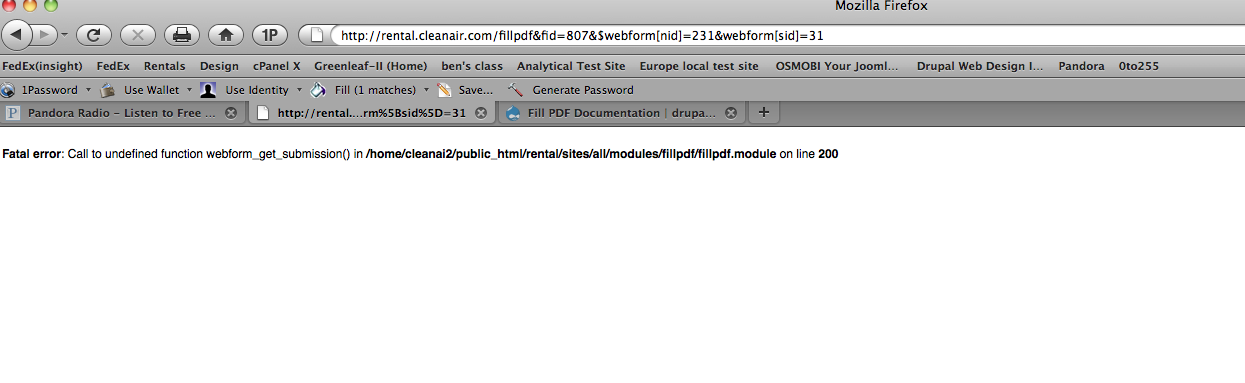
goody815 commentedI'm still getting the same error message. maybe i'm just putting the link on the wrong page. Should the link be on the webform page?
i attached a screen shot of the error message and the link is in the address bar.
Comment #5
goody815 commentedwrong screen shot in #4. attached is most current error screen shot.
Comment #6
goody815 commentedhere's an update on where i'm at with this. If I make the link /fillpdf?fid=810&nid=233 i get the pdf form to download, but it has the tokens in the fields (see attached screen pic #1). Can't seem to figure out how to get the submissions to get entered into the form and download. it keeps giving me that error message on line 200 of the module (see last post screen pic attachment). any ideas lefnire?
Comment #7
goody815 commentedComment #8
lefnire commentedIt seems you might have the webform setup with that 'submit' link manually going to the fillpdf URL? If that's the case, then the actual webform-provided submit button is bypassed, and a submission is never created -- so there's no data in the database from which to pull. You'd have to instead remove that link so the user can click the real 'submit' button, then add that link back in somewhere else -- post-submission. If this is not the case, hit me up.
Also, it looks like your fillpdf url has
&webform[sid]=-- it's looking for a blank submission number. You can either get that sid manually with php, or if you remove it altogether it will pull the most recent submission from the viewing user. Try/fillpdf&fid=807&webform[nid]=231If neither of these work, if you shoot me an admin login to your site via email, I can dissect a bit more (sorry about email vs issue-queue madness -- I'm pretty anal about keeping things on the issueu-queue so that other people can benefit, just email for sensitive information).
Comment #9
goody815 commentedThanks.
i do have the submit button set up just as submit. I can review all the submissions still. I put the link in the body of the confirmation page. It's currently set up using the php example from the directions. still no luck. i'll email you.
Comment #10
lefnire commentedOk, looks like 2 bugs in the module:
1) webform-3.x has a different setup, so webform_get_submission() doesn't work anymore. I'm going to have to code in support for both versions, ugh
2) the webform_tokens.inc file's not populating the PDFs properly, where it did before. Perhaps a token api change since I last visited the file?
These will take a bit of time, I won't be able to address these until tonight.
Comment #11
goody815 commentedThanks for looking into this for me.
Comment #12
lefnire commentedOk, I believe I fixed it. Try the latest fillpdf-6.x-1.x-dev (might have to wait a while, Drupal CVS commits take a bit to propagate)
Comment #13
goody815 commentedThanks lefnire. I'll upload it tonight and try it out. I'll post up tomorrow AM. Thanks again for your help and insight.
Comment #14
goody815 commentedLefnire, I installed the new 6.x-1.x-dev version this morning. it worked like a charm. thank you for all your help...
Comment #15
lefnire commentedWill roll an official soon. Wanna tack some other features on first