

 The 2026 Drupal Business Survey is open. Your response will help shape the future of the Drupal business ecosystem.
I've found that if I enter code on a page that contains previously entered multi-line code(s) with firefox... after I save and the page view reloads all previously entered codes are collapsed into one line each (i.e. linebreaks are removed within the pre tags - but only syntax highlighter related pre tags). Note that the newly entered code is not collapsed.
Safari and Chrome do not have this problem. This problem seems to affect Firefox only (have not tested on IE).
I've attached screen shots of where I enter code with Chrome and Safari with success (see syhi_1.png and syhi_2.png).
Then I use Firefox and all previous collapse (see syhi_3.png).
I restarted Firefox and tried to enter more code on that page, and the problem persists - previously entered code with Firefox is now collapsed, new code with Firefox looks OK (see syhi_4.png).
In terms of HTML you'll see something like this on your first code entry with Firefox (i.e. edit, add code, save, reload view)...
<p><pre class="brush: bash;fontsize: 100; first-line: 1; ">F1
F2
F3</pre></p>
If you try to add more code with Firefox the result will be as follows....
<p><pre class="brush: bash;fontsize: 100; first-line: 1; ">F1F2F3</pre></p>
<p>I just restarted Firefox. Let's enter some more code with Firefox...</p>
<p><pre class="brush: bash;fontsize: 100; first-line: 1; ">F4
F5
F6</pre></p>
Notice that the F1 F2 F3 code line has now collapsed.
Note that:
- <pre> tags that are not related to syntax highlighter are left alone (i.e. they do not collapse after using firefox)
- I am using the FULL HTML input filter
- using TinyMCE 3.3.1
- using Drupal 6.16
- using Syntax Highlighter 2.1.364 (javascript library)
- using Syntax Highlighter module 1.22
- using Wysiwyg Syntax Highlighter plugin 1.2
- using Wysiwyg Pre Element Fix 1.0-beta1
- SyntaxHighlighter is the only filter I have turned on
- have Pre Element Fix and SyntaxHighlighter turned on in TinyMCE buttons and plugins
- have Remove Line Breaks turned OFF in TinyMCE cleanup and output
- cleanup and output has only Verify HTML and Convert Font Tags turned on
- using Firefox on a mac
Any ideas what is causing this? Curious if other firefox users are experiencing this.
For long pieces of code that get collapsed, this is quite a critical problem, rendering the code unreadable.
| Comment | File | Size | Author |
|---|---|---|---|
| #7 | synhl.PNG | 51.61 KB | datune |
| #1 | syhi_1.png | 31.98 KB | s4j4n |
| #1 | syhi_2.png | 34.7 KB | s4j4n |
| #1 | syhi_3.png | 42.22 KB | s4j4n |
| #1 | syhi_4.png | 46.29 KB | s4j4n |



Comments
Comment #1
s4j4n commentedHere are the picture attachments related to the previous post...
Comment #2
s4j4n commentedAdditional fyi...
I'm using Firefox 3.5.9 (for Mac).
I'll try to test it on Firefox on a PC and report back.
Comment #3
ShadowMonster commentedI have similar problem but I find some issue how it in my case.
My System: Linux Ubuntu - Firefox 3.6.7
My options are:
HTML corrector -Off
HTML filter - Off
Line break converter - On
SWF Tools filter - On
Syntax Highlighter - On
URL filter - Off
reCAPTCHA Mailhide - Off
Rearrange:
URL filter
SWF Tools filter
Line break converter
Syntax Highlighter
And WYSIWYG Clean options only "Convert tags to styles" and "Verify HTML" are On.
I been trying different configuration and on it what I present up it work that:
1. I create content and put some code to Syntax highlighter so my code looks that (before I click save):
2. After click "Save" and go to edit page my code looks that:
And this is great ,my code is in multi-lines.
3. But if now I click again "Save" my code is going to:
And my code is only one line :(
So basically why editor is deleting BR tags?
Any suggestion appreciate.
Thanks
Comment #4
subhacom commentedI was having same problem. It was solved when I checked "Preformatted" in "Cleanup and output" for the corresponding profile (richtext in my case) under admin/settings/wysiwyg/.
Comment #5
ShadowMonster commentedThanks but for my case "Preformatted" option do not have any effect for it. I been trying different options combinations and still the best what I can avoid is this describe in post before. If I will find some more time Iwill try go deeper into this problem cause I know what is effect I just need find why is deleting BR HTML Tag.
Comment #6
jeremy.zerr commentedI have the same problem with
being stripped on 2nd save. I had also tried checking "Preformatted" under "Cleanup and output" but it did not fix the problem. I can also confirm that this happens on Firefox but not on Chrome.
Comment #7
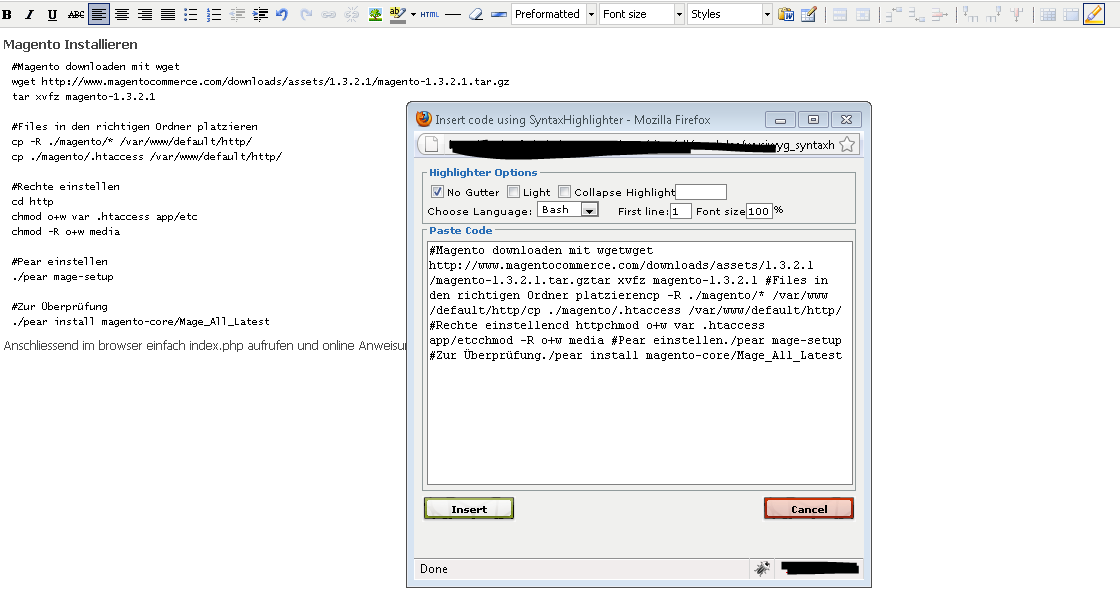
datune commentedI have the exact same problem, I am also being stripped on 2nd save. Have tried all the recommended settings, but did not work. I also noticed that whenever I set the focus on code that is inside a pre, and then click on the syntax highlighter button, the formatting is lost (see attached screenshot)
Comment #8
mattyoung commentedMoving this to the proper module.
Comment #9
meecect commentedI have created a new release (1.3). Please let me know if it solves your problem.