

Postponed
Project:
CKEditor 4 - WYSIWYG HTML editor
Version:
6.x-1.1
Component:
User interface
Priority:
Normal
Category:
Feature request
Assigned:
Unassigned
Issue tags:
Reporter:
Created:
4 Jun 2010 at 13:39 UTC
Updated:
17 Dec 2010 at 17:39 UTC

Comments
Comment #1
jvieille commentedAny solution / config settings for this very annoying issue?
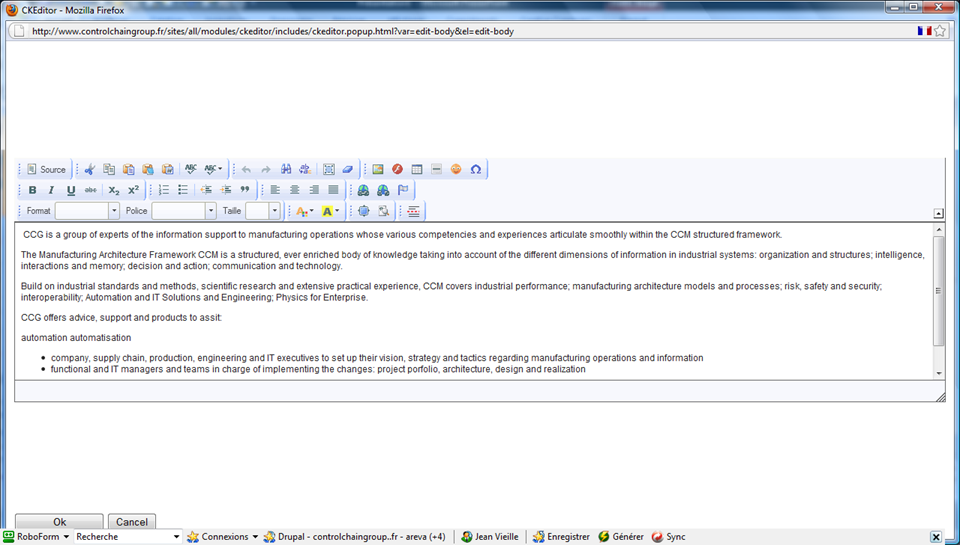
FCKEditor used to had a full screen, much more comfortable edition pop-up window
Comment #2
jvieille commentedAm I alone having this problem?
Comment #3
wwalc commentedhttp://dev.fckeditor.net/ticket/4606 - should be doable in 3.4
Comment #4
jvieille commentedThanks!
Comment #5
jvieille commentedCKEditor 3.4 is out now.
By the way, it seems to work.
What can I do? I don't understand anything they are talking about in the mentioned ticket
Thanks
Comment #6
jvieille commentedActually, Autogrow is implemented in CKEditor 3.4.
It normally allows the editor area to automatically grow as long as the content is added.
This does not work in the Drupal implementation.
My guess is that some hard coded settings in the module imposes the editor area layout, inactivating this gem.
(Probably the same that sets an initial height of about 400 px of the editor area in the popup window)
However, it is not exactly the problem I was mentioning: not having a growing area as long as the text expand, but having a full screen area when popping the editor window.
Thanks for considering supporting thess improvements:
- autogrow feature for both inline and popup editor
- full screen popup editor (or at least configurable initial height) - this shall be possible, as this is actually OK for the width
Comment #7
dczepierga commentedI think we try to work on it and fix it in next release of CKEditor module.
Comment #8
scottkent commentedOk so I found the line in the ckeditor.module that sets the height automatically.
Line:550
// sensible default for small toolbars
if (isset($element['#rows'])) {
$height = intval($element['#rows']) * 14 + 140;
} else {
$height = 400;
}
Also if you search for height:',v,' you can find one area that sets this to the container that has the iframe in it.
I really have bone to pick to get this to auto size like it does with the WYSIWYG module.
All I want is to set the size to the content.
Anyone?
keywords: ckeditor module height issue autogrow. default minimum height re-size to content