Closed (fixed)
Project:
Video
Version:
6.x-4.1-rc4
Component:
Code
Priority:
Critical
Category:
Bug report
Assigned:
Reporter:
Created:
7 Jun 2010 at 03:56 UTC
Updated:
22 Oct 2010 at 16:25 UTC
Jump to comment: Most recent file


Hello
When I am uploading a video after 99% (according to Chrome) a message pops up saying "An HTTP error 0 occurred. ?q=filefield/ahah/video/field_video/0"
I've changed my max upload filesize/max php script size but I haven't seen any results. I've also installed jquery_update and changed jquery.form.js with a new one without any luck.
Could you please help me?
Thanks a lot
| Comment | File | Size | Author |
|---|---|---|---|
| #16 | video settings.png | 34.97 KB | imDhaval |
| #16 | ffmpeg wrapper setting.png | 50.51 KB | imDhaval |
| #16 | error.png | 6.71 KB | imDhaval |


Comments
Comment #1
iLLin commentedTry the 4.x-dev version. I'm waiting on some more feedback and then I am going to push an alpha release.
Comment #2
iLLin commentedhttp://drupal.org/node/25274/release Alpha1 has been released.
Comment #3
whytewolf commentedI'm still having this issue on rc1
Comment #4
iLLin commentedI don't think this is a problem with the video module. Try reading over this thread to see if it helps you at all.
http://drupal.org/node/247009
Comment #5
whytewolf commentedthat thread did not help me, tho it did point me to hitting save which gave me a new error.
Fatal error: Call to undefined function ffmpeg_wrapper_get_file_data()
whats odd is i can find no ffmpeg_wrapper_get_file_data function anywhere and google turns up no results for this function.
Comment #6
iLLin commentedChange from ffmpeg_wrapper to ffmpeg for transcoding. See if that fixes you, I bet its a wrapper issue and the functions being called. He changes function names all the time lol.
Comment #7
jonathanmd commentedI just ran into this same problem. For me it was the Apache module mod_security that was preventing the uploads. Drupal has some issues uploading files and images when running Apache's mod_security using the default configuration settings. Here's what I did to identify the problem and get it working.
Besides that javascript error, there should be an error in the apache error log that you can check.
Error 1
Here's the first error I was getting in the apache error log.
ModSecurity: Request body (Content-Length) is larger than the configured limit (131072)The configured limit is 131072 BYTES! That's only 128 kB!!
Solution 1
Edit /etc/apache2/conf.d/modsecurity.conf and set SecRequestBodyLimit to a larger size than the default of 128 KB and then reboot apache. I set mine to match my max_upload setting from my php.ini. Remember it has to be in bytes!
More Info about SecRequestBodyLimit
Description: Configures the maximum request body size ModSecurity will accept for buffering.
Syntax: SecRequestBodyLimit NUMBER_IN_BYTES
Example Usage: SecRequestBodyLimit 134217728
Processing Phase: N/A
Scope: Any
Dependencies/Notes: 131072 KB (134217728 bytes) is the default setting. Anything over this limit will be rejected with status code 413 Request Entity Too Large. There is a hard limit of 1 GB.
Error 2
After I fixed that error I was able to upload files without a problem and things were running smooth...until I tried uploading a certain video. All my other videos uploaded fine except this one. I checked the Apache error log and saw:
ModSecurity: Warning. Match of "eq 0" against "MULTIPART_UNMATCHED_BOUNDARY" required. [file "/etc/apache2/conf.d/modsecurity.conf"] [line "60"] [msg "Multipart parser detected a possible unmatched boundary."]Solution 2
After digging around on teh internets I found the rule referenced in the error above will sometimes return false positives, which will then deny the request. To fix that just remove the "deny" from the rule so that it will simply log when these events occur.
Edit /etc/apache2/conf.d/modsecurity.conf and update the rule for MULTIPART_UNMATCHED_BOUNDARY, setting it to log only.
OLD
NEW (removed 'deny' from line 3)
Comment #8
mrlava commentedi have this same problem, doesnt matter what version of video i use or ffmpeg wrapper
i have no idea what the above post is talking about for a fix considering i dont even have a modsecurity.conf located anywhere on my system.
PHP Fatal error: Call to undefined function ffmpeg_wrapper_get_file_data() in sites/all/modules/video/transcoders/video_ffmpeg_wrapper.inc on line 162, referer: http://mywebsite.com/content/admin
due to this I can't even load the node edit page after enabling the ffmpeg_wrapper module option
using the ffmpeg alone instead of the wrapper does not work either.
i've set this up 50 times before on many different servers with no problem yet i've spent 2 weeks dealing with this one. any help would be greatly appreciated, thanks all
Comment #9
iLLin commentedUsing RC1 and you have installed it before? Try using 3.9 and see if you get the same issues as the HTTP 0 error is normally a server problem but if you can get it all working on 3.9 then I'll try to take a look as I cannot duplicate this.
Comment #10
travismiller commentedin reference to #5 and #6 above, it appears the correct function call is ffmpeg_wrapper_file_data
Comment #11
hypertext200Fixed in dev
Comment #12
rohiniyadav298 commentedComment #13
hypertext200This is fixed in the latest build.
Comment #14
hypertext200Reopen if this is still exist.
Comment #16
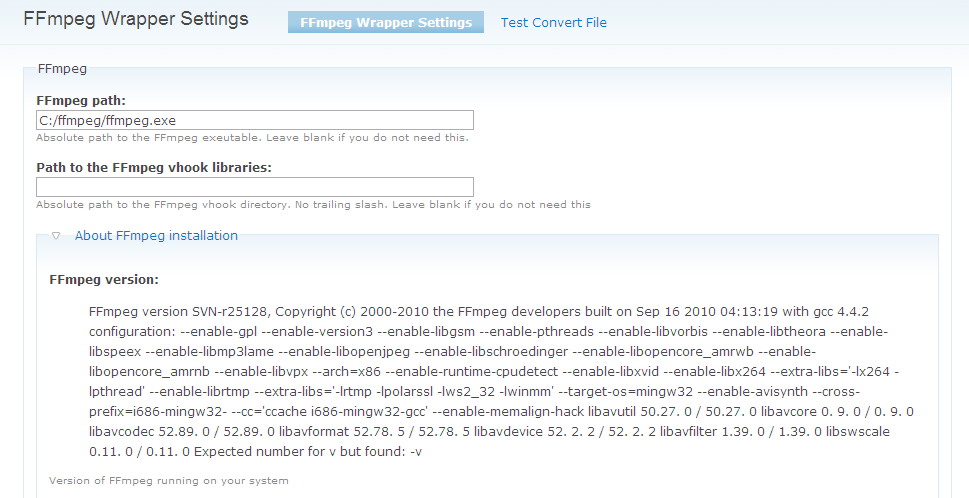
imDhaval commentedi am using windows 7 & video 6.x-4.1-rc4 & FFmpeg Wrapper 6.x-1.1-beta2
in Video transcoder, i was using ffmpeg for transcoding n it is working
then i changed my video trancoder to FFmpeg Wrapper,
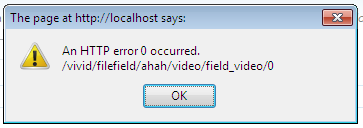
& when i upload video this error occurs "An HTTP error 0 occurred. /vivid/filefield/ahah/video/field_video/0"
[
in my php.ini
max_execution_time = 300 ; Maximum execution time of each script, in seconds
max_input_time = 300 ; Maximum amount of time each script may spend parsing request data
memory_limit = 128M ; Maximum amount of memory a script may consume (16MB)
]
so what is the problem??
plzz help.
Comment #17
hypertext200It seems somethings is wrong with the video conversion settings. If manage to set up them correctly then it should work.
Comment #18
hypertext200Comment #19
hypertext200Comment #20
errand commentedMy server support fixed it by increasing mod_fcgid
Comment #21
verta commentedI am also seeing
Call to undefined function ffmpeg_wrapper_file_data
using video rc4 and ffmpeg wrapper dev release from 9/30/10.
Changing video to use ffmpeg with no wrapper fixed it. Wrapper is giving me FastCGI issues, so I'm moving ahead without it.