Closed (fixed)
Project:
Wysiwyg
Version:
6.x-2.1
Component:
Editor - CKeditor
Priority:
Normal
Category:
Support request
Assigned:
Unassigned
Reporter:
Created:
7 Jun 2010 at 15:33 UTC
Updated:
6 Oct 2010 at 13:10 UTC


I installed the latest version of CKEditor (3.3), yet when I go to create a page on my site, the editor does not display properly. It displays as shown in the attached screenshot. I was previously using FCKEditor and experienced no problems. Any suggestions as to what I might be missing? I'm running Drupal-6.16. Thanks.
| Comment | File | Size | Author |
|---|---|---|---|
| ckeditor_screenshot.jpg | 19.99 KB | bill_redman |

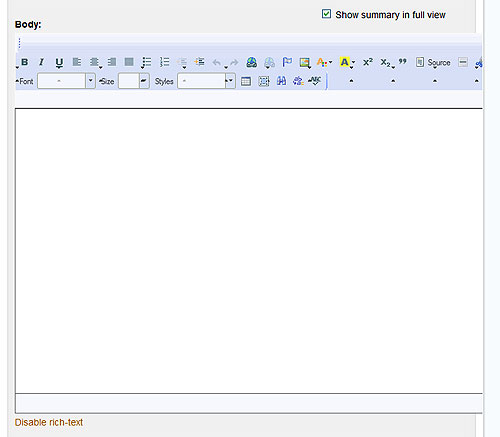
Comments
Comment #1
twodLooks like you're using the office skin. Did you override the default value using hook_wysiwyg_editor_settings_alter or are you encountering the same problem as in #737318: ckeditor skins problem?
The way Wysiwyg works now, the module doesn't have the capability to group buttons - so they're all in one big group - and since CKEditor will try its best at keeping all buttons in a group on the same row, some rendering issues appear when enabling lots of them. (The default state when no buttons are explicitly enabled is not affected as it uses CKEditors own toolbar definition, which has groupings.) These rendering issues are annoying when using the default Kama skin as well as it will make some buttons appear to be placed between two rows. Sadly, it looks like it just gets worse when using the Office skin. That part of the problem will fix itself when #277954: Allow to sort editor buttons gets in, but you may want to try looking into if any other styles from your theme is interfering with the toolbar. The Firebug extension for Firefox should be able to find if any styles other than those belonging to the editor itself are being applied to its toolbars by accident.
Do the [exact] same issues appear when using Garland?
Comment #2
bill_redman commentedAfter I encountered my problem yesterday, I disabled Wysiwyg and installed CKEditor as a standalone module and all worked fine. In doing this, though, I saw that the admin interface for CKEditor using Wysiwyg is quite different from that of CKEditor standalone. Yesterday, I had explicitly checked the buttons I wanted on the toolbar. After reading your reply, I again enabled CKEditor with Wysiwyg, but this time did not enable any buttons. The toolbar now displayed properly in what appears to be the Office skin. Although I'd prefer to use the Kama skin, this will be fine for my purposes. I haven't yet gotten brave enough to start making changes to the code. Maybe it's time to take that step. I read the other threads you referenced, but I need to go back and read them more closely. I'll also look at the styles as you suggested. In the meantime, I think I'm good for the time being. Thanks very much for the information.
Comment #3
sunLooks like this is resolved.
Comment #4
bill_redman commentedYes, it has been resolved. The problem involved the Office skin. I renamed that folder so that the editor would find the Kama skin which did not exhibit the problem. My apologies for taking so long to provide an update. Thanks again to TwoD.