

 Come together with the global Drupal community in Rotterdam, 28 Sept – 1 Oct 2026. Sessions, contribution, connection, and Early Bird savings until 8 June.
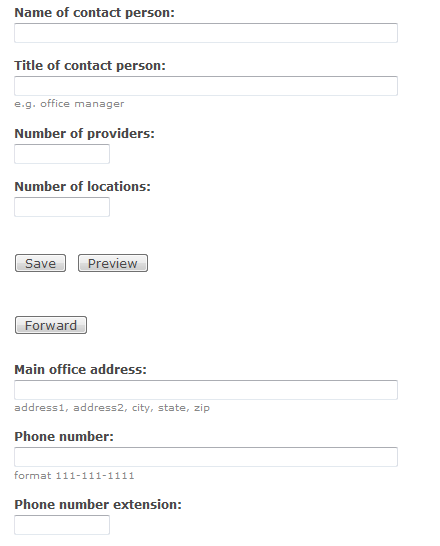
In my pageroute the buttons appear above the content, but I want them at the bottom.
Is this possible?
Cheers
Ben
(if the submit buttons should be appearing at the bottom, let me know and I can try and provide more info)
| Comment | File | Size | Author |
|---|---|---|---|
| #3 | pageroute.png | 12.42 KB | namtih58 |
| #1 | pageroute.jpg | 27.63 KB | bkno |


Comments
Comment #1
bkno commentedComment #2
brei9000 commentedI was just wondering the same thing! It would be nice.
Comment #3
namtih58 commentedHaving the same issue but with the buttons in the middle.
Comment #4
namtih58 commentedThe issue for the buttons appearing in the middle, is actually related to the #weight attribute. It appears that the buttons are inserted immediately after the Item with a weight of 0. The workaround is to go to the DB and change all the weight attributes of your content type fields to negative numbers with the last item before where you want the buttons to appear having a weight of 0.
Comment #5
brei9000 commentedI'm having the same issue. I've added pageroute to my profile pages.
The HTML looks like this:
But I'd like the button to come after the fieldset.
Ideas anyone?
Comment #6
white_pawn commentedIt's absolutely counter-intuitive, and kind of hard to believe the developer(s) really wanted to have it at the top. I'm also hoping someone will come up with a solution.
Comment #7
bentekwork commented#4 gave the correct solution to this. Simply login to phpMyAdmin (if using mysql) navigate to the table named `content_group` and click the pencil to edit the row with the content type you are looking to move the buttons for. Change the weight field to -10 and then click save. Repeat for any other groups for the same content type. When complete login to your drupal installation and flush caches.
Comment #8
white_pawn commentedDidn't work. I'm using Pageroute to guide users through setting up their profiles, so I'm assuming the appropriate MySQL table is 'profile_fields' (the weights can also be adjusted via 'admin/user/profile'). I even tried assigning the whole profile form a weight of -10 via a custom module, but to no avail.
EDIT: The custom module trick worked! In my first attempt, I left out the fieldset title (in my case, it's 'My profile'):
Comment #9
brei9000 commentedThank you white_pawn! That worked for me!
One part that confused me... what is below - 'wizard' - referring to?
if(arg(0) == 'wizard'){If I comment that line out (and the corresponding end bracket) it works great.
Comment #10
charles.holtzkampf commentedHi All,
Im having problems applying the code above.
I have the following:
case 'profile_node_form': \\I use content profile, so I changed this to reflect that
if(arg(0) == 'registration'){ \\I assume this is the path set on your route ?
$form['profile']['#weight'] = -10; \\ Not sure what I put here. I changed this the name of my content type
Any help would be appreciated
Comment #11
charles.holtzkampf commentedIve changed the below,
Comment #12
Anonymous (not verified) commentedHi all,
Well, I am sure that the above "insiders" solutions may seem fine to some, but they are not satisfactory to me.
The fact of the matter is that Drupal's standard "save", "preview", etc. buttons appear in the proper place, always. Namely below the entire body of content it pertains to. That should be the same here, for pageroute's buttons.
I am sure someone can get this working properly, off-the-shelf. Nobody should have to go to the DB and/or run custom PHP code to get this behavior right.
IMHO.
Best to all,
Bob
Comment #13
FooZee commentedwell, #8 worked, but this has to be done for each page on ur route ! so I strongly support #12
@brei9000
if (arg(0) == 'ur_route_path');helps u only apply the following edits (changing #weight) to ONLY the page rout, protecting the other forms with the same $form_id !Comment #14
_vid commentedThanks to namtih58 #4 for identifying the issue.
I wanted to point out that you can work around it without mysql DB changes or custom php modules.
Simply disable js and then edit the field weights in your content type.
Steps:
Navigate to your content type and manage fields: (Administer > Content management > Content types > Your_Content_Type > Manage Fields). Sample URL: /admin/content/node-type/CONTENT_TYPE/fields
Now disable javascript and reload the page. Now you'll see the 'weight' field exposed.
Update all the weights to negative numbers and the pageroute buttons will show up at the bottom of the form.
Personal work flow note: I use the QuickJava Firefox extension to disable/enable javascript quickly.
There's a patch under review here: http://drupal.org/node/829170#comment-3523396 which appears to move the buttons to the bottom by default (weight: 200).
Comment #15
arvindkumargupta commentedHi,
I was facing the same issue in Drupal 7 and I used the field weight module to resolve this issue.
http://drupal.org/project/field_weight
Thanks