

Closed (duplicate)
Project:
SMTP Authentication Support
Version:
6.x-1.x-dev
Component:
Code
Priority:
Normal
Category:
Bug report
Assigned:
Unassigned
Reporter:
Created:
18 Jun 2010 at 20:21 UTC
Updated:
7 May 2018 at 16:55 UTC
Jump to comment: Most recent, Most recent file

Comments
Comment #1
HS commentedDo I need to configure phpmailer for Gmail? Is there any other instructions outside of the install.txt that I am missing?
Comment #2
tscadfx commentedPost all of your settings in order to review that they are correct. Leave out personal information (i.e. real email address and password).
Comment #3
HS commentedHi,
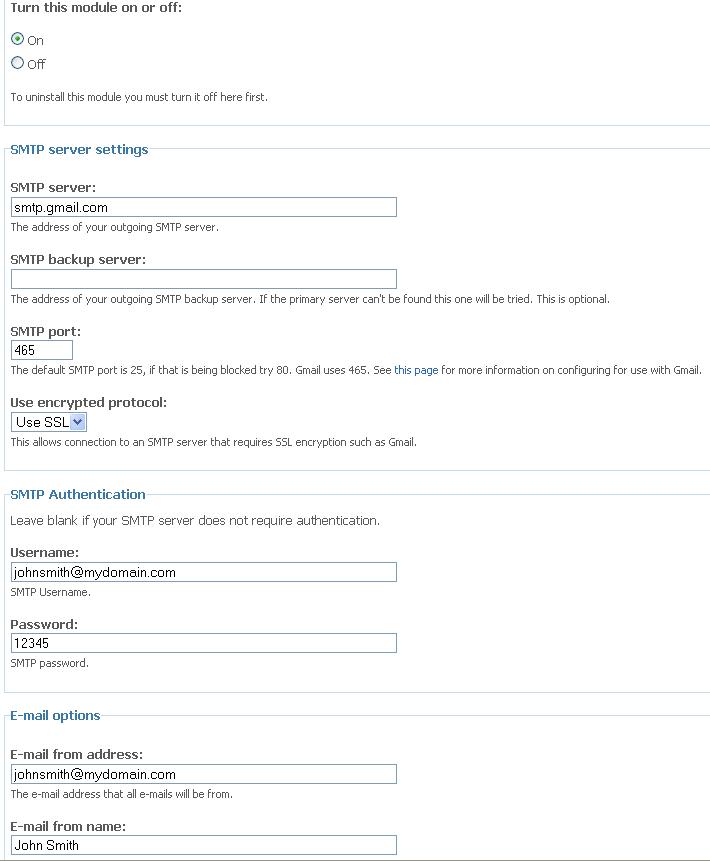
See the attached screenshot.
I see this now: SMTP -> ERROR: Failed to connect to server: Connection refused (111) SMTP -> ERROR: Failed to connect to server: php_network_getaddresses: getaddrinfo failed: Name or service not known (0)
And the following in my logs:
Error sending e-mail from johnsmith@mydomain.com to someone@example.com : SMTP Error: Could not connect to SMTP host.SMTP -> ERROR: Failed to connect to server: Connection refused (111) SMTP -> ERROR: Failed to connect to server: php_network_getaddresses: getaddrinfo failed: Name or service not known (0)Comment #4
HS commentedBTW, the screenshot includes the settings you asked for and I have changed the email addresses and other sensitive information that were generated by the error messages and also included in the screenshot.
Comment #5
keithm commentedTry port 587 with TLS encryption protocol.
Comment #6
thirstysix commentedSMTP -> ERROR: Failed to connect to server: Connection refused (111)
SMTP Error: Could not connect to SMTP host.
I change the port 587 with TLS encryption protocol, but repeat the same error.
Comment #7
HS commentedKeith in my response above I have pointed out that I have indeed used port 587.
Comment #8
HS commentedSorry.. duplicate..
Comment #9
HS commentedI've tried all combinations. Nothing works. Been more than a month now since I posted this but couldn't get any help with this from the developers so I've discarded the module.
Here is another alternative folks: http://drupal.org/project/phpmailer
Comment #10
keithm commented+1 on phpmailer. I converted all my sites to it a couple of months ago. Works flawlessly on gmail.
Comment #11
geeksforpc commentedPerhaps your hosting account system wants you to use email of your domain like abc@yourdomain.com which is already setup one their email system. Try to use the follow setup. It worked for me. Your SMTP server should be relay based instead of normal smtp server like smtpout.secureserver.net:
SMTP Server: relay-hosting.secureserver.net
SMTP User: abc@yourdomain.com
SMTP Passwork: leave blank
SMTP Port: 25
SMTP Authentication: No
SMTP Encryption: None
Good luck
Comment #12
franzThere are thousands of issues related to this already, if none of the solutions are work, please reopen.
Comment #13
oliver huynh commented#11 works for users that hosts sites in GoDaddy
Comment #14
billyroebuck commentedI ran into the same problem with a Drupal 6 site, where the client uses Godaddy for hosting and Gmail for their email.
After spending a lot longer than I'd like to admit on this, I tried point #11 but it didn't work until I left the SMTP user as blank.
Under SMTP Auth Support settings:
SMTP server: relay-hosting.secureserver.net
SMTP port: 25
Use encrypted protocol: no
SMTP auth (make sure you set BOTH to blank)
--email: blank
--password: blank
Email from: {your@email.com}
I hope this helps!
Comment #15
IreOke commentedYou are my personal live saver, I was like 3 days looking for that anwers...
Comment #16
gjpino83 commentedyou are the best!!!, I´ve been working on this for weeks!, thank youuuuu!!!!
Comment #17
bottle commentedThis saved me too!! Thanks a lot!
Comment #18
MerrySea commentedJust to confirm, this was the resolution to fix the SMTP problem on GoDaddy. It only took 3 days to find this solution.
Comment #19
charlie charles commentedUsing
Digital Ocean Hosting
Ubuntu
LAMP
I fixed it by uninstall smtp module
Then only use PHP http://drupal.org/project/phpmailer
Comment #20
skrtvm commentedthanks geeksforpc..
It works for me too.
Great... I have fed up by this problem for last 2 days...
thank you https://www.drupal.org/user/976928
Comment #21
cprofessionals commentedI have a lot of apologizing to Godaddy.... #14 worked (thanks billyroebuck). Actually godaddy was my backup I seem to have the same issue authenticating to an exchange server as well. Any idea why proper authentication does not work?
Comment #22
unicus.blr1@gmail.com commented@billyroebuck, I made changes according to your configuration, but i still getting error. i am using prestashop, not php mailer.
Error: Please check your configuration
Connection could not be established with host relay-hosting.secureserver.net [Connection refused #111]
Please any one help,How to solve this error?
Comment #23
rick.kowal commentedFor my particular case connecting to Gmail, I need to let Gmail know that I was allowing "less secure apps" to access my gmail account (this was testing from local development setup). When I adjusted those settings in Gmail, everything worked as expected. https://support.google.com/accounts/answer/6010255?hl=en