

 The 2026 Drupal Business Survey is open. Your response will help shape the future of the Drupal business ecosystem.
Here is my configuration:
- ImageMagick and Ghostscript and module dependencies are installed
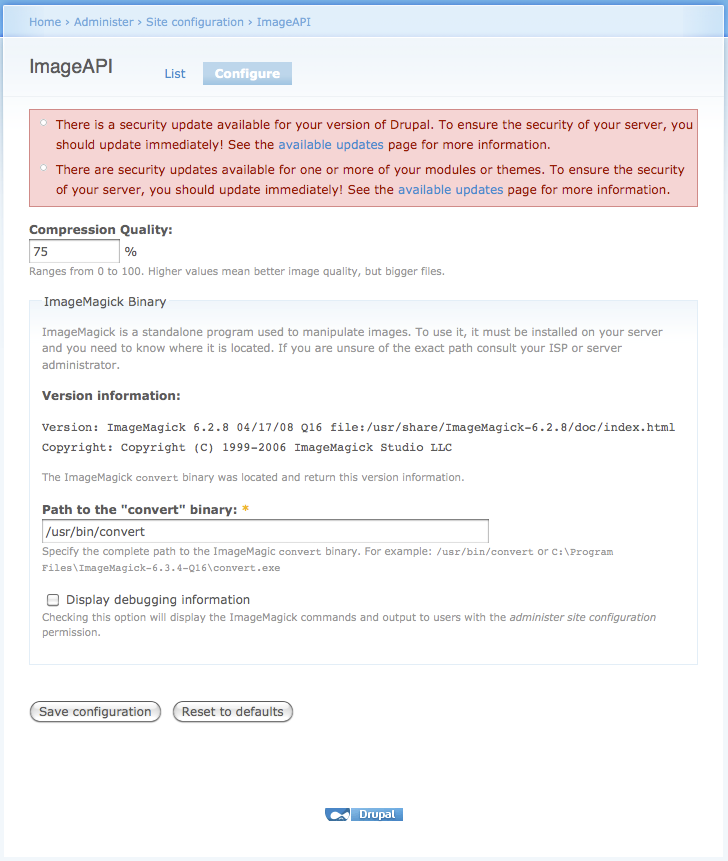
- ImageAPI is set to default to ImageMagick. It sees the IM version info and the path to the convert binary (/usr/bin/convert)
- Image uploads work fine and are placed in sites/default/files/images
- Content type has field_pdfdoc. When managing the fields the following is reported successful:
ImageMagick command: /usr/bin/convert -density 624x468 'sites/all/modules/pdf_to_imagefield/imagemagick_test.pdf' 'sites/default/files/imagemagick_test.jpg'
ImageMagick output:
Target ImageField is field_myimg. Image Attach settings are enabled and max number is unlimited. Path is sites/default/files.
- When creating content, I am able to upload my pdf doc. It then says "Waiting in queue".
- Drupal reports cron jobs run successfully (every 5 minutes)
After all this, the images never appear in my files directory. They remain in the queue (where do they get queued?). Am I missing something? Thanks in advance!
| Comment | File | Size | Author |
|---|---|---|---|
| #8 | PDF-to-thumb-editscreen.png | 115.74 KB | rustyleaf |
| #8 | PDF-to-thumb-managefieldsscreen.png | 146.28 KB | rustyleaf |
| #8 | PDF-to-thumb-displayfieldsscreen.png | 89.69 KB | rustyleaf |
| #8 | PDF-to-thumb-PDF-field.png | 207.5 KB | rustyleaf |
| #8 | PDF-to-thumb-PDF_thumb-field.png | 216.8 KB | rustyleaf |


Comments
Comment #1
iamsoclever commentedI tried running this command manually, and it threw errors because IM couldn't find the file...
/usr/bin/convert -density 624x468 sites/all/modules/pdf_to_imagefield/imagemagick_test.pdf sites/default/files/imagemagick_test.jpg
So I added the full paths /Users/myusername/Sites/drupal and that worked just fine. So, it seems that I need to somehow let drupal know the full path.
My first thought was to change the document root in the Apache config from DocumentRoot "/Library/WebServer/Documents" to
DocumentRoot "/Users/myusername/Sites/drupal" and restart, but it didn't seem to help.
Comment #2
jemp commentedI have spent almost the whole day trying to get this to work and I am totally broken! It seemed that I had finally configured everything correctly (which almost killed me as this is my first website) and even though I have run cron a few times the pdf files are just sitting in the queue. Can anyone tell me in idiot-proof terms what I need to do?
Comment #3
Durrok commentedNot sure if this is related but the issue that I had getting it running was in the pdf_to_imagefield table one of my entries had a 0 for it's value instead of the name of the pdf. After I deleted that it worked like a charm.
Hope that helps!
Comment #4
jemp commentedsorry that I sound like an idiot but where do I access the pdf_to_imagefield table?
Comment #5
2ndmile commented@ Durrok - I think you are on to something here... I looked in the pdf_to_imagefield table and there were a bunch of entries that referred to file ids (fid) that did not exist. The `field`, `density_x`, and `density_y` columns were blank for these records.
I deleted and it is running as normal again.
Theory: The module entered in record for a file to be converted that was deleted before conversion. It did not delete the record and there did not run. Obviously more testing is needed.
Comment #6
jemp commentedI just downloaded a free program PDFCreator that converts PDF files to images - quick, easy and free! Now my files are already images and I will just upload them as any other image. It is a neat solution for clueless web people like myself.
Danielle
Comment #7
arsenalpilgrim commentedI thought my problem was single pages. However, applied the page and still have the problem with single page. Now it doesn't create multi-page images. Only on one occasion have I been able to make a conversion work.
Imagemagick is installed correctly, as is ghostscript.
I had it work just once after applying the patch.
I set up a simple node: title, description, a field to upload a file. Two extra fields as per installation instructions: a field to upload the PDF image and a field that holds the image conversion from the PDF field file.
When I look in the database at the pdf to image table, I see two entries.
pid fid field density_x density_y finished
31 54 0 0 0
32 55 field_imageresult 100 100 0
Cron was run several times. Field in first entry in table remains empty.
Clues? Where else can I look to find more error messages/information?
I'd like to help, but will have to move on and find an alternative. For short time can try more testing.
NOTE. When I applied the patch, and then went to look at it, the version line wasn't updated. But when I checked the code, it matched the patch file.
NOTE2. The above test was using a multi-page PDF file.
Thanks,
Comment #8
rustyleaf commentedSame problem... I just can't get it convert a single image from PDF. Really can't understand what's going wrong :(
I have attached screenshots of my setup including the different options chosen and how the content fields are configured. I have set up an image cache preset as-well (you'll see in the PDF-to-thumb-displayfieldsscreen.png image)
Does the new image get saved in a files directory or in the database and can this be set/changed?
I have also attached a screenshot of my image api settings.
To begin with I just want to get the module working - beyond that I need to convert over 4000 single and double page pdf's to images...
Would appreciate some feedback - if you've got the knowledge.
Cheers
Comment #9
rustyleaf commentedThere was one entry in the pdf_to_imagefield table - I deleted this using phpmyadmin. I also deleted all PDF-to thumb content.
It now appears to work albeit with eroors associated with the following errors:
**** The file has been damaged. This may have been caused **** by a problem while converting or transfering the file. **** Ghostscript will attempt to recover the data. ESP Ghostscript 815.02: Unrecoverable error, exit code 1 convert: Postscript delegate failed `sites/default/files/9rvuwu5dqxykuu3.pdf'. convert: missing an image filename
**** Warning: CS/cs (setcolorspace) operand not a name: [/ICCBased {31 0 resolveR}] **** ****
but I imagine this has to do with ghostscript - but its working!
Comment #10
tigron commentedI'm not able to get a single page PDF to generate but I have no problems with multi-page PDF's. Is there someone that can confirm if the setup is wrong or if it's an issue with the code ?
Update: It seems that there was an issue with the code. Applied the patch and now all is well.
Comment #11
elamanTrue. There is an issue with the code. Module generate no errors and tries to convert pdf files from queue which was deleted and somehow left record in queue table... >_<
Comment #12
elamanComment #13
khalor commentedAlso getting an issue (no error sent to log, page is converted and visible in folder but not sent to imagefield) with single-page PDFs. Multi-page PDFs work fine.
Is there a patch we can review?
Comment #14
khalor commentedOk, after some pretty extensive use of this module I've found the following...
Aside from the single-page issue noted previously (which should be split off into a separate issue) I've found that when adding nodes using any content type that contains a Filefield, a new row is added to the pdf_to_imagefield table:
Then with these blank rows in the table each cron run is attempting to convert PDFs that aren't PDFs, have no target field, etc... so the row is never given a 'finished' value and any subsequently added nodes that DO have a 'PDF to Imagefield' field are never processed.
This occurs whether the filefield widget be File upload, Image, Image with cropping... SWFUpload is curiously exempt though that could be connected to the unlimited/multiple uploads setting - I have yet to try that with the other widgets.
Pretty sizeable bug although I can't for the life of me figure out where it's coming from... I'm no module developer though.
Can anyone else replicate this?
Comment #15
Durrok commentedKhalor - Yes, you are describing the exact same issue I had with the module. Luckily after setting it up the first time and removing the bad rows it has functioned perfectly.
Comment #16
khalor commentedStill needs a proper solution but I've got a workaround (of sorts).
Made a change to the pdf_to_imagefield_check_file function (line 261 of the dev branch):
(note this function must return true for a new row to be written to the pdf_to_imagefield table)
(sorry not really set up to make patches at my current job, if anyone would like diff it and post here that would be appreciated)
Now the function checks whether the file being written to the db is in fact a PDF. This of course shouldn't be necessary, as the other checks should only validate if the field that passed the file was a PDF to Imagefield... but they don't. And despite my best efforts to dump/inspect the $file object it passes I couldn't get any results (hence the field_file_load call).
I'm leaving this as 'needs work' as this fix won't help if you allow PDFs to be uploaded elsewhere on your site to ordinary Filefields. Also there's the additional performance impact of the field_file_load call but with everything else this module is doing I think that's acceptable.
I think the problem itself lies in the use of hook_file_insert being called on every Filefield, but I can't find any documentation on the function, and the checks in the function above don't seem to do anything.
Comment #17
dman commentedI agree that hook_file_insert is probably not the best place for this trigger. Maybe we can move it to hook_nodapi('update') like normal
Comment #18
dman commentedVersion 6.x-2.0 is out. Pretty much every phase was rewritten or shifted elsewhere in the 2.x rewrite, whatever was happening here - ain't happening no more.