

 The 2026 Drupal Business Survey is open. Your response will help shape the future of the Drupal business ecosystem.
Create a (sophisticated, easy-to-use, powerful, beautiful, AJAX-powered and what-not) admin interface for creating and configuring search servers and indexes, configuring the indexing process and viewing search-related information.
Add the path in the .info file and a link in a watchdog() call in .module (marked by @todo).
| Comment | File | Size | Author |
|---|---|---|---|
| #19 | screen-v2.png | 26.83 KB | drunken monkey |
| #16 | screenshots.zip | 205.38 KB | drunken monkey |
| #15 | search-category.png | 15.94 KB | Bojhan |
| #15 | add-search.png | 18.6 KB | Bojhan |
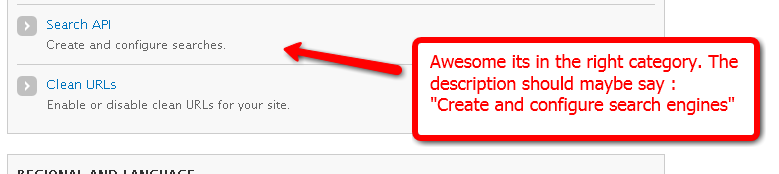
| #15 | search-overview.png | 41.18 KB | Bojhan |









Comments
Comment #1
drunken monkeyWorking on it. Just posting for people who would be interested in testing: Attached is a minimal module I use for testing the admin UI (which wouldn't really be possible without defined service classes).
Comment #2
Bojhan commentedIf you need me to review, post some screenshots or a demo somewhere.
Comment #3
drunken monkeyI'll see what I can do regarding a demo site. Not so easy to organize. But at the moment the UI is far from finished anyways.
And btw: The latest version of the little test module can be downloaded at http://betrunkeneraffe.be.funpic.de/search_api_test.tar.gz from now on.
Comment #4
drunken monkeyUpdate: I had planned to have this done by today, but as per usual I quite underestimated the workload here.
I hope I can get it to work by Thursday, because I'll be out of town this week-end. I think at least that should be possible, most of the code can be copied anyways.
Everything related to servers is already working and indexes can be created.
Comment #5
Bojhan commentedScreenshots please :)
Comment #6
drunken monkeyScreenshots!
Comment #7
drunken monkeyI didn't make it completely, but the admin UI is almost done now. The following things are working:
- Showing all servers and indexes.
- Adding, editing and deleting servers.
- Adding, editing and deleting indexes, adding the pre-/postprocessing workflow of indexes.
Still missing are:
- Buttons / links for directly indexing content, scheduling an index for re-indexing and clearing an index.
- Setting the fields to be indexed, along with their type (string/fulltext or maybe also more detailled datatypes).
Comment #8
Bojhan commentedWhy are actions tabs? they should be actions
Comment #9
drunken monkeyYou are right, I fixed that. As being still new to D7, I didn't really think of actions.
Comment #10
Bojhan commentedOk a little bit deeper review.
Comment #11
drunken monkeyThanks for the review!
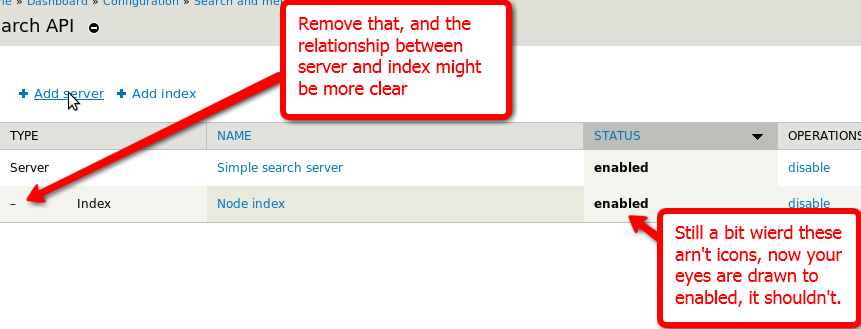
* Indentation: This is to show that the index belongs to the above server. I thought a while about this but didn't come up with a better way to visualize this. I'd be grateful to get a better suggestion for that, I don't really like that myself.
* Icons: If you've got some idea on how they should look, I could use icons, although I don't think they would improve the look that much. If I don't use icons, is displaying "enabled" in bold still OK?
* "click to enable": I just thought, such one-click functions could/should be displayed directly with their items. (For indexes, I'll also add re-indexing and clearing the index there. Those I really wouldn't know where else to display.) Just displaying the link in the overview would be a bit strange, I think, but displaying it as a checkbox when editing felt also kinda wrong, mixed with all the other settings. Again, suggestions are welcome.
I'll fix the others (and add a few bits) and get back with some more realistic examples.
Comment #12
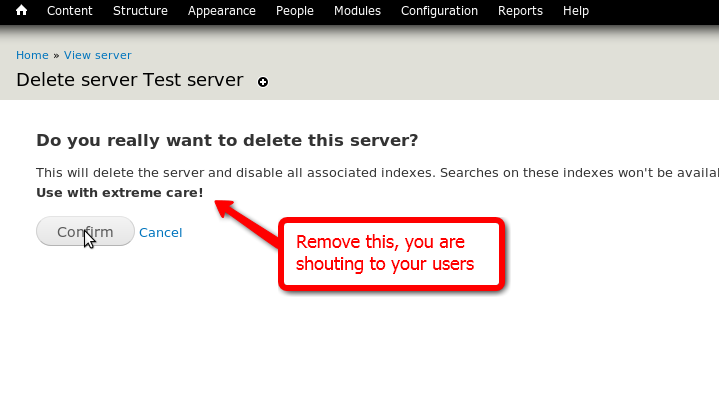
drunken monkeyOK, the admin interface is finally completed. Attached is another bunch of screenshots showing almost every interface page (minus some of the "Are you really sure?" ones).
The index fields settings are still a bit Wizard-of-Oz'd, since I haven't yet figured out how to access the available properties via entity_metadata. I've marked these places with @todos and will take care of them in the course of #833648: Refine API/framework core functionality.
Suggestions for some of the more cryptic descriptions would be greatly appreciated!
Comment #13
Bojhan commentedEhh, can you just upload the pictures I have no idea how to unzip or unrar a tar?
Comment #14
drunken monkeyhttp://betrunkeneraffe.be.funpic.de/search_api-screens/2/
Also, I've attached a ZIP version.
But actually almost any archiving program should be able to deal with a .tar.gz file (you just have to store it that way, the upload here sadly added an underscore). Programs for Windows include PowerArchiver 6.1, 7-zip, Winzip and ZipGenius, for Linux just use
tar xvfz screenshots.tar.gz.Comment #15
Bojhan commentedI think we could go for the existing core pattern and use some AJAX trickery to get a "other" option which exposes a textfield.
Comment #16
drunken monkeyThanks again for the detailled review! I've implemented most of your suggestions. Regarding a few others:
> Still a bit weird these aren't icons
As said, I would be more than prepared to change these to buttons, but have no idea how they should look. If you can give me a hint or show me an example, I'd do it. As for now, I removed the bold font from "enabled", so it doesn't draw the attention that much.
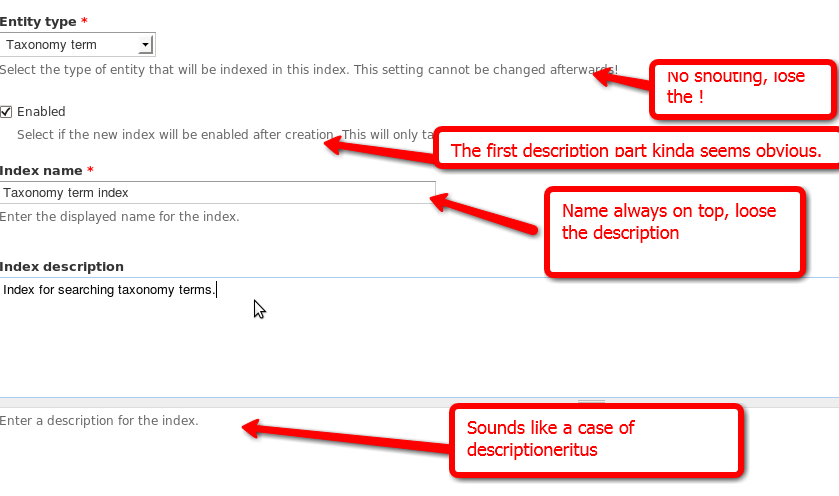
> What's the use of this text?
It describes the respective service class a bit, the text is specified with a hook. The name of the class alone could be a bit little in some or even most cases.
> Why are examples bigger?
They are just in
<code>tags, for some reason the seven theme displays those larger.> Also – let's do one example.
> Why not just the examples?
I've copied all three descriptions from the apachesolr module, so this was no explicit decission. However, these are only descriptions of the (mock-up) service class and therefore not part of the module, so they aren't an issue here.
> I think we could go for the existing core pattern and use some AJAX trickery to get a "other" option which exposes a textfield.
I haven't found anything like that in a quick search. Could you give me an example (path)? I also don't really know what you want to solve with that (probably because I don't know which pattern you mean).
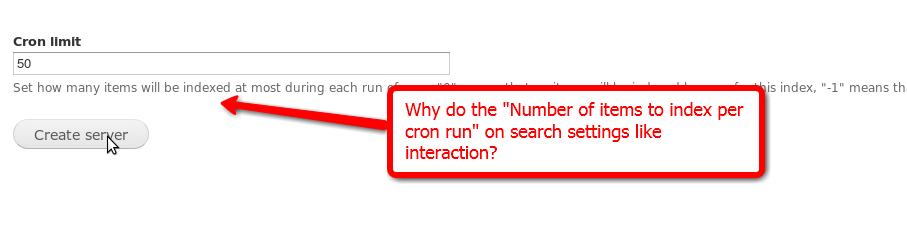
> Why do the "Number of items to index per cron run" like interaction?
I don't really understand this comment. Do you mean, "why let users set this"?
If that is the case: the cron limit is a standard setting in most search implementations I know, and setting it per index seems like a good idea. Some items might be quick to index, some take considerably longer, and you even might want to stop indexing some items (at least via cron) for a while.
> Is a bit useless, can you link to a resource?
Do you mean the whole description or just the first sentence? Would this be better (replacing the first sentence): "Whether detailled field types are supported depends on the type of server this index resides on. Check the server's service class' documentation for details."
What kind of resource did you have in mind?
> This is weird, actions on a view page?
Should have seen that one coming. Just thought it would be practical to have these at hand, but I guess you're right. They just aren't really "settings" (except "Disable"), so I'll probably move them to a new "Status" tab.
> Why is that field so long?
Because it's the default width. But you are right, of course. (Ew, two consecutive sentences starting with conjunctions…)
> "Re-index entity" instead of "clear", perhaps?
There are actually both, as you can see on the image after that one. "Clear" not only marks all of this index' content for re-indexing, but also deletes all indexed data from the server. "Re-index" just marks the content for re-indexing, and is therefore disabled when all content needs to be indexed anyways.
However, the new layout has (hopefully) made this a lot clearer.
Attached are a few screenshots of the new interface.
Comment #17
Bojhan commented1.Alright, I have said you should use icons - so I have linked some, more importantly outline them to the far left in the table :
http://drupal.org/files/issues/Fail-icon.png
http://drupal.org/files/issues/Succes-icon.png
2. Alright, I would avoid using it when its super obvious what it is for example with solr.
3. Get them out of that then :) I would really not recommend having strange markup in this description
4. Oke
5/6. You can see it at admin/config/search/settings; my comment wasn't about its purpose.
7. I don't know which kind of resource, but I feel its somewhat useless to say; maybe it will work with your service with no direction where to find out whether it will.
8,9,10. The redesign did a lot, I think we can make this status page a little bit more prettier :) But I will get back to that later.
Comment #18
Bojhan commentedOn that last note look for example at a design exploration we did for search settings page.
Comment #19
drunken monkeyIt certainly looks a lot nicer than the current interface, but I think this is beyond the scope of this issue. Before implementing such eye-candy, I should get the module completely running and with usable example implementations.
Thanks again for your help, and feel free to post further suggestions in a new issue, but I'm marking this one as fixed (as long as you don't think there are still really annoying UI bugs).
Attached is a screenshot of the overview with icons. I first tried to create some similar ones on my own, but the ones you posted are just better. Is it OK to use these (don't know where they were posted originally, or by whom)?
Comment #20
Bojhan commentedThey are GPL, just didn't go into core. I would avoid using a sort on status though. When its possible ping me to create that new status page design issue, its not really eye-candy.