G'Day,
I have a client who will bulk dump/refresh her online biblio collection on a regular basis, using her EndNote database as the offline master. Sshe is doing incremental updates to her existing titles, and adding new opones. THis will go on for a year or so, with maybe an update every two weeks. We plan to simply delete all biblio nodes and refresh with a current EndNote XML export.
On the website we want to use citekeys to help organise things (eg, path aliases) and to provide stable bibref values.
The logical field to use then would be the rec-number value that comes from EndNote. Using NID values is useless of course because with each dump/refresh the NIDs increment automatically.
So I looked in the selection of fields available at biblio>settings>citekey and did not find the option to use the rec-number.
I understand this is specific to EndNote, but since biblio is written around EndNote and lots of people use it, I thought rec-number might have been available. So:
1. Does anyone have a better suggestion for providing persistent citekeys?
2. Is there a simple way to use PHP to grab the rec-number values out of the imported EN XML file and shove it into the citekey field?
3. Is there some other clever way to tokenise the citekey and keep it stable across successive database updates?
Thankss indeed,
JB


Comments
Comment #1
rjerome commentedHi John,
Last night I check in some changes that will allow you to change the field mapping or map previously un-mapped fields (such as rec-num) to biblio fields. You will find this on the "admin/settings/biblio/fields/typemap" page of the latest 1.x-dev release.
I'm a little hesitant about relying on record numbers for this though, since while record numbers are unique within an EndNote Library, if someone deleted an entry and then added it back, it would have a different record number and if libraries are merged the incoming record numbers will change. The following is from the EndNote manual...
Comment #2
boabjohn commentedHowdy Ron,
Thanks for that and for the advice from our friends at EndNote. Geez they don't make things easy! We can't be the only people who want to implement a "unique identifier" in EndNote, but I can't see how to retrofit such a thing on an existiing EN library except by hand-editing every single entry...gack.
But thanks for the additional flexibility in Biblio. Those additional mappings may come in handy!
Kind regards,
JB
Comment #3
rjerome commentedIf everything were easy, we'd have nothing to do :-)
Don't get me wrong, I'm not necessarily saying not to use it, but you and the person maintaining the EndNote library, need to be aware of the way that EndNote deals with record identifiers and work accordingly if you don't want them to change.
By the way, the 6.x-2.x branch has "exact duplicate" detection built in, so if you just make additions to a EN library (not changes to existing entries), then only the new entries will be imported and the existing ones will be completely ignored on subsequent imports.
Ron.
Comment #4
boabjohn commentedHowdy Ron:
I've got the 1.x-dev release from 8 Jul installed, but am not having a lot of joy with the new mapping settings. Chiefly: where are they?
Went to: Fields>Type Mapping> selected EndNote X3
and got the usual *publication type* mapping interface...
What I was looking for is a *field* mapping, so I could grab a field from the source XML and give Biblio a logical place to store it (eg, pushing rec-number into Biblio_Custom_2)
Is that the expected usecase? If so, I'm not sure where to find the field mapping.....
Related, perhaps...
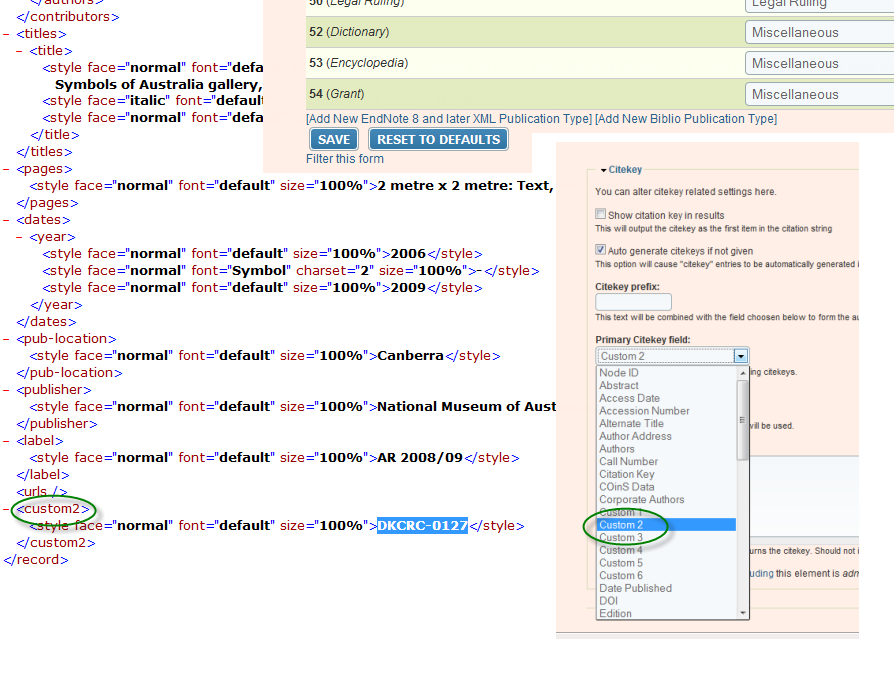
The client has tediously gone back through ~1000 records and manually assigned a unique identifier in EN field Custom_2. This will become our CiteKey, and we avoid the problems you flagged above at #1.
So, this should be the normal Biblio CiteKey process, pinking up a value from a normal EN field (Custom_2).
I ran the import, and the citekey values were assigned from the secondary source (NID).
Why?
Not sure...new question, or related?
See the screenshot attached of the source XML showing a nice identifier value in custom2...and an inset with the mysterious non-mapping, and another inset of my Biblio CiteKey Preferences, selecting Custom 2.
(perhaps this should go under a new issue, but we have a contextual thread here...)
Comment #5
rjerome commentedHi John,
Field mapping is on the same page (admin/settings/biblio/fields/typemap), so I'm guessing a "cache clear" is in order (admin/settings/performance and click "Clear cached data" near the bottom of the page.
Your citekey generation "should" work, I'll test it out and get back to you (I don't have an EN xml file handy right now).
Comment #6
rjerome commentedThere was a small (but obviously significant) but in the citekey generation code which is fixed now.
http://drupal.org/cvs?commit=390438
Ron.
Comment #7
boabjohn commentedG'Day Ron,
Thanks for looking into this and fixing up that bit...but now a new issue is that the dev versions don't seem to be available from the project page:
http://ftp.drupal.org/files/projects/biblio-6.x-1.x-dev.tar.gz
(and the 2.x-dev)
both throw a file Not Found error: "The requested URL /files/projects/biblio-6.x-1.x-dev.tar.gz was not found on this server."
Looking forward to installing and testing.
Cheers,
JB
Comment #8
boabjohn commentedRon,
Sorry for the false alarm (or irrelevant)...I just tried the link again and did not get an error.
Downloaded and installed, no worries. I found the field mapping, but did not need to use it since the client had populated EN field custom2, and your defaults settings pick up custom2 and map it to Biblio_Custom2.
The CiteKey is now being generated from this value, so all of that is good.
HOWEVER, I'm suddenly without titles??
The XML imported and did not throw any errors, but looking at the generated nodes there is no title provided...thus no link to the generated nodes. Rather than a screenshot, I'll just leave the site online tonight so you can see: http://www.desertknowledgecrc.com.au/publications
Will check first thinng in the morning: I'll have to pull this down before the client shows up to work!
Kind regards,
JB
Comment #9
rjerome commentedOops, sorry that was my fault.
Quick fix is to edit the file biblio.type.mapper.inc and uncomment (remove "//" before 'title') on line 559
Comment #10
boabjohn commentedHowdy Ron,
To be safe, I downloaded/installed the latest (12 Jul) dev, and had a look on line 559 as above...the comment had already been removed...so I guessed we were good to go.
Deleted all biblio nodes, re-ran the import, but got the same problem. No titles.
I've taken the site offline now because it's almost time to open for business here.
Got any more clues for us?
Cheers,
JB
Comment #11
rjerome commentedOK, my bad!
This time I actually tested it :-)
I've checked in the fix to the -dev version, but here's the quick fix if you need it (same line, same file, just add 'title' next to the title key of the array...
Sorry about that, that line got messed up when I added the field mapping and moved that stuff from the endnote8.parser.inc file.
Ron.
Comment #12
liam morlandThis version is no longer maintained. If this issue is still relevant to the Drupal 7 version, please re-open and provide details.