After upgrading my drupal instance and views, I begun to get these error messages from Views UI:
An error occurred at /admin/build/views/ajax/add-item/PDF/default/field.
Error Description: { ... }
An error occurred at /admin/build/views/ajax/config-item/PDF/default/field.
Error Description: { ... }
Error description is encoded JSON data. After decoding it I realized it is the HTML list of all available fields I can use with the views. Other than nothing really related with the error message.
Before the upgrade, the instance was Drupal 6.16 with Views 6.x-2.10.
Now it is Drupal 6.17 with Views 6.x-2.11
Along with Drupal core and Views module I updated CCK, Filefield, Imagefield and Link modules too.
I found a similar issue posted last year for version 6.x-2.6 #417570: An error occurred at /admin/build/views/ajax/config-item/view_name/default/field/value comment #16
But since then the code changed and it doesn't apply to this version.
I compared 6.x-2.10 and 6.x-2.11 with WinMerge. check_plain function got my attention due its compatibility with PHP 5.3.
Any ideas, solutions?
Thanks,


Comments
Comment #1
dawehnerThis does not really means a lot. If you look at the other issue you should have seen that this error is caused often by php errors.
So i hope you can enable php logging and provide the error message.
Comment #2
osmanI enabled the PHP error logging, tried again. Nothing in the logs. I believe the php.ini configuration is just fine.
I also tried disabling jQuery and jQueryUI update modules. They didn't effect the problem.
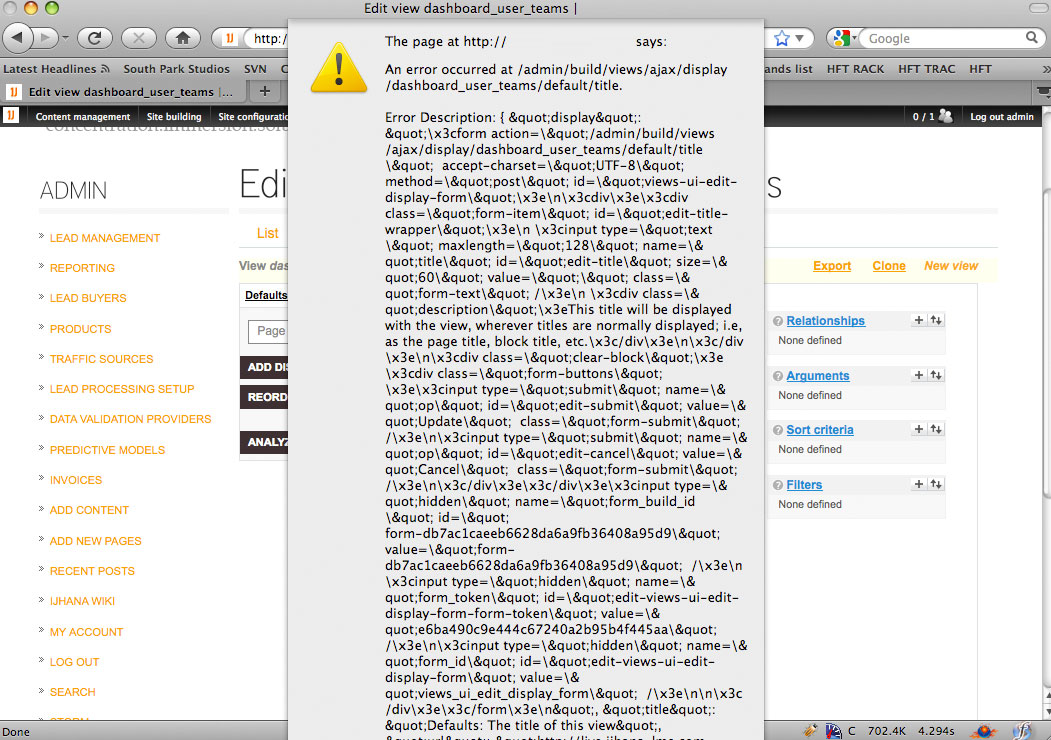
Here is one of the errors I get from the views UI, when javascript is not disabled. Does this make any sense? this is the output of field settings below the UI...
Comment #3
merlinofchaos commentedThat's weird. It looks like a proper response that may've gotten mangled somehow.
Comment #4
osmanHi Earl, would you have any suggestions to check up on?
All i can think about is related with the last update, as I mentioned above. Since, it was working perfectly before.
But still doesn't make much sense.
Comment #5
merlinofchaos commentedMaybe look at http://drupal.org/node/752290 -- a possibly valid response like above not getting read could may be affected by that item that was discovered?
Comment #6
osmanthanks for the tip Earl.
This works for now (Drupal 6.17 & Views 2.11):This is not an ideal way to fix this issue, but as a temporary solution it works.I'll re-open and update this ticket if I find a better solution.
EDIT: I guess I just rushed it without properly testing it. This patch turned Views UI completely unusable. I wouldn't recommend using it for the given versions.
Comment #7
osmanComment #8
WAKeaney commentedThis is also present in Views-6.x-3.x-dev. I tried the suggested fix from #752290: Reason for lots of users seeing "An error occurred at /admin/build/views/ajax/(field)/(view)/default/field/(name)" as well, and didn't notice any change.
I'm disabling javascript with Views for now.
Comment #9
likewhoa commentedsubscribing
Comment #10
WAKeaney commentedJust a quick note while I continue researching - disabling SSL on my apache server seems to make this error go away. Can anyone else comment on that?
Comment #11
WAKeaney commentedseutje on IRC pointed out that the async call is probably being made over http, which is considered crossdomain by javascript. Setting my base_url to specify https:// for the whole site did the trick perfectly, without modifying one line of code.
$base_url = ((isset($_SERVER['HTTPS']) && $_SERVER['HTTPS']=='on') ? 'https://' : 'http://') . 'mysite.com';Comment #12
liamaloma commentedTo offset the $base_url, should this line be put at the template.php?
Comment #13
WAKeaney commentedI replaced the $base_url line in sites/default/settings.php with it, on line 126.
Comment #14
ljrweb commentedI tried the fix suggested by changing the $base_url but im still getting the output in the javascript popup :(
see the attached screenshot..
any other ideas? or can anyone confirm this for sure works?
Comment #15
merlinofchaos commentedAre you somehow using jquery 1.4?
Comment #16
ljrweb commentedin my
/sites/all/modules/jquery_ui/jquery.ui/version.txt
it says: 1.6
also using this version of jquery_update:
version = "6.x-2.x-dev"
I'll check the theme templates though and make sure nothing is contradicting
thanks
Comment #17
ljrweb commentedMY THEME was hardcoding the include of an old version of jQuery :(
thanks very much
Comment #18
dawehnerSo this is fixed?
Comment #19
ljrweb commentedno! And i just realized i got ahead of my self..
i was using jquery 1.4.2 which is the current release..
and jquery-ui-1.8.4.custom.min.js - which i believe was an implementation of a date picker..
I tried to downgrade to 1.3.2 (the previous release of jQuery)
but now the javascript actions arent really working when i try to edit views :(
Im not exactly sure what to do next..
Comment #20
merlinofchaos commentedDrupal core has a bug that kills JSON responses when using jquery 1.4 see http://drupal.org/node/263445
Comment #21
ljrweb commentedthe patch i see there was committed in 2008?? Im using the most current version of all modules and drupal core..
Comment #22
merlinofchaos commentedWhoops. Sorry, wrong link: http://drupal.org/node/479368
Comment #23
ljrweb commentedafter clearing caches and testing, it seems like downgrading to
jQuery 1.3.2
is working for now..
Comment #24
merlinofchaos commentedResetting status (I assume active because of crosspost)
Comment #25
HydroZ commentedThis worked for me:
MySQL database 5.0.51a
PHP 5.2.14-0.dotdeb.0
Drupal 6.19
- Ubercart
Thanx a lot for your solution and enlightening explanations ;)
Comment #26
scottm316 commentedFound this page on google and #11 worked for me! Thanks WAKeaney!
Comment #27
ihomam commentedhi
i faced the same problem in my website
and then i figured it out
-----------------------------------
it was because the jQuery ui that i embedded directly in my page.tpl.php "not using the jQuery ui module".