Hi Guys,
I have a problem getting Panels to render content correctly in HTML.
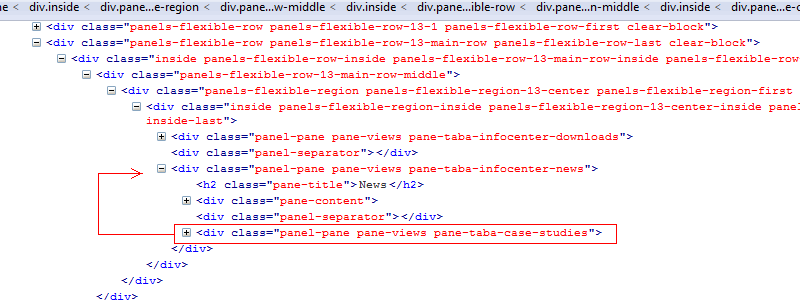
My main goal is to have 3 views in a panel region that one can tab through. I can get 2 to work perfectly, as soon as I add the third one it gets included in the previous view's html code when the page gets rendered and inspected by firebug. Screenshots of the firebug code attached.
The views that I pull into my panel region all use the default display, with the title being over ridden. The view use fields and filters, no arguments/relations etc.
Actions taken thus far:
Tried all options in the tab module. Fades, slides, getting captions and titles etc.
Disabled the panel tab module
Disabled tab module.
Disabled jq compression
Disabled jquery update.
I have tried a single and flexible panel layout.
Tried pulling in different content pieces into the panel, blocks etc...
Uninstall all modules not used.
I have tried to drag and drop them around in their order, without much success, they do change order, but I find the 3d view always embedded in the second ones HTML.
Switched my custom theme to garland
Flushed cache many times :)
My setup:
Drupal 6.17
Ctools 6.x-1.6
Panles 6.x-3.5
Views 6.x-1.1
Firefox/Chrome.
Thanks in advance for all your help!
D



Comments
Comment #1
merlinofchaos commentedThis suggests that your theming for that 2nd pane is missing a closing div somewhere.
Comment #2
Ddroid_za commentedThanks,
After testing this on another fresh setup I can confirm that the panels render the HTML correctly.
As for my production site, tracing the missing closing
tag seems a near impossible task. I have used the following as a temporary fix:
I added new custom content pieces between my 3 original views. Inside the custom content body field I add the following php code:
this seems to push the div's into the correct order. In my case I am using these as tabs, so i had to hide the empty tab links with some CSS. Not perfect, but works.
Thanks again.
D
Comment #3
merlinofchaos commentedThe easiest way to trace this would be to start with your theme. Create a new theme that is a copy of your existing theme with no templates. Move templates in one by one (or go the other way, start with all templates and remove one by one) until you see the behavior change.
Comment #4
merlinofchaos commentedComment #5
Letharion commentedBecause the issue queue has a great number of open issues, and there are few volunteers to tend them, I must prune old issues that are left untouched for a long time.
This issue has been marked "Postponed, needs info" for a long period, and is therefore closed. If this issue is still relevant to you, please feel free to re-open it.
Comment #6
Vote_Sizing_Steve commentedI'm not sure I understand 100% the original post - but I am finding unintuitive behavior when creating column/row/regions in flexible panels. If I add columns/rows/regions to bottom, then the regions get processed in the order *created*; but if I add to the top, then even though my php code fields are placed top-to-bottom, they can be processed in a 'scrambled' order (according to their creation, not placement on page).
Comment #7
merlinofchaos commentedThere is no defined order to processing panes. They get processed in the order they are loaded from the database, with the exception that panes with the setting 'render last' are held until all panes without that setting are rendered, and then they are rendered.
The original problem had to do with a missing closing div in a pane, which caused the apparent order to be wrong, but that really wasn't the issue at all; it sounds to me like what you're posting may be something different. It's hard to tell, though, because you posted very little information.
Comment #8
Vote_Sizing_Steve commentedSorry to post in the wrong forum, but the title seems appropriate for my issue. I've continued my issue at http://drupal.org/node/1623170.
Comment #9
japerryDrupal 7 is no longer supported, closing.