Closed (fixed)
Project:
DrupalChat
Version:
6.x-1.2
Component:
Code
Priority:
Critical
Category:
Support request
Assigned:
Reporter:
Created:
19 Jul 2010 at 05:29 UTC
Updated:
26 Feb 2011 at 14:41 UTC
Jump to comment: Most recent file


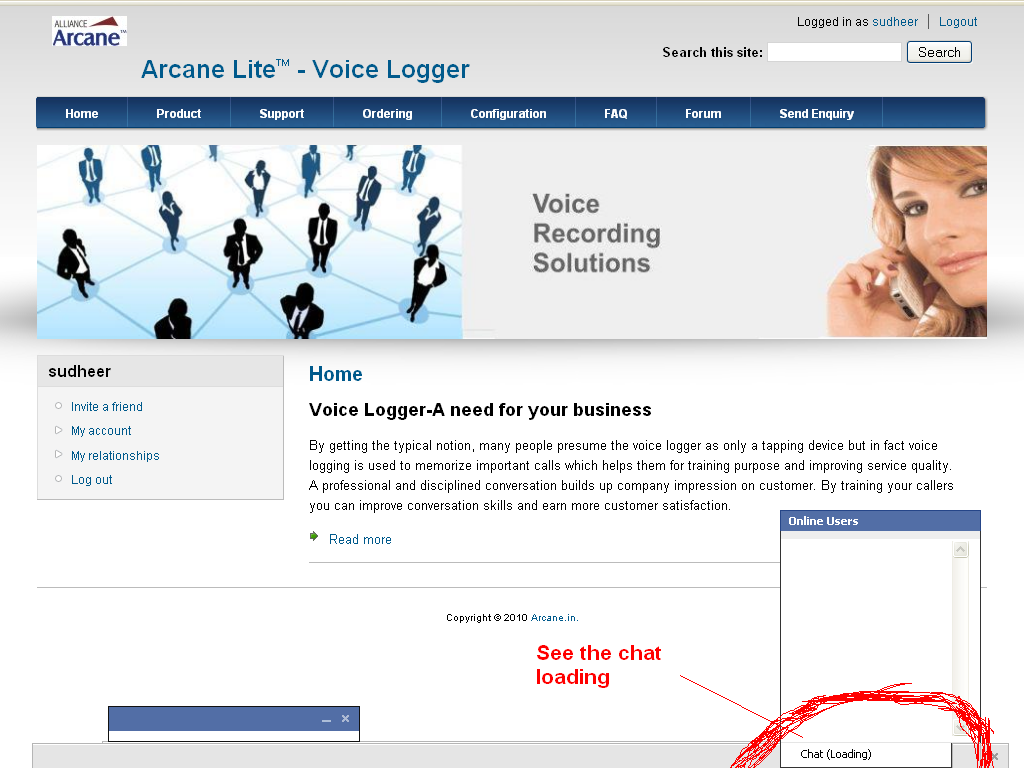
In chat module doesn't work. it keeps saying 'chat (loading)'
is this a bug? how will i solve this problem?
Thanks in advance..
| Comment | File | Size | Author |
|---|---|---|---|
| #74 | capture1.jpg | 139.51 KB | Shadow-Hawk |
| #74 | capture2.jpg | 69.19 KB | Shadow-Hawk |
| #55 | error console_mozilla_1.jpg | 51.43 KB | semevo2010 |
| #55 | error_console_InternetExplorer.jpg | 68.12 KB | semevo2010 |
| #54 | error console_mozilla.jpg | 51.43 KB | semevo2010 |








Comments
Comment #1
darklrd commentedHi satheeshkumarr,
Which version of jQuery Update module are you using? And in which browser are you testing this?
Comment #2
thirstysix commentedjQuery Version: jquery_update-6.x-1.1 and Browser:Mozilla & chrome
thanks in advance.......
Comment #3
darklrd commentedYou need to use 6.x-2.0-alpha version of jquery_update.
Comment #4
thirstysix commentedI used 6.x-2.0-alpha version of jquery_update.
Thanks .. It's work perfectly...
Thanks for your reply....
Comment #5
darklrd commentedYou are welcome.
Comment #6
Theodorsen commentedHi guys,
I have the same issue, and use jQuery Update 6.x-2.0-alpha1, using Chrome and Safari.
Any suggestions?
Cheers
Comment #7
darklrd commentedCan you post a screenshot? Also can you check browser's(preferably in Firefox) javascript console for any error messages?
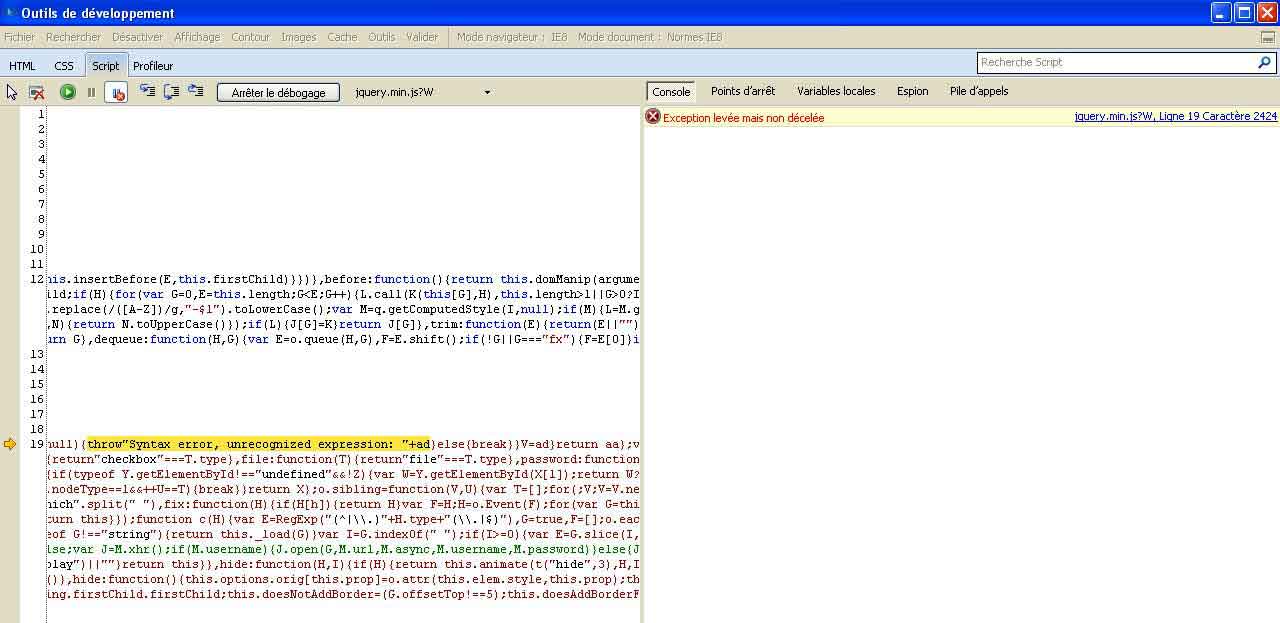
Comment #8
Theodorsen commentedThanks, I have attached two screenshot, one showing the page in Chrome, and one showing the error in Firefox
Cheers
Comment #9
darklrd commentedThanks for these screenshots.
Are you using latest version of DrupalChat? What other modules are you using on your site?
Also in firefox console screenshot the js file name and line number at which the error occurred is missing. This is present at bottom right side just below the error notice. It will be really helpful if you include this as well in your screenshot.
Thanks.
Comment #10
Theodorsen commentedI should be using the latest version. I have a few modules installed, I included a screenshot of those too.
Hope the firebug screenshoot is right :)
Cheers!
Comment #11
darklrd commentedIt seems like the problem lies somewhere else. Disable all the modules except DrupalChat and jQuery Update and see if it works then.
Comment #12
darklrd commentedIt seems like your problem is related to shoutbox module. Check out this thread - http://drupal.org/node/860372.
Comment #13
Theodorsen commentedIndeed - thanke you so much for excellent support!
Works perfectly now, looking forward to using it!
Have nice weekend,
Sune
Comment #14
newbie66 commentedi have this same problem - says chat(loading)...
if i click it the chat box appears but the online users do not show in the box. am using latest Drupal Chat module and 6.x-2.0-alpha version of jquery_update. i will do all the above on local site to test but if anyone has any other clues why the online users do not show in the chat box would be appreciated. thanks in advance.
Comment #15
darklrd commentedHi newbie66,
Disable all the modules except DrupalChat and jQuery Update module and see if it works.
Comment #16
greywolfsspirit commentedAlso having this problem, using the current Drupalchat module, tray module, the drupalchat tray bridge, jquery 2.0 alpha.. Here's the list of my modules. Any ideas where the problem lies?
addanother
admin_message
advanced_forum
advanced_forum_more_styles
advanced_help
advanced_profile
allperms
amfphp
apc
arcade
author_pane
autoload
better_formats
better_messages
better_perms
birthdays
boost
brilliant_gallery
cacherouter
calendar
cave
cck
checkall
checkbox_validate
colorpicker
contemplate
content_display_order
content_profile
countdown
ctools
customerror
dashplayer
date
drupalchat
emfield
event
extlink
favorite_nodes
filebrowser
filefield
filter_perms
flashnode
flashvideo
flowplayer
front
getid3
html
http_request_fail_reset
iconizer
image
imageapi
imagecache
imagecache_profiles
imagefield
job_queue
jquery_ui
jquery_update
lightbox2
link
location
mailhandler
media_archive
media_youtube
menu_editor
messaging
mimedetect
mimemail
module_filter
nice_menus
nodecomment
node_export
notifications
onepageprofile
panels
pathauto
pcp
pending_user_notification
pirate
poormanscron
potx
print
privatemsg
profile_location
services
settings
smtp
statistics_advanced
subform_element
swftools
switchtheme
taxonomy_multi_edit
text
theme_editor
token
transliteration
tray
tray_drupalchat
troll
upload_image
user_relationships
video
videochat
views
views_bonus
views_bulk_operations
views_php_extension
votingapi
weather
webform
wysiwyg
wysiwyg_spellcheck
Comment #17
darklrd commentedHi greywolfsspirit,
I have gone through your module list but couldn't find any module which has already a known issue with new version of jquery_update. Most likely problem is that one of the modules listed above is not compatible with jQuery Update 2.0 alpha. You will have to do it the hard way :(
Try disabling all the modules except DrupalChat and jQuery Update module and see if it works. Then try enabling one module at a time and keep re-checking. You will eventually find the module which is not functioning properly. Please post your findings. It will help others.
Comment #18
greywolfsspirit commentedDoes this module also rely on the 6.x-2 branch of services? I'm still using 6.x-1 as I was having issues with dashplayer and could only get it to work with the 6.x-1 branch of the services module..
Comment #19
darklrd commentedYes it requires 6.x-2 branch of jquery_update. It won't work with 6.x-1 branch.
Comment #20
greywolfsspirit commentedGot it working now.. My problem was I had a $param with the API flag still in my config file. To get it to work correctly, I had to delete that line out. Now, all works as it should if you follow the videos and the note about the changes to make to work with services 6.2
Comment #21
chompz commentedI am also getting the Chat(loading) message with no update. I am also using jquery_update 6.x-2.0-alpha1. Below screen shots of all the modules I have installed. Please have a look and let me know what I could do to get chat working.
I am currently using my school's computer, so I can't install firebug, so I made a guest login if you need to check it out.
chompz.5vm.net
User: guest
Password: guest
Thanks
Comment #22
darklrd commentedHi chompz,
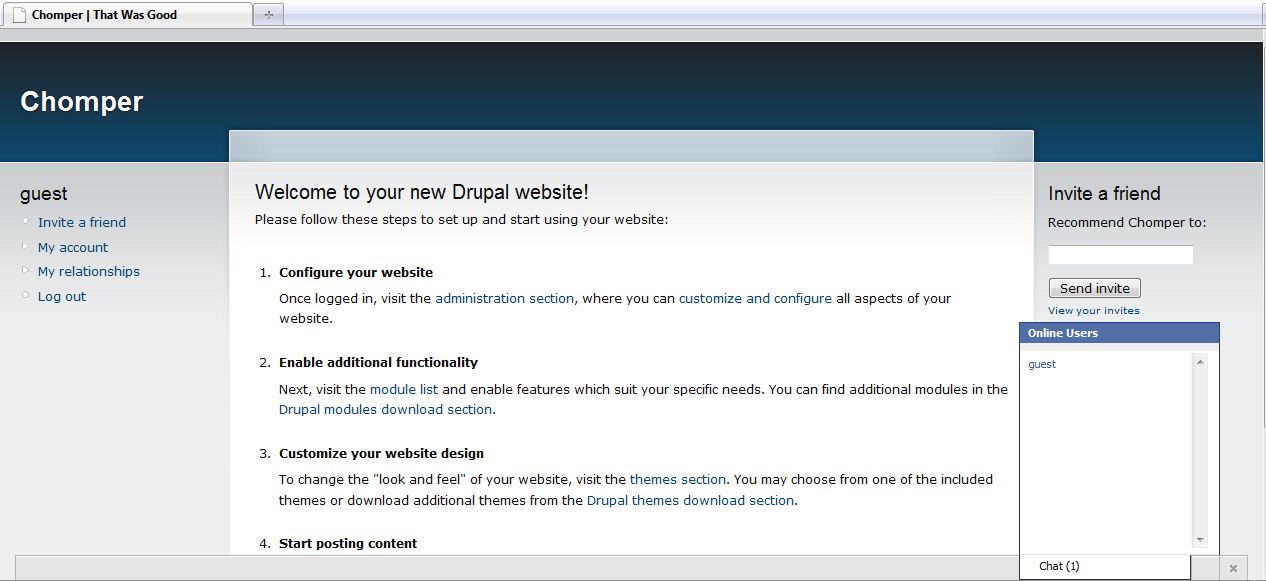
Its working! See the attached screenshot.
Comment #23
chompz commentedok that was you that just logged on. Did you get my message when I said "hi"?
When I on Safari and I send a message the other user takes a very long time to receive it and some times the message does not get to the other user.
This seems to be something on and off. Some times I logon and I get a chat(loading) text in the middle of my screen (please see screen shot1). What are the recommended Performance settings for this module (my are below in screen shots)? I notice this happens when I enable block cache.
I am also using two computer one logged in as admin and the other as panw, but I don't see panw or guest. The panw account also does not have admin shown on the chat list. should the admin not see anything?
Your module is awesome and I appreciate your help very much. Sorry that things are not working out very smoothly for me.
Comment #24
darklrd commentedHi chompz,
Its perfectly okay :)
Its not working properly because you have enabled block caching. Disable it and it will start working normally. You can enable the 'Optimize Css files' and 'Optimize Javascript files' though.
Comment #25
chompz commentedYea its working great! Thanks for checking up on my site. I had a few more questions about the current release.
Your the man! Thanks.
Comment #26
Akama-1 commentedI'm also having some trouble with this, I'm using Google Chrome and jQuery Update 6.x-2.0-alpha1.
I did turn off all the mods and I was still stuck on it saying Chat(Loading)
Comment #27
chompz commentedTry reading through the last few posts. I solved my problem by disabling block caching and it runs fine for the most part on all browsers. Safari is still funky some times though.
Comment #28
fenda commentedWe will be moving the drupalchat away from the block structure in the next update, this should stop any cache issues.
Comment #29
greywolfsspirit commentedIs this basically a re-vamp of Bowob chat? without the need to have to rely on the bowob server (which has been down more than up lately)? Will there be the chatroom ability for all users to interact with one another or will this be more along how Facebook has theirs for a more of a glorified instant messenger more than a chatroom? Im not knocking the effort, just want to make sure I know what direction this chat is branching towards is all. No offense is intended.
Comment #30
darklrd commentedHi greywolfsspirit,
It is going to provide both - one on one chat(like FB) and groupchat(chatroom). But this will take time.
Comment #31
greywolfsspirit commentedcool.. ok thanks, will keep an eye on this then.
Comment #32
DanWoodbury commentedHi,
I am also getting this error and cant seem to sort it out. I have followed the steps above and still no joy.
anybody have anything else that may help?
Comment #33
chompz commentedtry playing around with the performance settings (site config/performance). I turned on the first caching option and kept block caching disabled.
if you have not added the chat block you might also want to try that out.
There is infinite possibilities why it might not be working, so you should be as descriptive as possible.
Comment #34
takisthe commentedMe also i did what you all say but it's not working....
At ff nothing shows up and at Chrome is always says loading.....
Comment #35
greywolfsspirit commentedAlso still getting the loading message.. worked for 15 minutes when I first went through the cache clearing, and making sure block caching was off..
Comment #36
newbie66 commentedI cleared my cache and chat is now working on local site but... since doing that, when I click on any admin navigation menus (ff and ie) i get a lightbox as per attached screenshot... this happens with Administration Menu and the usual Drupal admin navigation for both User1 and other User so now I'm not able to edit any of the website or even log out although Log out works if i refresh the page but nothing else does. The following are the modules i have enabled. Any ideas from anyone?
Administration Menu
CCK
Flags
Image Cache
MediaFront
Nodewords
Quiz Block
Node Gallery
CKEditor
Couloir Slideshow
Drupal Chat
Embedded Inline Media
Fancy Login
IMCE
Lightbox2
Pathauto
Persistent Login
SocialTwist Tell-a-Friend
Spread
token
Captcha
Image captcha
Google Analytics
JQuery Update
Comment #37
darklrd commentedHi newbie66,
There seems to be a compatibility problem b/w Lightbox2 module and the jQuery Update(2.0) module.
Try disabling Lightbox2 module and see if everything works properly.
Comment #38
eleben commentedMaybe this has been discussed already but this is what I'm finding...
I created a new test site with just tray, drupalchat, and jquery (6.x-2.0-alpha1) installed.
I can get it to work just fine with SOME of the default themes. Garland, Bluemarine, Minnelli, Pushbutton all work fine but switching over to Marvin or Chameleon will cause the dreaded "Loading" error.
So there must be something in the THEMES themselves causing the issue - not just installed modules conflicting.
I haven't had time to dive deeper in to the issue. It is 4:35AM here so I'm going to bed :)
Great work so far. Can't wait to use this on my live site.
Comment #39
newbie66 commentedDue to this conflict with Lighbox2, I'm not able to do anything from my site now ie I cannot disable it because i cannot access the admin navigation, so before I drop any modules via the db, are you able to recommended a Gallery/Lightbox I can use that won't conflict with Drupal Chat or is there another chat module that will work with Node Gallery and Node Gallery Lightbox2 Integration. Thanks for all your work and help so far... I hope I can continue with Drupal Chat and willing to try another gallery but there are so many.
ok i got rid of lightbox 2 and have it working with Node Gallery but no lightbox effect. I guess I'll have to go for a different gallery down the track that is compatible with thickbox or some other.
Thanks for your great support of your module here :)
Edited to add new comments.
Comment #40
darklrd commentedHi newbie66,
The compatibility issue of Lightbox2 module is NOT with DrupalChat rather its with jQuery Update 2.0. So please create an issue for this on Lightbox2 module issue page. I am sure the developer(s) there will help you out with this. :)
Comment #41
darklrd commentedHi eleben,
Thanks for bringing this up. :)
I am looking into it.
UPDATE: I checked it out and the problem lies with jquery_update(v 2.0). Its not working with the above mentioned themes. You should create a new issue for it on jquery_update project page.
Comment #42
Starminder commentedSubscribing -
Comment #43
mstef commentedAny known problems with Fusion? Still can't get it to pass the loading stage..
Comment #44
mstef commentedDisabled fusion and went to garland..works nicely..
Wow this is an amazing module. Awesome work...really impressive.. I might just want to join in on the dev.
Comment #45
mstef commentedAnd btw, shoutbox should work with jquery_update now..grab the -dev.
Comment #46
psudheer commentedHello Darklrd,
This is very good module, today morning am configure this module in my localsystem.it's showing chat loading.
i am following all recent comments like disable all modules except drupal chat and jquery_update(v 2.0).
But it's not working.
See the attachment for my error.
Please clarify the problem as soon as possible.
Thanks in advance
Comment #47
TmaX-2 commentedi followed all the things said above but i was still getting loading error...
after all options tried i found out that in my case it was because you had to go to jQuery section and configure again since it was a new module install
Visit Administer > Site Configuration > jQuery Update and configure to
Choose jQuery compression level:
Production (Minified)
Development (Uncompressed Code)
hope this helps. Great Module i love it one more reason to stick to drupal
Comment #48
MAds commentedHello. After going through my modules, Ive discovered that 'Context Module' is creating the conflict for me.
Id appreciate any help to get this fantastic chat up and running.
thanks!
Comment #49
deverman commentedAfter trying comment #47 the module was able to get the number of users online but I still had many other javascript problems somehow I get a broken lightbox 2 on any link I click on now. I am using the drupal commons distribution and then installed pmgrowl to support the private msg module. There must be some serious conflicts with that.
Comment #50
semevo2010 commentedHello Darklrd,
This is very good module, I just set DrupalChat it displays this message: chat loading.
I am following all the comments lately as disable all modules, except the cat Drupal jquery_update (v 2.0).
But this does not work.
See attachment for my mistake.
Please clarify the problem as soon as possible.
Thank you in advance
Comment #51
darklrd commentedWhich theme are you using?
Comment #52
semevo2010 commentedI use the theme newswire.thanks for your help
Comment #53
darklrd commentedHi semevo2010,
Can you please run your test site in firefox and then post the message displayed in error console? That will be really helpful in debugging the problem.
Thanks
Comment #54
semevo2010 commentedThanks, I have attached two screenshot, one showing the error console in Firefox, and one showing the error console in Internet Explorer.
Thanks darklrd
Comment #55
semevo2010 commentedThanks, I have attached two screenshot, one showing the error console in Firefox, and one showing the error console in Internet Explorer.
Thanks darklrd
Comment #56
semevo2010 commentedChat Module is not compatible with External Links.
Thanks .. It's work perfectly... now
Comment #57
jrcristo commentedwhere you downloaded the version 6.x-2.0-alpha
Comment #58
thirstysix commentedDownload Jquery Update in below link
6.x-2.0-alpha version of jquery_update.
http://drupal.org/node/779956
Comment #59
HyperD commentedI installed the module
6.x-2.0-alpha version of jquery_update.
I have cleaned the cache
as suggested but the issue stays ... what do I have to do now please ?
[EDIT]
At once started to work after 10 minutes about I isntlled it and written this message. I hope it will be stable
[/EDIT]
Comment #60
darklrd commentedHi -Tiziano-,
Please check the error console in firefox and post your error message here.
Comment #61
HyperD commentedI use Chrome but it tells that it works but I see only one user: myuself but it tells that there are 4 users online ...
Comment #62
darklrd commentedThats great! :)
Seems like it hasn't stabilized yet. In what mode are you using DrupalChat - AJAX or Long Polling? Check out its settings page in admin section. Change it to long polling mode.
Comment #63
HyperD commentedCheckin "long polling" i freezes ... in Ajax it pseudo works ..
I use "pseudo" becaus I see some user but I'm not able to open any chat with ...
Comment #64
HyperD commentedNO ALT ...Darklrd .. I discovered what's happens ... the chat window it opens BUT it stays behind the blocks of the page .. ;another layer .. behaind all the contents of the page ... that's why I was thinking I was not chatting.
Please can you suggest me how to bring the chat alwasy on top ?
Comment #65
fenda commentedHave you tried the dev version? If not, please do.
Comment #66
extensive commentedThanks drupal chat work perfectly now using jquery update 2.0 alpha.
Comment #67
webmestre commentedThe unic page the Drupalchat doesn't write "chat (loading)" is the admin/build/block with Acquia Marina Template.
With the same template both on admin and user pages, the chat says "loading".
Mu jquery_update version was caught on the oficial site : jquery_update-6.x-2.0-alpha1.tar.gz
It's a pity this module would not work. Just a little thing is missing...
Comment #68
fenda commentedPlease try the latest dev version. Does that help?
Comment #69
webmestre commentedIt was a Ctools js file missing. Now it works perfectly. Nice job !
Comment #70
that0n3guy commentedI had this issue so I put on the dev version (I'm using on drupal_commons install profile). Then, after I did some stuff in the settings, I went to test it. This issue went away but no users ever showed up in the box.
Then stuff stopped responding, then I couldn't even type in ssh anymore.... it locked up my whole vps... had to restart to get out of it... scary stuff.
Comment #71
darklrd commentedHey that0n3guy,
It seems like your web server isn't properly configured.
@everyone: Try out the latest beta release :)
Comment #72
cerion86 commentedHello everyone, chat is always loading for me: I've installed jquery update alpha and I've disabled avery module but nothing changed. In my Firefox console error I can see:
Error: $("#drupalchat_chat_window_users_region > div").live is not a function
File: http://www.esanum.it/cooleu/sites/all/modules/drupalchat/themes/js/drupa...
Row: 346
Could anyone help me? Thanks a lot!
Comment #73
cerion86 commentedSorry, reinstalling jquery_update alpha it works... :)
Comment #74
Shadow-Hawk commentedDisregard, I found the issue and it works- I am waiting for the update that opens the options in the block though.
Comment #75
Shadow-Hawk commentedI figured out that the issue was simply my permissions were set incorrectly
Comment #76
darklrd commentedHey Shadow-Hawk,
The update error isn't related to DrupalChat.
Seems like you have fixed your issue yourself :)
Comment #78
Arpanjot Singh commentedhello
i jjust installed drupal 6 followed by Drupalchat ........i used jquery update alpha version which is posted above in comments bt my problem is that i get a circle(loading one) that doesnt stops........and when i click on chat nothing happens instead i get the navigated to top of present page bt no chat window opens at all....and that loading circle keeps on rotating...doesnt stop
plz help
Comment #79
darklrd commentedHello Arpanjot Singh,
Read this issue - #1055896: Many issues one after another... FAQ & Help here!. It should fix your problem.
Thanks