I'm currently working with Feeds + XPath parser to try some use cases.
I like the functionality this module has to fetch images (I did something not very different a while years ago : docs for image_ownage)
Here's the thing.
Example: An RSS feed using Google Merchant extensions:
<item>
 <title>Ladies - Worms Tee</title>
 <link>http://shop.flightoftheconchords.co.nz/node/13</link>
 <description></description>
 <category domain="http://shop.flightoftheconchords.co.nz/taxonomy/term/2">Apparel</category>
 <category domain="http://shop.flightoftheconchords.co.nz/taxonomy/term/3">Ladies Size (US)</category>
 <g:price>45.00000</g:price>
 <g:id>FOC06</g:id>
 <g:image_link>http://shop.flightoftheconchords.co.nz/sites/fotc/files/FOC06-01_0.jpg</g:image_link>
 <g:image_link>http://shop.flightoftheconchords.co.nz/sites/fotc/files/FOC06-02.jpg</g:image_link>
 <pubDate>Sun, 29 Nov 2009 11:43:29 +0000</pubDate>
 <dc:creator>admin</dc:creator>
 <guid isPermaLink="false">13 at http://shop.flightoftheconchords.co.nz</guid>
</item>
- I can get the g:image_link from there and import it to my site along with the other stuff.
Example: An RSS feed using Atom Media extensions, compatible with CoolIris:
    <item>
      <title>Models - Model plane preview</title>
      <link>http://thevintageaviator.co.nz/node/2207</link>
      <media:thumbnail url="http://thevintageaviator.co.nz/files/images/models/thumbnail/model_plane.thumbnail.jpg"/>
      <media:content url="http://thevintageaviator.co.nz/files/images/models/screensize/model_plane.screensize.jpg"/>
    </item>
- I can get the media:content@url from there and import it to my site along with the other stuff.
So we can see that this is a natural fit for feeds - and the file importer we have here.
But I don't need the scraper. Instead I just added another option to the feeds_imagegrabber settings:
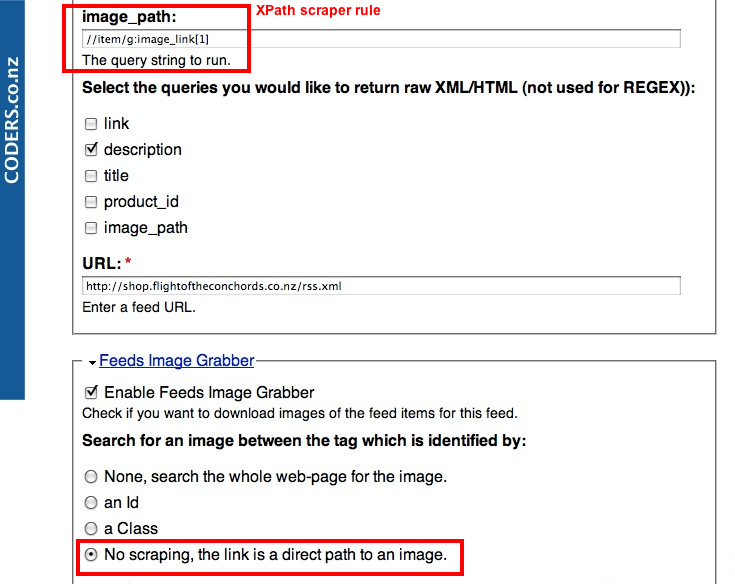
The code wasn't too bad. Here's the patch. With a few stylistic improvements and error-catching also.
(Cumulative with the other issue I raised a patch for earlier #857980: Suggestion: Use Drupal 'libraries' convention for third-party dependency libraries - I won't separate the patches yet unless it's worth proceeding and the CVS code has been cleaned up to meet code style standards so it's safe to work on)
I know that imagegrabber does not handle parsing attachments #731736: Import pictures attached to a feed item? ... and that can be done by other methods, but imagegrabber does do retrieving attachments - So I think this function fits here.
If you are not interested in this feature, I'll guess I'll fork this code somewhat and come up with feeds_filegrabber which will be able to handle images like this, plus podcast or arbitrary file-sucking features through feeds. But I think it would be more productive to grow this idea here.
Does this fit on the roadmap?


Comments
Comment #1
publicmind commentedHi,
I always thought of adding this feature as it wasn't much work but the module is complex enough at the moment and I didn't want to add more to it. Your patch look nice expect a few typo mistakes I guess. I will be probably able to review it by the weekend and will commit it then (or you can, I will give you CVS access :)).
On second thought, we should add these settings under the "Advanced" fieldset to make it easy for basic users. What do you say?
Cheers,
Comment #2
parasox commentedI think this is exactly what I was looking for. It seems that grabbing by Id's and classes doesn't really work for ATOM/RSS files, which is why image grabber isn't getting the right images for me. It will load a slew of duplicates and incorrect images, if it will find the JPG at all. I thought it was the media:content "namespace" but I guess it's larger than that.
Here's to hoping you two can get this to work! If I can get image grabber to properly snatch jpg's from RSS feeds that will be a nice addition for me.
Also that "xpath scraper rule" with image_path dialogue: Is that something new with this addition? Or is that a separate module that's working together with this?
Comment #3
dman commented@parasox
My eg above uses (a modified version of) feeds xpath parser to do the field extraction in the first place.
Yes, there is a weakness with namespace handling somewhere in the Feeds suite also - which I'm attempting to iron out in another thread.
@publicmind
Given how chatty the interface is already, I'm pretty happy for this rule to remain where it is on the UI. It's not quite right, but it's better there than in another place altogether. I've done many scraping interfaces and rulesets of this sort (import_html is one big XML scraper) and I think that if the choices are exclusive, then they can fit into a radioset just fine. Beyond that we get into dependent fields and AJAX - which are possible, but not right now.
If you are looking for UI improvements, move the 'full xml' checkboxes up next to each of the field rules themselves, not in that list below (which I found awkward)
I don't mind coming on board with CVS if it will help out :-)
.dan.
Comment #4
Sewdn commentedThis patch (http://drupal.org/files/issues/feeds_imagegrabber-direct_file_grabbing.2...) doesn't seem te work correctly on the latest dev of 24/8 (http://ftp.drupal.org/files/projects/feeds_imagegrabber-6.x-1.x-dev.tar.gz)?
1 out of 8 hunks failed (hunk#4)...
Comment #5
scotjam commentedRegarding patch, is there any possibility of reissuing a working version?
best wishes
scotjam
Comment #6
marcvangendSubscribe. I also have an XML feed coming in with an image url in one of the fields. It would be great if I can just pass that url on to the image grabber and have the image stored in an image field.
Comment #7
marcvangendHere is a new patch. I manually applied the patch from the original post to 6.x-1.0, which is the most current version at the time of writing. So far it seems to work, but more testing is welcome.
Comment #8
marcvangendBy the way, at line 263 of my patched file, it reads:
What I don't understand is this: $enclosure->getFile() is first stored in the $file variable, but when calling field_file_save_file() the getFile method is called again. Wouldn't it make sense if that last line is
$info = field_file_save_file($file, $validators, $target_dir, user_load($node->uid));? Or am I missing something?Comment #9
marcvangendFYI: I posted a new feature request, building upon the patch from #7, in #967658: Allow grabbing multiple images.
Comment #10
publicmind commentedFinally after a long time, in between which I ignored this module and created another (Facebook-style Micropublisher), I am ready to commit this. Thanks Dan and marcvangend for your efforts.
@marcvangend, #8: I agree that we could have cached the file locally but that is already being done by the Feeds module. So when you call GetFile() the second time, the locally stored file is returned and it is not retrieved again (AFAIK).
marcvangend: I fear that this adds a lot more complexity to the module and people might not understand it which would make your efforts futile. Would you be willing to create the official documentation page for the module? I already have a few tutorials which can give you a kick start (http://publicmind.in/blog/tutorial-for-feeds-image-grabber/) but it really needs to be updated if we need this patch to be committed. I might be asking a lot but do you have time to invest on this module, probably by being the co-maintainer.
I have attached the updated patch on the latest dev build, please let me know what you think.
Thanks and Regards,
Comment #11
parasox commentedI'm trying this patch out Public Mind, hopefully my misunderstandings can clarify from a noob perspective.
1. Do I need to have the Feeds Xpath module installed to use this? Does my feed need to be set to the Xpath parser then as well? And do I also need to use the Xpath code in the images provided above? Or is this just an install and play with the checkbox type thing?
2. The text "No scraping, the link is a direct path to an image." Does this mean that the actual links contained within the RSS files are direct links to images? I think most people using this want to grab a JPG from an extra tag in their RSS files. Maybe I misunderstood above but several posters in this thread alluded to that as well. For example I'm looking at an RSS file now that has a
<link>pointing to a URL, and also an<enclosure type="image/jpeg" url="http://cache.updates.blah.com/215x120.jpg"/>tag. So instead of scraping the website, it would be nice to just grab the provided image.(to make things really cool, an option to "grab the first JPG within an
<item>" would be the best, so you don't even need to mess with it.)Edit: Sometimes the JPG link might even be embedded into the Description field too, which is why searching for the first URL ending in a JPG would be beneficial
3. Somewhat offtopic, but would also be interested in being able to scrape, but looking for a file mask. Like "large.jpg" or "*.jpg" or maybe regexp.. re: http://drupal.org/node/887492
Comment #12
marcvangendI can answer some of that...
1. No, you don't necessarily need Feeds Xpath.
2. The way I'm using it (using a custom parser), the xml feed contains an image path like "files/images/foo.jpg". My parser prefixes it with a domain and passes the string "http://www.example.com/files/images/foo.jpg" to FIG.
3. I understand (but it's not a question so I can't answer that).
Publicmind, I am honored that you ask me as a co-maintainer. I will consider it but I'm rather busy already and I have a 3rd child coming up soon... Maybe instead of being a co-maintainer, I can promise my support for this particular feature?
Comment #13
publicmind commented@parasox
I think marcvangend answered your questions well. You can use Feed XPath Parser to create a new source field in the Node Processor mapping targets and map it to the Image Field (FIG), and select the option "No scraping..".
@marcvangend,
I understand your time time constraints, if you can help out with the documentation that would be great. I just don't want to introduce features that are difficult to understand/use with no documentation/support.
Attached is the updated patch.
Regards,
Comment #14
marcvangend@publicmind, no problem, I can contribute documentation.
Comment #15
publicmind commentedPlease go ahead and add it to the drupal site builder's documentation near the Feeds module. You can take reference from http://publicmind.in/blog/tutorial-for-feeds-image-grabber/ and http://publicmind.in/blog/tutorial-for-feedapi-imagegrabber/
Thanks a lot.
Comment #16
jlmeredithThe patch here no longer works. It fails on several of the hunks. Can someone adjust and reupload? Or is this committed in the latest dev version?
Comment #17
scotjam commentedHi jlmeredith, there's been changes applied for http://drupal.org/node/1020268#comment-3955276 so that's probably why this patch up won't work. it was working for me on the previous dev version. If you see the previous post, it'll be applied when the documentation is sorted. hope this helps!
Comment #18
NeoID commentedAny news regarding this feature?
Comment #19
jlmeredithI would be happy to provide documentation if someone can reroll the patch so that it works with the current dev version.
Comment #20
thedavidmeister commentedi don't know how to roll a new patch, but i applied the patch in #13 to the latest dev version and although it failed, it was very easy to manually fix.
just change the '#options' array on line 337 to contain:
it seems to be working fine, testing it now and images are indeed coming through :)
Comment #21
karengrey commentedThis is just what i need, thanks!
But im having a problem which im not sure how to resolve.
The XML I am importing doesnt use a normal 'http://website.com/filename.jpg' to point to its image. Instead it uses
'http://website.com/show/?520'
The error im getting is:
'The selected file ?520 could not be saved. Only files with the following extensions are allowed: png gif jpg jpeg.'
How can i bypass this validation and save the image?
Thanks!
Comment #22
stevenx commentedI got almost the same issue:
'http://xxx.xxxx.org/60.jpg?8128-e95d36d7903400d8
My image will only be displayed or deliverd if I add my unique hash code after the ?
How can i bypass this validation and save the image?
Comment #23
parasox commentedI guess some information about how the scraping is actually done (curl, wget etc) would be needed. I think this conversation should be made into a new issue though, and even then it's beyond the scope of this module to cover getting through scripts and whatnot to download files. I know I've battled with that myself with wget trying to get a URL with a .php?something= type download script that some websites use.
Comment #24
publicmind commented@karengreen
Posting on multiple issues won't get you faster response, so do not pollute this topic. Follow here: #756470: Cannot import images with an URL containing PHP parameters
@stevenx
Bypassing the validation would not solve problems, as it would cause bigger issues (not validating user input, ahah!!!)
Regards,
Comment #25
scotjam commentedWith reference to #13 and #14
What documentation do you require before the patch can be re-written and applied?
Can I help? If you let me know what you are looking for, as an example, I can try to make it up.
cheers
scotjam
Comment #26
nicolash commentedsubscribing
Also, I had some minor trouble applying the last patch in #13. I created a patch again using Git against 6.x-1.x...no functional differences here.
Comment #27
nicolash commentedThere seems to be a download performance issue with this.
I have to download quite a large feed with images being fetched from another service. Functionally this works fine with the patch...but it takes a long time. In my case it wasn't sustainable and I need *something* working next week, so I tried some other options. For now I've made a mapper that utilises filefield_sources curl approach to download an external image.
When testing this on my machine, it takes about 1-3 seconds with the curl approach vs 10-15 seconds per image with FIG (I'm not really sure where the file gets downloaded, FeedsEnclosure()->getFile()?).
I agree with dman that this is a good place to have this functionality. I got no other comparison right now than my laptop, so there might well be a configuration problem. Maybe you could run some tests as well...I've put the mapper up in a sandbox.
Comment #28
rfaysubscribe
Comment #29
geerlingguy commentedSubscribe.
Comment #30
rfayWell.. I just discovered that feeds is happy to consume a URL. It doesn't need any of this (or Feeds Imagegrabber at all) to take an image URL and put it into a filefield/imagefield. At least it works fine on D7. And per #754788-13: How to retrieve additional elements from source (e. g. images) , alex_b confirms that it's just a built-in feeds feature.
I won't be so bold as to "Won't fix" this, but seems like it's on the wrong track.
Comment #31
publicmind commentedThanks Fay. If Feeds can be used directly to map image URLs, I am not going to duplicate it here. For people looking on how to get it work, please follow the link provided in above comment. In short, you will need the SimplePie parser which will provide the enclosure support which you can use to directly map to the imagefield/filefield.
Regards,
Comment #32
rfayNo, you don't need any extra parser or anything. If you give feeds a URL to an image it will work. Out of the box.
If you have to figure out a way to *parse* that URL out of something then you may need something extra. But if your feed contains an image URL and you map that to an imagefield, it just works.
I did an article and screencast on doing this with importing Drupal Commerce nodes, http://www.drupalcommerce.org/node/467
Comment #33
publicmind commentedFay,
People usually do not pass the URL to the image as the Feed URL, that is complete waste IMO of Feeds module.
Here is the typical use case for this request. People have a feed which along with the title and description of the feed item contains an image inside say another tag
<item-image />. FWIU, Feeds provides default FileField mapper for enclosures which are provided by the SimplePie parser only. So people will need to install the SimplePie parser, Map "Enclosures" to their imagefield and click "Import" :)Thanks,
Comment #34
EKM commentedAs a follow up, the patch for the current HEAD of the remotes/origin/6.x-1.x branch (commit 6d7add43e8d960e9314859b52729a3e266ac019b ), this should apply cleanly to drush make.