

Closed (fixed)
Project:
Panels
Version:
6.x-3.x-dev
Component:
Mini panels
Priority:
Normal
Category:
Bug report
Assigned:
Unassigned
Reporter:
Created:
22 Jul 2010 at 11:35 UTC
Updated:
20 Oct 2010 at 07:44 UTC
Jump to comment: Most recent, Most recent file


Comments
Comment #1
nigelcunningham commentedIf I delete and recreate the mini-panel, I no longer get that error, so I get it's an upgrade issue.
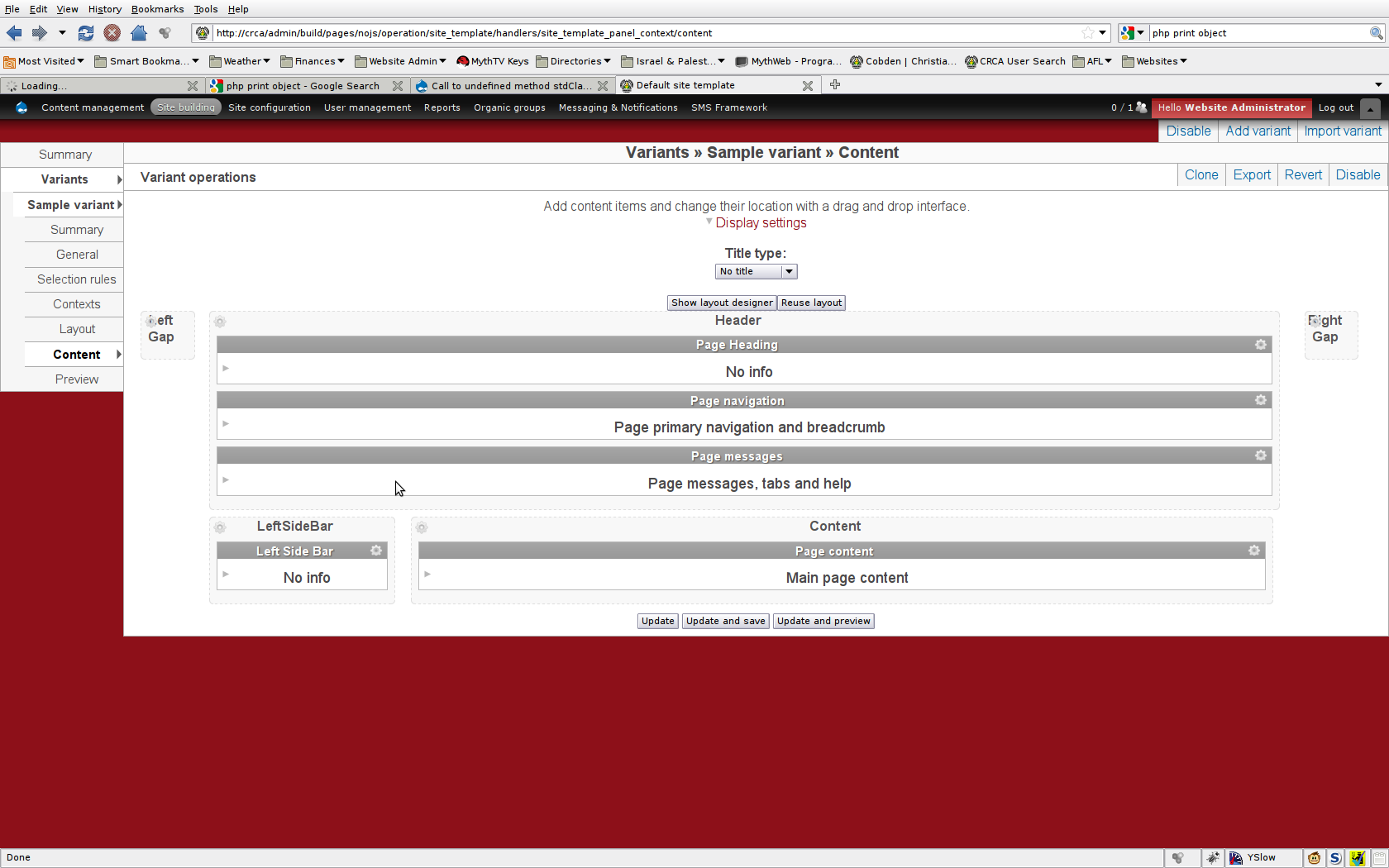
Having said that, after recreating the minipanel and selecting Flexible for the layout, I get nothing of substance in the content tab. Would you like a separate issues for that? (I haven't yet checked if it's already reported).
Comment #2
merlinofchaos commentedDo you have a backup of the database? An export of the mini panel prior to deleting that could be very interesting.
I did *just* perform some architectural changes to the mini panels UI, so there could be some errors. A separate issue would be good.
Comment #3
nigelcunningham commentedI think I just got a -dev release at the wrong time.
I also just found that the clone a panel layout tab is also empty.
I don't have a backup of the minipanel, sorry. I could probably reproduce the issue, because I'm working on a local copy of my site, and I only rsync'd everything yesterday.
That said, how about if I do a CVS checkout of your latest and greatest and see if the issue is still there? Perhaps the dev release just got rolled at a bad point in your committing of changes.
Comment #4
merlinofchaos commentedI can't make this happen in my own testing. I've modified that code path just this morning, though, so maybe I fixed it without knowing this was a problem. Can you try latest CVS?
Comment #5
nigelcunningham commentedI'm running CVS now without issues, so let's just call it transient and close it.
Thanks for your time!
Comment #6
nigelcunningham commentedHmm. I can still reproduce it.
Here's an 'export' of the panel I'm using.
Steps to reproduce:
1) Create a new mini panel using the flexible format.
2) From the list of mini panels, click the 'Edit' item for your new panel.
3) Click on 'Content' in the bread crumb (is it a breadcrumb - it looks like one in the theme I'm hacking around!) and the error will appear.
I added a print_r($display) prior to that line, and will attach it as text.
Comment #7
nigelcunningham commentedOooh. Looking through the cvs log just reminded me to say: I'm using Panels Everywhere. Perhaps that's significant.
Comment #8
merlinofchaos commentedHmm, maybe it is. In my test site I have PE off on admin pages.
Comment #9
merlinofchaos commentedHm. No, that didn't make this happen for me either.
However, I guess I hadn't walked thorugh the 'add' mini panel process. I hadn't quite gotten that right.
I just checked in a fix to CVS. Panels you previously added probably won't work quite right, but older ones should be ok and newer ones I think will be fine.
Comment #10
nigelcunningham commentedI'm afraid I'm still getting it after doing a CVS update. I'll try to get some more info.
Comment #11
nigelcunningham commentedI've found another way to reproduce it:
1) Create a new mini panel with the panany theme installed (not sure panany is significant, but I'm using one of its styles below).
2) Use the flexible layout style but don't worry about modifying the layout (it doesn't make a difference).
3) Seek to change the style for the 'Center' region to "Panany gradient background" and click next.
4) Regardless of whether you select to surround panes or panels, when you cliick the Save button, you get a popup error message:
Unable to complete operation. Fatal error in panels/plugins/display_renderers/panels_renderer_editor.class.php on line 1669: Function name must be a string
Hope that helps. I'll keep using xdebug to try and figure it out.
Comment #12
nigelcunningham commented$style is empty.
Comment #13
merlinofchaos commentedWell, #11 is a different error message than the original, so I'm a little confused. Are these maybe two separate issues?
Comment #14
nigelcunningham commentedMaybe.
I've done some tracing, and found that the function gets called three times. It's only on the last time that it bombs out, by print_r'ing the $display array each time through (Xdebug's interactive examination of variables isn't working for me at the moment :<), I can see that the last time through $display is lacking a lot of info it has on the other calls - not just the renderer argument.
This makes me think that perhaps I didn't give you enough info about my layout for you to be able to reproduce the issue. I'm therefore attaching screenshots of my site template and front page layouts. Both the 'Left sidebar' and 'Page heading' areas in the site template use minipanels. The side bar is a simple column and the heading has two columns, one with just an image and the other with the site name and a suckerfish menu. (Not that I think the actual contents are important).
I'll see if I can use the backtrace to find out more.
Comment #15
merlinofchaos commentedYes, giving me the results of a vsm_trace() when that $display is missing a bunch of data could be *very* helpful!
Comment #16
nigelcunningham commentedIs this good enough? I don't get a rendered page when the problem happens.
Hmm. Funny that it says $display is completely uninitialised.
Comment #17
nigelcunningham commentedI think I've found the problem.
panels_mini_load calls ctools_export_load_object with type 'names' prior to the render call and caches the result. When it's called for rendering, it thus returns just the result of the 'names' invocation, rather than the 'all' data that's needed.
Hope that makes sense :)
Changing 'names' to 'all' on line 136 of panels_mini.module makes it work for me.
By the way, I do still get that other error, so I'll start looking at it now.
Comment #18
merlinofchaos commentedHm. That's weird, though, because there is a special check for $all_loaded in that caching to make sure that if just a small number of mini panels had previously been loaded, it will still load them all. I don't see how that can be getting short circuited.
Comment #19
nigelcunningham commentedI might just be ignorant, but are we looking at the same function? The $all_loaded check isn't in that caching - I'm looking in panels_mini_load and the only $all_loaded I can see is in panels_mini_load_all.
Comment #20
incaic commentedsubscribing
Comment #21
merlinofchaos commentedYour reference to the 'all' data made me think you were referring to panels_mini_load_all() -- since 'all' means, to ctools_export_load_object() to load all of them. It doesn't need to use 'all' to load just one export.
Also the 'needs review' status means that there is a patch attached.
Comment #22
nigelcunningham commentedAh, sorry on both counts.
Hmm. So why does that make it start working? Guess I'll have to look some more!
Comment #23
mrlava commentedI'm getting
PHP Fatal error: Call to undefined method stdClass::render() in modules/panels/panels.module on line 1013
after I create a mini panel then try to edit the content of it at admin/build/mini-panels/list/(panel name)/edit/content
(it's a 3 column layout with views blocks as the content of each column)
Comment #24
nigelcunningham commentedMorning! :)
I've just updated, and this seems to be working for me now. Will double check when I get back from dropping the son off at school.
Comment #25
nigelcunningham commentedYeah, it looks like it's working fine here. mrlava, would you confirm?
Comment #26
nigelcunningham commentedAh... I was looking in the wrong place. Just hit it again :\
Comment #27
joecanti commentedHi,
Just upgraded and get the same error message as #23. Whether it's part of the rest of this post I couldn't say but it looks similar... I notice it appears when going in to edit the content of a mini panel, but not when creating a new mini panel. Running panels 3.7 , panels everywhere 1.1 and ctools 1.7.
Will try the dev version later tonight.
Thanks, Joe
Comment #28
kundu commentedWell, I know it's not a def. solution, but at least i can edit my mini-panels again!!
what i did:
Went to panels.module and about line 1013, changed:
return $display->render($renderer);by
And in panels_mini.module, about line 80 changed:
$block['subject'] = $panel_mini->display->get_title();by
and it works.
Don't ask me why..i'm just learning this stuff...drupal, php...etc...
maybe it also works if you comment that line, i didn't test it...
Cheers.
Comment #29
merlinofchaos commentedOk, I discovered elsewhere that the reason I've had trouble seeing this is that it only occurs if the mini panel (any? Maybe just the one you're editing? Not sure) is also displayed on a block on the page.
That should help get more to the bottom of this.
Comment #30
mrlava commentedCorrect, it is in a mini panel that is also in a block currently being displayed on the page, 3 column mini panel with a views block in each column.
Comment #31
nigelcunningham commentedI'm in that situation too - the one I'm editing is being displayed as well.
Comment #32
FreeFox commentedI have the same error and can confirm that if the mini-panel is visible on the site, you get the error. When I disable the block in context, the error is gone.
Hope this helps a little
Comment #33
pimok3000 commentedSubscribe:
On the path "admin/build/mini-panels/list/sub_header_mini_pane"
i get the error:
Fatal error: Call to undefined method stdClass::render() in /var/www/sitename/sites/all/modules/panels/panels.module on line 1013
It is a 3 Column Mini-Panel 33/34/33
Comment #34
merlinofchaos commentedThis patch appears to fix this. Can I get a confirm?
I'm a little curious why I did it this way. I seem to recall having that line outside the if on purpose, but I can't seem to find anything this patch breaks.
Comment #35
merlinofchaos commentedWhoops. Previous patch accidentally included another patch.
Comment #36
populist commentedI saw the same issue and the patch in #35 solved the problem.
Comment #37
FreeFox commentedI comfirm that the issue in #32 is solved by the patch.
Thanks a lot merlin
Comment #38
mrlava commentedpatch in #35 resolved the issue
Comment #39
merlinofchaos commentedNot fixed until the patch is committed, lest I forget to actually commit it. =)
Comment #40
mrlava commentedah sorry, thanks for the help Earl! =)
Comment #41
mrlava commenteddoh, auto set it when i replied, sry =/
Comment #42
merlinofchaos commentedOk, committed! Now it's fixed. =)
Comment #43
nigelcunningham commentedConfirmed fixed here too. (Sorry for the delay in replying).
Comment #44
karma.code commentedNow all the mini-panels that I have exported out into code are not appearing in the mini panels UI. Anybody else having the problem?
Comment #45
febstarer commentedFirst lines of code in #28 fixed the issue for me, tho I understand it's not really a solution but more a workaround.
New patch didn't solve it (using panels 3.x-dev).
I'm not using mini-panels and I was getting the exact same error while executing cron with both version 3.7 and 3.x-dev (and related ctools version).
cheers =)
Comment #47
jweberg commentedI'm getting this error when I try to edit a mini panel on the content tab only. The only difference is mine shows line 1013. I have uninstalled mini panels and reinstalled. Panels seems to be working fine.
Comment #48
Anonymous (not verified) commentedI was having the same error at line 1013. After upgrading to the latest Panels, Ctools and Panels Everywhere dev versions everything works, except I can't change layouts. I'm stuck with whatever I choose at creation.
Comment #49
BernieCram commentedupgrading to dev on Panels and CTools has also fixed the error at line 1013 problem for me. Thanks Merlin
Comment #50
zach harkey commentedGetting same result as Edith Illyes #48 - Can't ever change or modify layout after initial creation.
Comment #51
zach harkey commentedI have mini-panels working now and I can edit and save them without error.
I believe my problem was that I had upgraded panels and ctools to dev instead of trashing and downloading fresh copies.
In other words
After this I recreated my mini-panels from scratch (although this may not have been necessary) and now I can edit them without getting the Call to undefined method stdClass::render() error (or any other errors).
Comment #52
lpalgarvio commentedhey
also the same, but like someone before said, in another line:
Fatal error: Call to undefined method stdClass::render() in /panels/panels.module on line 1013
panels 6.x-3.7
Comment #53
bryancasler commented#35 fixed my problem
Comment #54
merlinofchaos commented#48 re-opened the issue but the issue has been fixed. There may be another issue, but given that we're past 50 comments, we definitely need that to be a new issue as it will be impossible to track here. Reverting status.
Comment #55
dawolle commented"Fatal error: Call to undefined method stdClass::render() in /panels/panels.module on line 1013"
This comes up when i use my custome theme for adminpanel. when i edit a minipanel what is also displayed in a block at same moment i got this error,
this helps for me:
panels_mini.modile line 79:
$block['content'] = panels_render_display($panel_mini->display);
$block['subject'] = $panel_mini->display->get_title();
change to:
$methods = get_class_methods(get_class($panel_mini->display));
if(in_array('get_title', $methods)) {
$block['content'] = panels_render_display($panel_mini->display);
$block['subject'] = $panel_mini->display->get_title();
}
Hope it helps some one too :)